

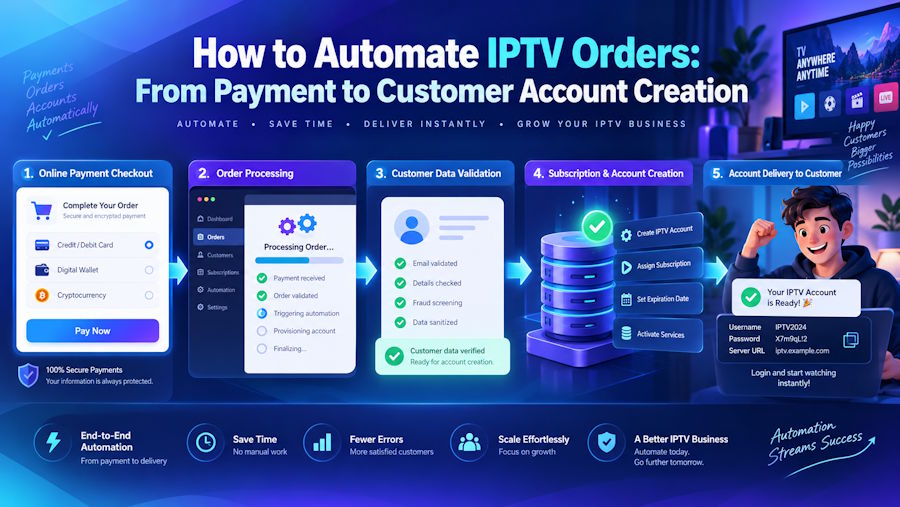
If you run a subscription-based service — IPTV, digital products, or any recurring offering — you've probably noticed a frustrating gap: payments happen automatically, but service delivery doesn't. The customer pays in three seconds. Then someone has to manually create their account, generate credentials, and send an email. That gap is where customers get frustrated, orders pile up, and revenue leaks.
This guide walks through the practical workflow of automating IPTV orders — from the moment a payment clears to the moment a customer receives their credentials. We'll compare manual versus automated account creation, cover renewal and lifecycle automation, and look at how a centralized workflow replaces a patchwork of disconnected tools.
The Traditional Order Workflow (And Where It Breaks)
A standard checkout flow handles the front end of a transaction well. A customer selects a plan, checks out, and the payment goes through. The payment gateway confirms the charge. An order confirmation email lands in the customer's inbox.
For physical products, the workflow continues: warehouse picks, packs, ships. For digital subscriptions, there's no warehouse. The fulfillment is the creation of an account or the provisioning of access — and most standard checkout systems don't do that natively.
This is the fundamental limitation. A checkout system is a payment and order capture layer. It is not a service delivery layer. For an IPTV business, the actual product is a streaming account with credentials, an expiration date, and a panel assignment. A standard checkout has no built-in mechanism to generate that account.
So the workflow stops at payment. Everything after that is manual — unless you add an automation layer.
What Happens After a Successful Payment
When a payment gateway confirms a transaction, an event is fired. That's the technical trigger. From that point, there are two paths: do the work manually, or automate it.
Without automation, here's what typically happens:
- Payment gateway confirms the transaction.
- The operator receives a notification.
- The operator logs into the IPTV panel manually.
- A new user is created with the correct plan and expiration date.
- The operator copies the M3U URL and Xtream Codes credentials.
- An email is composed and sent to the customer.
- The order is marked as fulfilled in a spreadsheet or admin panel.
Steps 3 through 7 are entirely manual. They depend on someone being available. They introduce the possibility of typos, wrong plan assignments, or expired credentials. And they don't scale.
At twenty orders a day, this is manageable. At two hundred orders a day, it's a full-time job. At two thousand, it's impossible without a team — and a team introduces coordination overhead, training costs, and inconsistency.
The technical gap is clear: the payment system knows a payment succeeded. The IPTV panel knows how to create accounts. Nothing connects the two.
Creating Accounts Manually vs Automatically
The manual approach is easy to start with but expensive to operate. The automated approach requires an integration layer but pays for itself almost immediately.
Manual Account Creation
Advantages:
- No technical integration required.
- Full control over every account.
- Simple to start with a small number of customers.
Disadvantages:
- Time cost scales linearly with order volume.
- Human error is inevitable.
- Availability is limited to operator working hours.
- Customer experience suffers during off-hours.
- No audit trail unless manually maintained.
The manual process also creates a single point of failure. If the operator is unavailable — sick, on holiday, asleep — orders don't get fulfilled. Customers complain. Refund requests increase. Churn rises.
Automated Account Creation
Advantages:
- Zero manual intervention per order.
- Instant fulfillment, 24/7.
- Consistent plan assignment and expiration.
- Full audit log of every account creation.
- Scales to thousands of orders without additional headcount.
Disadvantages:
- Requires an integration layer between the checkout system and the IPTV panel.
- Initial setup investment.
- Needs a reliable connection to the panel's login interface.
The automated approach doesn't eliminate the need for oversight. It eliminates the need for manual execution. The operator still monitors the dashboard, handles exceptions, and manages the business. But the routine work — account creation, credential delivery, expiration tracking — happens without human involvement.
Connecting Payments to Account Provisioning with AutoTaskClick
The integration layer is where a tool like AutoTaskClick fits into the workflow. Rather than building a custom bridge between your checkout and your IPTV panel, you can use a dedicated automation workflow that handles the connection.
Here's the actual flow:
- Payment confirmation — AutoTaskClick detects when a payment has been completed, regardless of the payment method used. It connects directly with the payment itself to confirm the funds were received.
- Panel authentication — The system logs into your IPTV panel using your login credentials. No API is required. This is important because many panels don't offer a valid API, and some that do have broken or incomplete endpoints.
- Account provisioning — A new user is created on the panel with the plan and expiration matching the purchased product.
- Credential generation — M3U URL and Xtream Codes credentials are generated or retrieved.
- Email delivery — A branded email containing the credentials is sent to the customer, typically within 20 seconds of payment confirmation.
- Credit deduction — The corresponding credit is deducted from your panel balance.
- Order logging — The order status is updated in the AutoTaskClick orders table, giving you a clean record of every transaction.
The entire sequence is automated. No operator login. No copy-pasting credentials. No manual email composition.
Why No API Is Required
This is a critical technical detail. Most automation solutions depend on the panel's API — a documented set of endpoints that allow external systems to create users, check balances, and manage subscriptions. But many panels don't provide a working API. Some offer one that's incomplete. Others have one that breaks after updates.
AutoTaskClick works at the authentication layer instead. It logs into the panel the same way a human operator would, using the credentials you provide. This means:
- No API dependency — Works with any panel, regardless of whether it has an API.
- Captcha support — Even panels that require captcha bypass for login are supported.
- Reseller account compatible — You can test with a reseller account instead of your main admin credentials, for added security.
- Encrypted credentials — All login credentials are encrypted at rest.
The trade-off is that the panel must be accessible and the credentials must be valid. But for most IPTV reseller operations, that's a reasonable constraint — and the compatibility gain is worth it.
You can see the full workflow and download options on the dedicated WordPress plugin page.
Works With Any Website — Or No Website at All
Another important detail: AutoTaskClick is not tied to WordPress. It works with:
- WordPress sites — Install the plugin and embed the checkout form using a shortcode.
- HTML or custom websites — Use the embedded checkout form or redirect to the hosted checkout page.
- No website at all — Generate a direct checkout link with a preselected plan and send it to your client via WhatsApp, Telegram, or email. The client completes the payment, and the credentials are delivered automatically.
This means you don't need a full storefront to start selling. You can send a single link and collect payment. The order is processed, the account is created, and the customer receives their credentials — without any manual work.
No WooCommerce Required
AutoTaskClick operates independently. It does not require WooCommerce. It does not require any third-party plugin. It connects directly to the payment and manages the entire workflow internally.
If you're already using WooCommerce, you can integrate with it. But if you're not, you don't need to install it. The platform handles order capture, payment confirmation, account provisioning, and credential delivery on its own.
This also means there are no WooCommerce order status updates to worry about. Every transaction is tracked in the AutoTaskClick orders table, which shows the status, timestamp, and delivery confirmation for every order.
Renewal and Lifecycle Automation
Automating the initial order is only half the workflow. Subscriptions have a lifecycle: renewal, expiration, suspension, reactivation. Each of these events can also be automated.
Renewal Reminders
For a subscription business, renewal timing is critical. A customer who forgets to renew is a customer lost. Automated reminders — sent at defined intervals before expiration — recover revenue that would otherwise churn.
Typical configuration:
- Reminder 1: 2 days before expiration.
- Reminder 2: On the expiration date.
- Reminder 3: 2 days after expiration (grace period).
These emails can be templated with the customer's name, plan details, expiration date, and a direct renewal link.
Automated Suspension and Reactivation
When a subscription expires, the panel account can be automatically suspended. This prevents unauthorized access and frees up resources. When the customer renews — which may happen days or weeks later — the account is reactivated with a new expiration date, and the customer receives updated credentials if necessary.
This lifecycle automation reduces the administrative burden dramatically. Without it, an operator must manually track expirations, suspend accounts, and reactivate them on renewal. At scale, that's unsustainable.
Client Self-Service
A self-service portal allows customers to manage their own subscriptions: renew, change plans, add devices, update payment methods, and retrieve credentials. This reduces support tickets and improves the customer experience.
The self-service layer also generates valuable data: renewal rates, plan upgrade patterns, churn reasons. That data feeds back into pricing and product decisions.
Building a Centralized Workflow
The final architectural consideration is centralization. A subscription business typically touches multiple systems: the storefront or checkout page, a payment gateway, an IPTV panel, an email system, and a database for reporting.
Without centralization, each system operates in isolation. The payment gateway doesn't know about the panel. The panel doesn't know about the customer's order history. Reporting requires manual consolidation.
A centralized workflow connects these systems into a single pipeline:
- Order intake — Storefront, embedded form, or direct checkout link.
- Payment processing — Gateway integration with fallback routing and threshold management.
- Fulfillment — Automated account provisioning and credential delivery.
- Lifecycle management — Renewal reminders, suspension, reactivation.
- Reporting — Real-time dashboard showing orders, revenue, active users, and credit consumption.
AutoTaskClick's automation platform is built around this model. It provides a unified dashboard where the entire workflow is visible: every order, every payment, every account, every renewal. The system works with any IPTV panel that accepts login credentials, and it doesn't require WooCommerce — though it integrates cleanly with WordPress sites if you want that.
From a technical perspective, the value of centralization is observability. When something goes wrong — a failed payment, a panel timeout, an email delivery failure — the dashboard shows exactly where and when. That makes debugging and remediation straightforward.
For more details on the full platform and its capabilities, visit AutoTaskClick. The site includes documentation, feature breakdowns, and a free trial for testing the workflow.
Conclusion
A standard checkout workflow handles payment well, but it stops short of service delivery. For subscription businesses — especially IPTV resellers — that gap between payment and fulfillment is where manual work, errors, and scaling limits live.
Automating the workflow requires an integration layer that connects payment events to panel provisioning. AutoTaskClick solves this by detecting payments, authenticating with the panel using login credentials, creating accounts, delivering credentials, and handling the entire renewal lifecycle.
The result is a system that operates 24/7, scales without additional headcount, and gives both the operator and the customer a cleaner experience. For technical operators, the implementation is straightforward: no API required, no WooCommerce dependency, works with any website or no website at all.
If you're building or scaling a subscription-based service, the workflow described here is a practical starting point. The automation layer doesn't replace the store or the panel — it connects them.

