

As your Shopify store grows, you start thinking about how to make your shopping experience easier for repeat customers.
You might improve your product pages, introduce a loyalty program, or put more thought into the emails you send after a purchase.
These things can all move the needle. But not as much as a mobile app.
Your customers are already on mobile. They’re already buying on apps. And by launching your own app, you could take hold of extremely valuable real estate on your best customers’ home screens.
The tricky part? Building it. But that’s what we’re here to help you understand. Below, we’re going to explain how to turn your Shopify store into a native mobile app, and expand your reach past the browser and into your customer’s pocket.
What Does Turning Your Shopify Store into an App Mean?
When you picture your store as an app, you're probably imagining your logo on a customer's home screen, opening into a shopping experience with your products and branding.
That's the idea: a dedicated app people can download from Apple's App Store or Google Play.
You’re not building a whole new store. Your existing site, catalog, and your Shopify backend can power a lot of what your app does. Your goal is to extend that to another channel.
You’re not choosing an app over your website, either. It’s not pivoting away from your site and focusing all your attention on selling through an app instead.
You want to carry over your products, collections, branding, and overall customer experience into a branded native app.
And the good news is that, today, it’s not that difficult to do this.
Here’s how to get there.
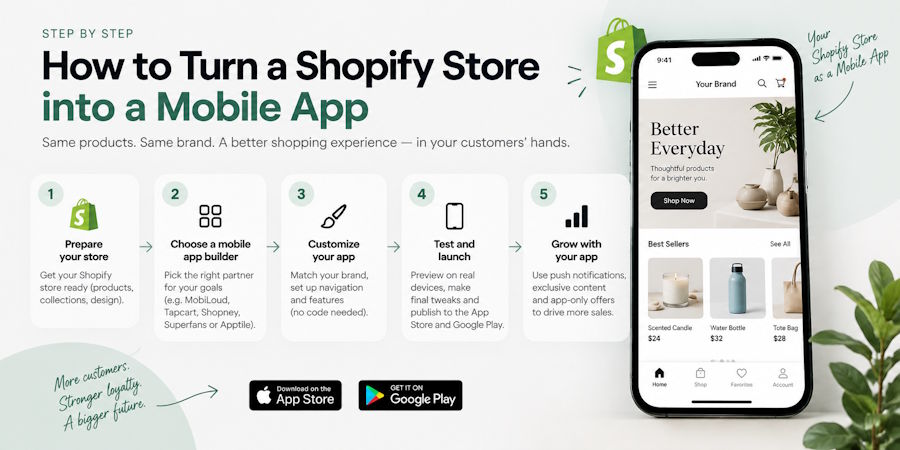
1. Choose How You'll Build Your App
You have three main routes to consider if you want a mobile app, each with a different balance of flexibility, support, and ongoing work. The right fit depends partly on how much you've already built into your store and how you want your app to work.
Option 1: A DIY App Builder
The Shopify App Store has dozens of tools that you can plug into your Shopify backend and have them generate a native app for you, without having to code or hire developers.
These tools are solid and convenient. But they’re inherently limited - they build from templates, which means you can’t always recreate everything your website does. And they also require more work, due to the DIY nature of no-code app builders.
They’re a good choice for brands that want to build a unique app experience, without the cost and complexity of building it all from scratch.
Option 2: A Managed “Website to App” App Builder
Other app builders take a different approach: like MobiLoud, which directly converts your existing store into a native app.
There are a couple of distinct differences between this type of app builder and a DIY tool.
One, it carries over everything from your website into the app. No matter how custom your store is, or how many third-party tools you have running on your site, all this will be compatible with your app as well.
The other big difference is it’s a managed service; you get a team helping you run the app, rather than a DIY platform your team has to learn and manage yourself.
This kind of app builder is typically a little more expensive, upfront; but the overall cost of owning it can actually be less, since there’s less overhead in keeping your app running.
Option 3: Custom Development
The final option; building a custom app from scratch, by hiring developers or working with an agency.
This gives you the absolute highest level of quality and freedom, but at a much higher cost. Expect to pay $100K+ for your app, as well as a similar cost per year just to keep it running.
Custom development is not super feasible for most ecommerce stores, and not really necessary for most either.
But if you’re a high-level brand wanting a fully bespoke app, with the budget to support it, custom is one direction you can go.
2. Set Up the Shopping Experience
Once you've picked a route, you shape what customers see. You're either working in an editor or reviewing what a team has configured for you.
Start with branding, because that's the easy part: icon, colors, imagery, navigation. Someone who knows your store should recognize it immediately.
Then work through the journey as a customer, not as a marketer. How they browse a collection. How they search. How they find their account and past orders. How they check out.
Think about what you need for an efficient shopping experience. What app customers need, and what, if anything, is different compared to your website.
Don’t try to reinvent the wheel. Don’t think that it has to be different just for the sake of being different.
The goal is to make it easy on your customers. And often, a great divergence between your website and app only makes it harder for people to follow if they shop across different channels.
3. Test It on Real Phones
Your first build makes the project feel real. It's also the moment to find everything that looks fine in a demo and breaks on your actual store.
Do a complete purchase on both an iPhone and an Android device. Search for a product, pick a size or variant, add to cart, apply a discount, pay. Then confirm the order landed correctly in Shopify.
Then run the scenarios that matter:
- A new customer checking out as a guest
- A returning customer signing in and redeeming a loyalty benefit
- Someone buying a subscription or a bundle, if you sell them
- Someone managing an existing subscription
- A customer tapping a push notification and landing on the right product
If you sell internationally, test the currencies, languages and delivery destinations your customers use. A wrong country selection changes the whole checkout.
While you're in there, pay attention to how it feels. Text readable, buttons easy to hit with a thumb, navigation obvious. Awkward moments are cheap to fix now and expensive to fix after launch.
4. Publish on the App Store and Google Play
Getting the app built and getting it approved are two different jobs.
You'll need the listing assets as well as the software: app name, icon, screenshots, description, privacy details and data disclosures. Your provider may produce most of it, but you'll supply or approve it.
Apple and Google each run their own review. Budget a week for it, more if something gets kicked back. First submissions get rejected for small things; a missing privacy label, a screenshot at the wrong size, an account deletion route Apple requires and nobody thought about.
One thing worth insisting on: keep the Apple and Google developer accounts in your business's name. Your provider can manage publishing, but the accounts and the listings should belong to you.
If you change providers in three years, you want to keep your app, your reviews and your install base. An app provider that publishes under their own accounts owns all this for themselves.
Use the review window to prepare the launch. That's the next step and the one most brands underestimate.
5. Get Your Customers to Install It
"If you build it, they will come."
Not quite.
The good news is that this is easier than it sounds, because most of your regular customers genuinely want the app. It's faster for them. They mostly just need to be told it exists, more than once.
What works, roughly in order of installs delivered:
- A banner or smart prompt on your mobile site. Usually the single biggest source in month one. These are people already shopping on a phone.
- Email and SMS to your existing list. Lead with what changes for them - faster checkout, order updates by push, early access - not with the fact that you built an app.
- Post-purchase and order confirmation prompts. Caught at the moment they're most engaged with you.
- Account page and checkout nudges for repeat customers.
- A QR code on packing slips, inserts and in-store signage if you have physical retail.
A small incentive helps: 10% off the first app order converts well and gives people a reason to act now rather than later. App-exclusive drops and offers afterwards are what keeps the app installed.
Then hold up your end. Useful notifications, sent with restraint, and an app experience that stays current with your site. Downloads tell you people are interested. Return visits, repeat purchases and app revenue tell you whether it's becoming part of how they shop.
What It Costs to Turn Your Shopify Store Into an App
The cost will vary greatly, depending on how you choose to build your app.
Entry-level app builders may cost as little as $150 per month for access to the platform; great value for a channel that’s likely to drive much, much more revenue than that, even week to week.
App builders can, however, go up to $3,000+ a month, if you need more extensive, enterprise-level features, or customizations that go beyond what the platform can regularly handle.
This is obviously an impossibly wide range. But for the typical mid-market brand, you should expect a cost around $500-$1,500 per month.
This is the cost for the platform only, mind you. There’s also the cost to consider of your team’s time.
If you’re using a DIY app builder, this can be relatively significant, and could add another $2-3K per month to the cost. A managed service like MobiLoud, however, comes with all of this included.
There’s also the cost of setting up Google Play and Apple Developer accounts, but these are relatively minor in the grand scheme of things.
If you want to go the custom route, this is where the cost can really blow out. You could be looking at six figures (or more), annually.
But if you choose a more efficient path, the cost to turn your store into an app is really very minor, when you think about the potential return you can get from a branded mobile app.
Next Steps
The barrier to launching a Shopify mobile app is lower than it’s ever been.
Most successful stores can afford one, and can have it live inside two months.
What's left is a decision about approach, and it comes down to one question: do you want a second storefront to design and run, or an extension of the one you already have?
Answer that, start with how your customers shop today, and the rest of the project is largely logistics.

