

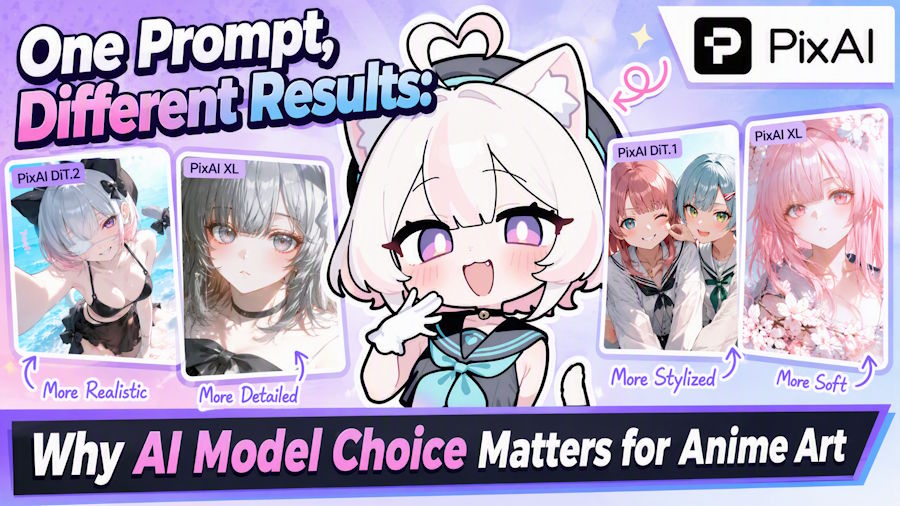
When an AI image does not match the idea in your head, the instinctive response is often to rewrite the prompt. Add more detail. Rearrange the tags. Increase a weight. Try again.
Sometimes that works. Sometimes the prompt was never the main problem.
The model itself can change how an anime image is interpreted, from the face and rendering style to the composition, pose, character interaction, and even which instructions receive the most attention. Two models can receive nearly identical prompts and still produce images that feel as if they came from different creative systems.
For anime creators, understanding that difference can save a lot of unnecessary prompt tweaking.
A Model Is More Than an Art Style
It is tempting to think of AI models as visual filters: choose one for soft anime art, another for a more detailed look, and move on. Style is certainly part of the difference, but it is only part of it.
A model also influences how the generator interprets language, balances several instructions, builds a scene, renders anatomy, and handles relationships between characters and objects.
This means model choice becomes more important as the task becomes more specific. A simple portrait gives the model a lot of freedom. A scene with a precise camera angle, two distinct characters, several props, and a particular action gives it much less.
1. The Same Prompt Can Produce a Different Visual Language
Even before looking at technical accuracy, switching models can change the overall visual language of an image.
One model may favor crisp facial details and polished character illustrations. Another may produce softer rendering, more dramatic lighting, or a different sense of depth. Background detail, line treatment, color balance, and how strongly the character dominates the composition can all shift.
That does not necessarily make one model better. It means the creator should decide what the image is supposed to do before deciding which result is more successful.
A model that is ideal for a profile illustration may not be the one you want for a manga-style scene or a cinematic environment.
2. Prompt Following Becomes a Model-selection Problem
The differences become more obvious when a prompt contains several requirements at once.
Suppose the prompt asks for a character seen from above, reaching toward the camera, wearing a specific layered outfit, while standing beside another character who is performing a different action. If a model repeatedly changes the camera angle or mixes clothing between the two characters, adding more adjectives may not solve the underlying issue.
This is where creators should stop asking only, "How can I improve the prompt?" and start asking, "Is this the right model for this task?"
PixAI's model-based workflow makes that kind of testing relatively straightforward because creators can switch between anime-focused models without rebuilding an entire local setup. The useful comparison is not which model is newest, but which one responds best to the instructions that matter for the image.
3. Character Work Exposes Model Differences Quickly
Character creation is another area where model behavior becomes easy to notice.
For a one-off image, small changes in facial structure or costume details may not matter. For an original character that will appear again and again, those differences become much more important.
Creators should pay attention to how a model handles defining features such as hairstyle, eye color, accessories, clothing structure, and proportions. They should also test the character in more than one situation. A model that looks strong in a close-up may behave differently when the character is shown full-body, from the side, or in a more complicated environment.
This is also why model choice and character-control tools should be considered together. LoRAs and references can add targeted guidance, but the base model still determines much of the broader generation behavior.
4. Multiple Characters Are Their Own Test
Two-character scenes are especially useful for revealing whether a model fits a storytelling workflow.
Common problems include clothing details jumping from one character to another, hairstyles becoming mixed, actions being assigned to the wrong person, or the interaction between the characters becoming unclear.
A model may be excellent at individual portraits while struggling when several identities and instructions need to remain separate in the same frame.
Creators who regularly make couples, group scenes, comics, or narrative illustrations should therefore include a multi-character prompt when comparing models. A beautiful solo portrait does not answer that question.
5. Specialized Tasks Need Specialized Evaluation
The same principle applies to less typical anime workflows.
Manga-style compositions, visible text, posters, reference-heavy creation, and image editing place different demands on a model than ordinary text-to-image illustration. A creator interested in those tasks should test them directly rather than assuming the model that wins a portrait comparison will also be the best option elsewhere.
This is one reason newer anime-focused model families are increasingly described by what they are good at rather than simply by image quality. The practical question is always the same: what kind of work are you asking the model to perform?
Model and LoRA Are Not the Same Decision
Model choice is also frequently confused with LoRA choice.
The base model shapes the broader generation behavior. A LoRA adds more targeted information, such as a character, outfit, style, or concept, on top of a compatible model.
If a creator wants a very specific character, adding a suitable LoRA may make more sense than changing models repeatedly. If the problem is that the entire scene ignores complex spatial instructions, changing the base model may matter more.
Treating those as separate decisions makes troubleshooting much easier.
A Simple Way to Test Models Without Overthinking It
Creators do not need a laboratory-style benchmark. A small controlled test is usually enough:
- Choose one type of image you actually make often.
- Write a prompt with several clear requirements.
- Keep the prompt and basic settings as consistent as possible.
- Generate with two or three suitable models.
- Judge specific criteria: style, prompt following, character quality, composition, and task-specific behavior.
- Repeat with a second task before deciding which model fits your workflow.
This is more useful than selecting a model from one lucky generation or assuming the latest release must be the best choice.
PixAI's existing model guides make the same distinction useful in practice: creators can start with the task they care about, then move toward a model that better matches that need instead of treating every model as interchangeable.
Choose by Task, Not by Release Date
Anime AI models are improving quickly, but model selection is not a race to click the newest option.
A better approach is to think about the job first. Do you need a polished single-character illustration? Strong prompt following? Two characters who remain distinct? A repeatable original character? A manga-like composition? An image you intend to edit later?
Once the task is clear, model comparison becomes much easier.
And when an image keeps going wrong despite several prompt rewrites, it may be worth changing the question. Instead of asking what else to add to the prompt, ask whether a different model understands the task better.

