

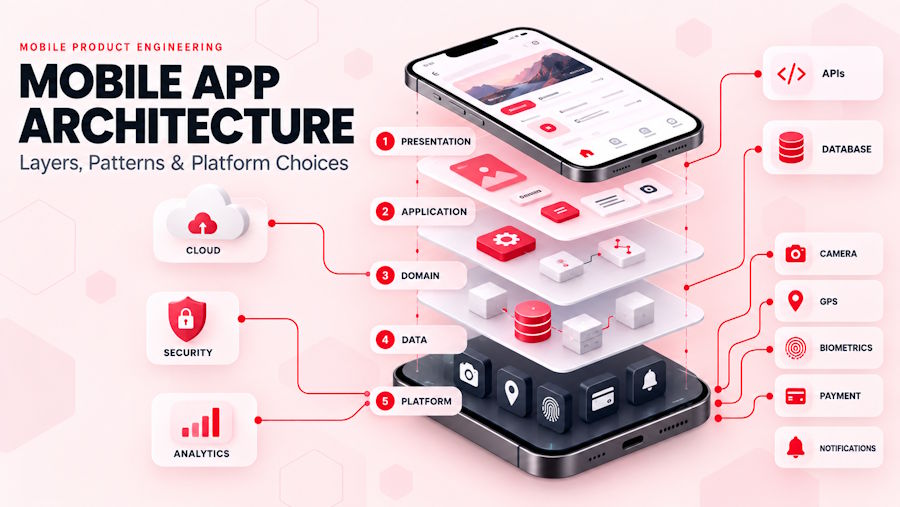
Mobile app architecture is the plan that defines how an application’s interface, business logic, data, APIs, and device services work together.
A clear architecture gives every component a defined responsibility. It also determines how the application handles growth, new features, weak connectivity, security risks, operating-system changes, and backend failures.
The best architecture is not the one with the most layers or newest technologies. It is the simplest structure that can meet the product’s current requirements without making future changes unnecessarily expensive.
Key Takeaways
- Mobile app architecture defines how screens, logic, data, APIs, and device features connect.
- Architecture is not the same as a technology stack or development framework.
- Most applications need a presentation layer, an application or business layer, and a data layer.
- A domain layer is useful when business rules become complex or reusable.
- Offline support requires local storage, synchronization, retry, and conflict-resolution rules.
- Native, cross-platform, hybrid, and progressive web apps are delivery approaches, not architecture patterns.
- A modular monolith is usually easier to operate than microservices during the early stages of a product.
- Security, performance, testing, and monitoring must be part of the architecture from the beginning.
What Is Mobile App Architecture?
Mobile app architecture is the structural design of a mobile application. It explains where code and data belong, how components communicate, and which part of the system owns each responsibility.
The architecture normally covers:
- Mobile screens and navigation
- Application state
- Business rules
- Local storage
- Network requests
- Backend APIs
- Authentication and authorization
- Device capabilities
- Third-party integrations
- Testing and monitoring
A useful architecture makes change predictable. Developers should be able to add a payment provider, update a business rule, or replace a database without rewriting unrelated parts of the application.
For another visual explanation of the core layers, platform choices, patterns, and backend options, see AppVerticals’ mobile app architecture guide.
How Is Architecture Different From a Technology Stack?
Architecture explains how a system is organized. A technology stack identifies the tools used to build that system.
| Area | Mobile app architecture | Technology stack |
|---|---|---|
| Main purpose | Defines responsibilities and dependencies | Selects implementation technologies |
| Typical decisions | Layers, modules, data ownership, API boundaries | Swift, Kotlin, Flutter, React Native, Node.js |
| Main concern | Maintainability, reliability, security, and change | Framework capabilities and developer skills |
| Expected output | Architecture diagram and decision records | Approved languages, frameworks, and services |
Choosing Flutter instead of Swift does not decide where business logic should live. Selecting PostgreSQL does not define how offline conflicts should be resolved. Those are architecture decisions.
What Are the Main Layers of Mobile App Architecture?
Most mobile applications use three essential layers: presentation, application or business, and data.
Larger products may add a domain layer and a platform integration layer.
| Layer | Responsibility | Examples |
|---|---|---|
| Presentation layer | Displays state and captures user actions | Screens, views, navigation, UI components |
| Application layer | Coordinates actions and prepares screen state | ViewModels, controllers, presenters, reducers |
| Domain layer | Contains complex or reusable business rules | Use cases, interactors, domain entities |
| Data layer | Provides and updates application data | Repositories, APIs, databases, caches |
| Platform layer | Connects the app to device and external services | Camera, GPS, biometrics, payments, notifications |
Presentation Layer
The presentation layer contains everything the user sees and interacts with.
It includes:
- Screens
- Forms
- Buttons
- Navigation
- Loading indicators
- Error messages
- Empty states
- Accessibility behavior
The presentation layer should display state and report user actions. It should not decide how a payment is authorized, how a discount is calculated, or how a record is stored.
Application Layer
The application layer coordinates what happens after a user performs an action.
For example, when a user taps “Place Order,” this layer may:
- Validate the current screen state
- Call the checkout use case
- Wait for a repository result
- Convert the result into a success or error state
- Send the new state back to the interface
Depending on the framework, this responsibility may belong to a ViewModel, presenter, controller, state holder, or reducer.
Domain Layer
The domain layer contains business rules that should not depend on a specific screen, API, or database.
Examples include:
- Calculating an insurance premium
- Checking order eligibility
- Applying pricing rules
- Validating a medical workflow
- Determining user permissions
The domain layer is optional. Simple applications may not need one.
The Android app architecture guide recommends adding a domain layer when business logic must be reused or when ViewModels become too complex.
Data Layer
The data layer controls how the application reads, creates, updates, and synchronizes data.
It commonly contains:
- Repositories
- API clients
- Local databases
- Cache services
- Data mappers
- File storage
- Synchronization logic
A repository provides a stable interface to the rest of the application. It hides whether the requested information came from an API, database, cache, or device service.
Platform and Integration Layer
The platform layer provides controlled access to device and third-party capabilities.
Examples include:
- Camera
- GPS
- Bluetooth
- NFC
- Biometric authentication
- Push notifications
- Payment SDKs
- Analytics tools
These services should sit behind interfaces so that the rest of the application does not depend directly on a specific vendor or operating-system API.
How Should Data Flow Through a Mobile App?
A mobile app should have one clear owner for each important type of data.
This principle is called a single source of truth. It prevents several screens or services from maintaining conflicting versions of the same information.
A predictable data flow looks like this:
User action → State holder → Use case or repository → Data source → Updated state → Interface
For example, when a user adds an item to a cart:
- The interface sends an “add item” event.
- The state holder receives the event.
- The repository updates the cart source of truth.
- The repository exposes the updated cart.
- The state holder creates a new screen state.
- The interface displays the updated quantity and total.
The Android architecture guidance recommends combining a single source of truth with unidirectional data flow. Apple’s SwiftUI model-data documentation also promotes state-driven interfaces connected to observable model data.
This approach makes state changes easier to test and debug because every update follows a defined path.
What States Should Every Mobile Screen Support?
A screen usually needs more than successful and failed states.
Depending on the feature, the state model may include:
- Initial
- Loading
- Content available
- No results
- Invalid input
- Permission denied
- Offline
- Partially synchronized
- Session expired
- Request failed
- Retry available
Treating these conditions as explicit states prevents the interface from depending on several unrelated Boolean values such as isLoading, hasError, and isOffline.
How Does Offline-First Mobile Architecture Work?
Offline-first architecture allows an application to perform all or part of its core work without a reliable network connection.
It normally uses:
- A persistent local data source
- A repository that coordinates local and remote data
- A durable queue for pending actions
- A background synchronization process
- A defined conflict-resolution policy
Google’s offline-first architecture guidance recommends using a local data source for critical reads and coordinating network synchronization through repositories.
Choose the Correct Write Strategy
Not every operation should behave the same way offline.
| Strategy | How it works | Suitable examples |
|---|---|---|
| Online-only write | The server must confirm the action before local state changes | Payments, password changes, limited inventory |
| Queued write | The action is saved locally and submitted later | Field reports, inspections, notes |
| Optimistic write | The interface updates before server confirmation | Reactions, preferences, simple profile changes |
| Local-first write | Local data changes immediately and synchronization runs in the background | Core offline workflows |
Make Retries Safe
A queued request may be sent more than once because of timeouts or connection loss. Backend operations should therefore support idempotency.
An idempotent operation produces the same final result when the same request is repeated. This prevents duplicate payments, orders, uploads, or records.
Define Conflict Resolution
A conflict occurs when local and server data change before synchronization finishes.
Common strategies include:
- Last write wins
- Server wins
- Client wins
- Field-level merge
- Version-based rejection
- Manual user resolution
- Append-only event history
The correct strategy depends on the data.
Last write wins may be acceptable for a profile color preference. It is usually unsafe for inventory, payments, clinical records, or collaborative documents.
Native, Cross-Platform, Hybrid, or PWA
Native, cross-platform, hybrid, and progressive web apps describe how an application is delivered. They do not replace decisions about layers, state ownership, repositories, security, or backend design.
| Approach | Best suited for | Main limitation |
|---|---|---|
| Native | High performance, deep device access, platform-specific UX | Separate iOS and Android development |
| Cross-platform | Shared workflows and coordinated releases | May require native modules |
| Hybrid | Simple, web-based applications and internal tools | WebView performance limitations |
| Progressive web app | Browser reach and centralized deployment | Restricted background and device capabilities |
Native Mobile Architecture
Native applications are built separately for each operating system, usually with Swift or SwiftUI for iOS and Kotlin or Jetpack Compose for Android.
Native development is appropriate when the product requires:
- Low-latency interaction
- Advanced camera or media processing
- Extensive background activity
- Bluetooth or NFC integration
- Complex animation
- Platform-specific accessibility
- Immediate access to new operating-system features
Cross-Platform Mobile Architecture
Cross-platform applications use frameworks such as Flutter or React Native to share a large portion of the codebase across iOS and Android.
Cross-platform development is often suitable for:
- Startup MVPs
- Marketplaces
- Booking applications
- Customer portals
- Internal business tools
- Content applications
- Products with similar workflows on both platforms
A shared codebase still requires separate testing on iOS and Android. Permissions, notifications, background work, store configuration, and device integrations may require platform-specific code.
Which Mobile App Architecture Pattern Should You Use?
An architecture pattern provides a repeatable way to organize application responsibilities. The correct pattern depends on screen complexity, business rules, testing requirements, team size, and expected product lifetime.
| Pattern | Best use | Main risk |
|---|---|---|
| MVC | Small applications with simple interactions | Controllers can become too large |
| MVP | Existing applications requiring testable presentation logic | Additional interfaces and boilerplate |
| MVVM | State-driven interfaces and reactive UI frameworks | ViewModels can accumulate too much logic |
| MVI or reducer-based state | Complex screens with many state transitions | Excessive structure for simple features |
| Clean Architecture | Products with substantial, long-lived business rules | Unnecessary abstraction in small applications |
MVC
Model-View-Controller separates data, interface, and interaction control.
MVC is easy to understand and can work for small products. Its common failure is the “massive controller,” where navigation, validation, networking, and business rules all collect in one class.
MVVM
Model-View-ViewModel separates interface components from screen state and presentation logic.
The ViewModel receives user events, calls repositories or use cases, and exposes observable state. MVVM works well with SwiftUI, Jetpack Compose, Flutter, and other reactive UI systems.
MVI and Reducer-Based State
Model-View-Intent and reducer-based patterns represent the interface as a state object modified by explicit actions.
This approach is useful for:
- Multi-step workflows
- Real-time updates
- Transaction screens
- Complex filters
- Features requiring reproducible state changes
It may be excessive for screens that only display a list or submit a simple form.
Clean Architecture
Clean Architecture directs dependencies toward stable business rules.
The interface can depend on domain operations, and data implementations can satisfy domain interfaces. Core business rules should not depend directly on the UI framework, database, or HTTP library.
A project does not need dozens of layers to follow this principle. The practical goal is to keep business rules independent from replaceable infrastructure.
How Should a Mobile App Be Modularized?
Feature-based modularization groups code by product capability instead of placing every screen, model, and repository in large technical folders.
A possible structure is:
features/
  checkout/
    presentation/
    domain/
    data/
  catalog/
    presentation/
    domain/
    data/
core/
  networking/
  persistence/
  security/
  design-system/
This structure provides:
- Clearer feature ownership
- Smaller dependency graphs
- Faster testing
- Easier parallel development
- Safer feature removal
- Better control over shared code
Modules should reflect real product or business boundaries. Creating a separate module for every screen adds complexity without improving ownership.
What Backend Architecture Does a Mobile App Need?
A mobile backend normally provides APIs, authentication, storage, integrations, notifications, and server-side business rules.
The backend should define:
- API request and response formats
- Authentication requirements
- Authorization rules
- Error responses
- Pagination
- Rate limits
- Idempotency
- Version compatibility
- Cache behavior
- Deprecation policy
Mobile clients may remain installed for months without being updated. Backend changes must therefore remain compatible with supported application versions.
What Is a Backend for Frontend?
A backend for frontend, or BFF, is an API layer created for the needs of a specific interface.
A mobile BFF can:
- Combine several service calls
- Return smaller responses
- Apply mobile-specific pagination
- Reduce network round trips
- Hide internal service structures
- Provide one stable endpoint for the mobile client
Microsoft’s Backends for Frontends pattern recommends this approach when mobile and web clients have meaningfully different requirements.
A BFF is unnecessary when every client uses the same operations and data formats.
Monolith or Microservices
A monolith contains backend capabilities in one deployable application. Microservices divide those capabilities into independently deployed services.
| Backend model | Best use | Main tradeoff |
|---|---|---|
| Modular monolith | Startups and products owned by a small team | Components cannot be deployed independently |
| Microservices | Complex domains with independent teams and scaling needs | Distributed-system and operational complexity |
Most new applications should begin with a well-structured modular monolith.
Microservices become useful when capabilities require:
- Independent deployment
- Independent scaling
- Separate team ownership
- Different availability targets
- Strong regulatory boundaries
- Different technology requirements
Microsoft’s microservices architecture guidance identifies service communication, data consistency, versioning, testing, and observability as important tradeoffs.
How Does Security Affect Mobile App Architecture?
Mobile security defines where sensitive data may exist, which operations the client may perform, and how every request is authenticated and authorized.
A mobile client runs on a device the product owner does not control. Application files can be inspected, devices can be compromised, and traffic can be intercepted.
Security architecture should cover:
- Sensitive-data classification
- Authentication
- Authorization
- Secure token storage
- Encryption
- API validation
- Session expiration
- Device permissions
- Third-party SDKs
- Application logs
- Dependency security
- Incident response
The OWASP Mobile Application Security Verification Standard organizes security controls around storage, cryptography, authentication, network communication, platform interaction, code, resilience, and privacy.
Important business decisions should be enforced on the server. A mobile interface may hide an administrative action, but the backend must still verify whether the user is authorized to perform it.
How Do You Measure Mobile Architecture Quality?
Architecture quality should be measured through observable product and engineering results.
Useful metrics include:
- Cold startup time
- Time until the first useful screen
- Screen-rendering time
- API response percentiles
- Crash-free session rate
- Memory consumption
- Battery usage
- Application size
- Synchronization success rate
- Age of pending operations
- Build time
- Automated test duration
- Release failure rate
The architecture should also support tracing a failed user action across the mobile client, API gateway, backend service, and external integration.
Useful production tools include:
- Crash reporting
- Performance monitoring
- Structured logs
- Distributed tracing
- Feature flags
- Remote configuration
- Phased releases
- Service alerts
Collect only the telemetry required to operate and improve the product. Logs and analytics should not expose credentials, health information, payment data, or other sensitive values.
How to Choose the Right Mobile App Architecture
The right architecture is selected by matching technical decisions to product constraints.
1. Define Critical User Journeys
Identify the workflows that create revenue, process sensitive information, or affect business operations.
Examples include:
- Account creation
- Checkout
- Booking
- Payment
- Data submission
- Messaging
- Account recovery
Architecture should protect these journeys first.
2. Rank Quality Requirements
Decide which qualities matter most:
- Delivery speed
- Offline operation
- Security
- Performance
- Scalability
- Maintainability
- Accessibility
- Auditability
These priorities guide platform, storage, backend, and pattern decisions.
3. Assign Data Ownership
For each important data type, document:
- Its authoritative source
- Who may modify it
- Whether it can be cached
- How long it can remain stale
- Whether it must work offline
- How conflicts will be resolved
- How long it must be retained
4. Choose the Delivery Approach
Select native, cross-platform, hybrid, or PWA delivery using product requirements rather than framework popularity.
5. Define Client Boundaries
Document which responsibilities belong to presentation, application, domain, data, and platform components.
6. Define the Server Boundary
Specify API contracts, authentication, authorization, version compatibility, error handling, and idempotency.
7. Model Failure Conditions
Decide what users will experience when:
- The connection disappears
- A request times out
- A session expires
- A permission is denied
- A payment result is uncertain
- An external service is unavailable
- Local and server data conflict
8. Validate High-Risk Decisions
Build small technical prototypes for uncertain integrations, background work, synchronization, video processing, hardware access, or performance requirements.
9. Record Architecture Decisions
An architecture decision record should explain:
- The problem
- Available options
- The selected option
- The reason for the decision
- Known tradeoffs
- Conditions that would require reconsideration
Organizations without experienced mobile architects may involve a custom mobile app development company during discovery to validate platform selection, data flow, integration boundaries, security requirements, and scaling assumptions before implementation begins.
Three Practical Mobile Architecture Examples
Architecture for a Startup MVP
A focused MVP may use:
- Flutter or React Native
- MVVM or simple unidirectional state
- Presentation and data layers
- Optional use cases for important workflows
- Modular monolith backend
- Managed authentication
- Hosted database
- Crash reporting and analytics
Microservices and extensive domain abstraction are usually unnecessary at this stage.
Architecture for an Offline Field Application
A field-service or inspection application may use:
- Persistent local database
- Repository as the data gateway
- Local source of truth
- Durable action queue
- Background synchronization
- Idempotent APIs
- Version-based conflict detection
- Attachment upload recovery
- Synchronization monitoring
For this product, data synchronization is more important than the choice between native and cross-platform delivery.
Architecture for a Regulated Application
A financial or healthcare application may require:
- Strict presentation, domain, and data boundaries
- Central identity management
- Role-based authorization
- Protected key storage
- Minimal local data retention
- Audit records
- API gateway
- Security testing
- Dependency scanning
- Controlled releases
- Incident-response procedures
Every security or compliance requirement should connect to an implementation control and a verification method.
Mobile App Architecture Checklist
Before development, confirm that the team can answer the following questions:
- What are the application’s critical user journeys?
- Which quality requirements have the highest priority?
- Who owns each important type of data?
- Which features must work offline?
- How will pending operations be stored and retried?
- How will synchronization conflicts be resolved?
- Which delivery approach fits the product?
- Which business rules require a domain layer?
- Can interface components access APIs or databases directly?
- Which application versions will the backend support?
- Where will credentials and tokens be stored?
- Which decisions must be enforced on the server?
- What information will analytics tools collect?
- Which performance targets will be monitored?
- Can critical components be tested independently?
- Who will monitor and support the product after release?
Unclear answers indicate unresolved architecture work.
Frequently Asked Questions
What is mobile app architecture?
Mobile app architecture is the structural design that defines how an application’s interface, state, business rules, data, APIs, and device services work together. It assigns responsibilities to components and controls the direction of dependencies.
What are the main layers of mobile app architecture?
The main layers are presentation, application or business, and data. Complex applications may add a domain layer for reusable business rules and a platform layer for device services and third-party integrations.
What is the best architecture for a mobile app?
There is no single best architecture. The right structure depends on product complexity, offline requirements, data sensitivity, platform capabilities, team size, expected scale, and product lifetime.
Is MVVM the same as Clean Architecture?
No. MVVM organizes the interface and its state-management logic. Clean Architecture controls dependencies across the broader application. A project can use MVVM in its presentation layer while applying Clean Architecture principles to its domain and data layers.
Does a scalable mobile app need microservices?
No. A modular monolith can support significant growth while remaining easier to build, test, and operate. Microservices become useful when capabilities require independent scaling, deployment, availability, or team ownership.
How does offline mobile architecture work?
An offline-capable application stores critical data locally, records pending actions in a durable queue, synchronizes when connectivity returns, retries operations safely, and applies defined conflict-resolution rules.
Can Flutter and React Native use Clean Architecture?
Yes. Flutter and React Native applications can use presentation, domain, and data layers, repositories, dependency inversion, feature modules, and unidirectional state flow. The delivery framework does not determine the architecture pattern.
Final Thoughts
Good mobile app architecture makes ownership clear.
The interface owns presentation. State holders coordinate user actions. Domain components protect important business rules. Repositories control data access. Local storage supports continuity. APIs enforce trusted operations. Monitoring reveals failures after release.
Start with the product’s risks and user journeys. Choose the simplest architecture that handles those requirements clearly. Add more layers, modules, or services only when they solve a specific problem that the existing design can no longer manage.

