

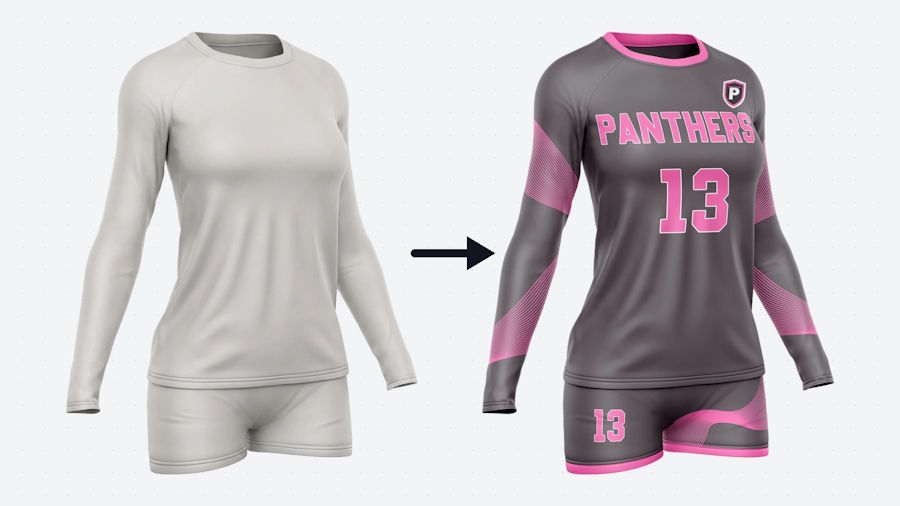
Most AI image demos have an audience of one: the developer who wrote the prompt and knows what to ignore. A public tool has no such luck. Its users are strangers who type whatever they like, upload whatever they have, and judge the whole product on the first picture they see.
We learned this while building a free jersey customizer for Capra Sports, a team uniform company. A coach picks a sport, chooses team colors, adds a team name and a logo, and gets a rendered uniform design back. There is no sign-up and nothing to install. The model behind it is a commercial image-to-image API, and nearly every hard problem sat in the code around that model. Here are six lessons that should carry over to any product that shows generated images to customers.
1. Replicate Curated Designs Instead of Inventing New Ones
The first version asked the model to invent a uniform from a text brief. Some results were good. Too many were incoherent: stripes that ran into nothing, a jersey and shorts that belonged to different kits, lettering melted into the pattern. A first-time visitor sees one roll, and if it is a bad one they leave.
So we stopped asking for invention. The service keeps a catalogue of vetted sample designs for each sport. When a visitor picks a style, a vision pass writes a plain description of that sample, the description is repainted in the visitor's colors, and the render call receives the blank garment template, the sample, and the visitor's logo as reference images. The output is predictable because a person already approved the design. Tuning now means adding or swapping samples, and nobody edits code to do it.
It also made failures cheap to diagnose. When a render looks wrong, the cause is the sample, the description or the colors, and each of those can be inspected as plain text or a plain image.
If your product has a known set of good outputs, constrain the model to restyle them. Novelty is a poor default for a first run.
2. Turn Taste Into Hard Rules
Prompts are suggestions. A model told that the primary color is navy will often return a white jersey with navy trim, which is a fair reading and the wrong answer. We made it a rule in code: the visitor's primary color is always the body color of the garment. The brief is assembled so the rule cannot be dropped, and the check runs before any money is spent on a render. A simplified version:
def build_brief(sample, visitor):
    desc = describe(sample.image)       # vision pass over a curated design
    desc = scrub(desc, drop=["lettering", "crest", "team_name"])
    desc = repaint(desc, body=visitor.primary, accents=visitor.secondary)

    if desc.body_color != visitor.primary:
        raise BriefError("primary color must be the body color")

    refs = [GARMENT_TEMPLATE, sample.image, visitor.logo]
    return Brief(text=desc, references=[r for r in refs if r])
Fonts got the same treatment. A free-text font field produced mush, so the picker offers four lettering styles, and each one is backed by a written description of its letterforms.
3. Image Models Copy Trademarks
Type a professional team's name into a brief and a recognizable logo can come back, even when nobody asked for one. Reference images leak too. A vision description of a sample will happily transcribe the wordmark and describe the crest on it, and the render then reproduces both.
Two fixes held. First, briefs never name a real team. They name the silhouette and the palette instead. Second, the description is scrubbed before it reaches the render step: transcribed lettering and crest details are removed and only their placement survives. We also zoom in on the crest area of every test render, because a thumbnail hides exactly the detail that causes legal trouble.
4. Expect Hallucinated Mascots, and Flag Instead of Rejecting
When a visitor uploads no logo, the model tends to fill the empty chest with a mascot of its own. A second, cheap vision call now asks one yes-or-no question about each render: is there a mascot or crest here that the visitor did not supply?
That check is wrong about one time in five on kits with animal-print patterns, which it reads as crests. So a positive result flags the render for a person to look at. It never rejects anything by itself. An automated screen with a known false positive rate should route work to a human, not throw it away.
5. A Revision Is an Edit, Not a New Roll
Customers ask for small things: center the number, darken the trim. Regenerating from an updated prompt hands them a new image in which ten other details have moved, and they notice every one. We send the exact image the customer saw back to the model with the single change, plus an instruction block listing everything that must stay as it is. Revisions became boring, which is what a customer wants from them.
The same rule covers customers who arrive with a picture they made in a chatbot. The tool first rebuilds that concept on the real garment template, and every later change is an edit of the rebuilt image, never a fresh attempt at the original.
6. Cap the Spend Before Launch
Every render costs money, and a public form with no login is an open invitation to scripts. The service enforces a daily spend cap. When the cap is reached it stops rendering and tells the visitor so. We set it before the first visitor arrived. The alternative is learning your worst-case bill from the invoice.
One Bug That Had Nothing to Do With AI
The worst outage came from a copy edit. We standardized spelling from British to American across a file that held both page text and JavaScript, and the replace also renamed a key that the server still sent under its old name. The color swatches vanished while the rest of the page loaded, so the tool looked half alive instead of plainly broken. Copy edits now touch user-visible strings only, and identifiers are diffed against the live API payload before a deploy.
What the Picture Cannot Do
A generated render is a sales sketch. It is not a print file. Seams, panel shapes, number sizes and league rules still have to be resolved before anything is produced, so every design made in the tool goes to a designer, who turns it into a proper mockup within 24 hours. The model made starting that conversation cheap. It did not replace the conversation.
That is the general shape of all six lessons. The model is one component. The product is the rules, the checks and the people around it.

