

A photograph captures one moment.
Video captures what happens before, during, and after that moment.
For years, turning a still image into convincing motion required animation software, visual effects, or a professional production workflow. AI video generation has changed that process by allowing creators to start with an existing image and describe how they want it to move.
This has created a particularly useful category of tools: image-to-video and talking photo generation.
The appeal is not difficult to understand.
Many people already have images they want to use.
The challenge is finding a meaningful way to animate them.
Why Image-to-Video Is Useful
Imagine a travel creator has a photograph from Paris.
The photograph is already attractive.
Instead of simply posting it as a static image, the creator could turn it into a short video: the camera slowly moves forward, the person turns toward the street, lights change as evening approaches, and the background becomes more dynamic.
The original image provides the visual identity.
AI generates the movement.
This is fundamentally different from starting with a completely blank prompt.
The creator already has something concrete to work from.
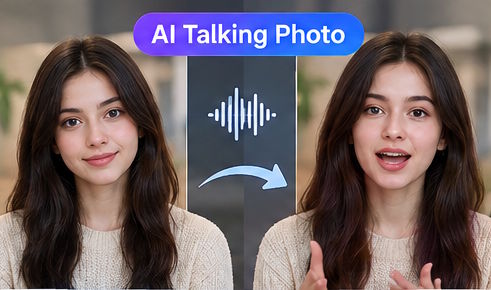
Talking Photos Are Another Use Case
Portrait images can be particularly interesting.
A single photograph can potentially become a speaking character, presenter, storyteller, or fictional personality.
For example, an educator could turn an illustrated character into a short narrator.
A creator could animate an old portrait for a historical storytelling project.
A marketer could experiment with a product mascot speaking directly to the audience.
The goal is not always realism.
Sometimes the most effective result is intentionally stylized.
A cartoon character can speak.
An illustrated mascot can react.
A fictional character can deliver a short line.
The image provides the visual starting point while AI handles motion and facial animation.
For creators experimenting with this format, an AI talking photo generator can be a useful way to explore how static images can become short-form video content.
The Importance of Choosing the Right Image
Not every image is equally suitable for animation.
A clear subject usually works better than a highly complicated composition.
For a talking photo, the face should be visible enough for the model to interpret.
For image-to-video generation, the subject should have a clear relationship with the background.
A product photograph with strong lighting and an uncluttered composition may provide a better starting point than a low-resolution image containing many overlapping objects.
The quality of the source image still matters.
AI does not completely remove the importance of good visual assets.
Animation Should Have a Purpose
One common mistake is adding movement simply because movement is possible.
A photograph does not automatically become more interesting because the camera zooms in.
Good animation should support the idea.
For example:
- Portrait: The person slowly turns toward the camera.
- Landscape: The camera moves forward through the scene.
- Product: The camera circles around the object.
- Character: The character performs one clear action.
- Food: Steam rises while the camera moves toward the dish.
Each movement gives the viewer a reason to watch.
From Static Assets to Social Content
This is particularly relevant for social media creators.
A creator may already have hundreds of photographs, illustrations, product images, or character designs.
Those assets represent a library of potential video ideas.
Instead of creating every piece of content from scratch, AI video can become a second layer on top of existing assets.
One photograph can potentially produce several versions:
- A slow cinematic camera movement
- A character reaction
- A talking presentation
- A product demonstration
- A transformation
- A short narrative
This makes image-based video useful for creators who need to publish regularly.
Multimodal References Expand the Possibilities
Modern video models are also moving beyond simple image animation.
Seedance 2.0 supports multiple input types, including text, images, audio, and video. Its official documentation explains that these inputs can be used as references for composition, movement, camera language, and sound.
That creates a more flexible workflow.
A creator might provide:
- One image for the main character
- Another image for the environment
- A video showing desired camera movement
- Audio establishing the mood
- Text explaining the sequence
The model then has more information than a text-only prompt can provide.
This approach is especially useful when the creator already has visual assets but wants to experiment with new ways of combining them.
The Role of Longer Video Generation
Image animation becomes even more interesting when the resulting video can develop a small story.
Seedance 2.5 supports up to 30 seconds in a single generation and is specifically positioned around longer storytelling.
Consider a single character image.
Instead of producing only a few seconds of movement, the creator could describe a sequence:
The character looks around.
They notice something in the distance.
They walk toward it.
The camera follows.
The scene ends with a reveal.
Now the original photograph is no longer simply being animated.
It has become the starting point for a scene.
Finding Inspiration Before Writing the Prompt
For beginners, the hardest part may not be the technology.
It may be deciding what to create.
Looking at existing examples can help.
A creator might browse an AI video inspiration gallery and identify patterns that could be adapted to their own images.
For example, one might notice that product images work well with slow camera movement, while character portraits benefit from subtle facial motion.
The goal is not to copy another creator's video.
It is to understand the relationship between the source image, movement, camera, and story.
What Comes Next for Image-Based Video?
The distinction between “image generation” and “video generation” is becoming less obvious.
A creator may start with an image, use it as a reference, add a short prompt, introduce audio, and end with a complete video.
That workflow reduces the gap between static and moving content.
But the creative decisions remain human.
Someone still has to choose the image.
Someone has to decide what the character should do.
Someone has to determine what the viewer should notice first.
AI can accelerate the production process, but the underlying creative idea still matters.
The most useful way to think about image-to-video is therefore not as a trick for making photographs move.
It is a way to turn existing visual ideas into new scenes.
And as models become better at understanding references, movement, sound, and longer narratives, a single image can become the beginning rather than the end of a creative project.

