

An AI movie maker can turn scripts, images, and prompts into video much faster than traditional production methods, but generating a few impressive clips is only the beginning. Once developers and creative teams start producing ads, short dramas, branded content, or recurring video projects, they also need to manage storyboards, references, models, revisions, assets, and production costs.
A modern AI movie maker becomes more useful when those tasks are connected in one production workflow. Instead of treating every generated clip as a separate experiment, teams can build a repeatable process that moves from script and planning through generation, review, refinement, and final delivery.
What Makes an AI Filmmaking Workflow Repeatable?
A reliable AI video workflow starts with production stages rather than one specific model.
A typical structure might look like:
Brief → Script → References → Storyboard → Model Selection → Generation → Review → Enhancement → Export
This approach matters because generative video models change quickly. One model may perform better for cinematic motion, while another may be more suitable for stylized animation, character scenes, or product visuals.
By keeping the wider production structure stable, teams can switch models without rebuilding the entire project.
For creative teams, that is one of the main differences between experimenting with generative video and using an AI movie maker as part of a repeatable production system.
How Multi-Model AI Video Production Works
Creative teams increasingly rely on several generative models during the same project.
The challenge is that multi-model production can quickly become fragmented. Every additional platform may introduce another account, subscription, upload, download, and folder structure.
Pixmax brings models including Seedance, Kling, GPT Image, Midjourney, Veo, Gemini, Vidu, and Minimax into one creative environment.
A multi-model creative production workspace allows teams to compare different generation approaches while keeping scripts, references, storyboards, and previous outputs closer together.
The advantage is not simply access to more models. It is reducing the amount of work required to move between them.
Script-to-Video Production Needs More Than a Prompt
A script-to-video workflow works best when a script is broken into manageable production stages.
Instead of sending an entire narrative into generation at once, teams can identify:
- characters;
- environments;
- key actions;
- camera requirements;
- visual references;
- scene order.
Storyboards then connect the written script with the final generated video.
This is particularly useful for short films, short dramas, advertising campaigns, product videos, and episodic content.
Why Storyboards Matter in Script-to-Video Production
Generating ten strong clips does not guarantee that they will work together as one sequence.
A storyboard gives teams a way to review scene order, framing, character placement, pacing, and continuity before spending more time or credits on final generation.
Pixmax uses an infinite-canvas workflow where scripts, text, images, video, audio, storyboards, prompts, and model settings can be organized within the same workspace.
That helps preserve the context behind each generated scene instead of leaving successful outputs disconnected from the process that created them.
Scene and Camera Control Beyond Prompting
Prompts are useful for describing creative intent, but they are not always precise enough for spatial decisions.
A filmmaker may need two characters positioned at specific points, a camera placed at a defined angle, or a controlled movement through a scene.
Pixmax includes a 3D Stage Editor that allows users to place characters, props, scenes, and cameras in 3D space. It also supports controls for camera movement, composition, perspective, and lighting.
When Visual Control Beats Prompt Engineering
For complex scenes, repeatedly rewriting prompts can become inefficient.
Visual and spatial controls give creators another way to define how a scene should look before generation begins.
This can be particularly useful for multi-character sequences, cinematic advertising, short dramas, and other projects where shot composition needs to remain predictable.
A stronger AI filmmaking platform therefore gives creators more than prompt input. It provides ways to influence how the scene is staged and captured.
Automating the AI Video Production Workflow
Some parts of AI filmmaking require creative judgement. Others involve repetitive setup.
Teams may repeatedly need to:
- turn scripts into scene ideas;
- create storyboard drafts;
- generate visual variations;
- test alternate shots;
- prepare first-pass video sequences.
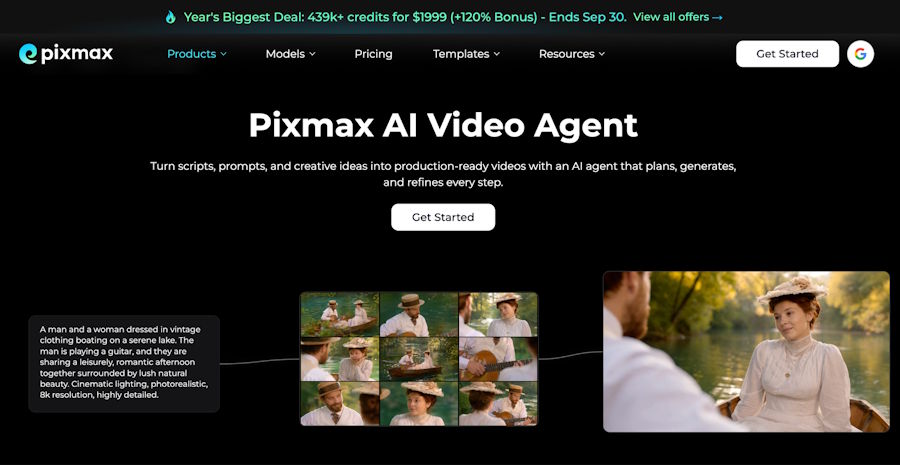
Pixmax includes an AI Video Agent designed to help move projects from ideas and scripts toward characters, scenes, storyboards, and video assets.
The goal of this kind of automation is not to replace creative direction.
It is to reduce repetitive production steps so teams can spend more time evaluating storytelling, continuity, visual style, and final quality.
Reusable Assets Reduce Production Rework
A repeatable creative workflow should not start from zero for every project.
Production teams often reuse characters, environments, brand styles, prompts, storyboard structures, templates, and approved visual references.
Pixmax includes an asset library designed to retain these types of production materials.
This is especially useful for advertising teams, short-drama studios, e-commerce brands, and other creators producing recurring content.
Once a visual direction or production method has been tested successfully, reusing it can reduce unnecessary regeneration and help maintain greater consistency across future projects.
For an AI movie maker, this reusable asset layer becomes increasingly valuable as projects expand from individual clips into campaigns or multi-scene productions.
Managing Generative Video Costs
Generative video encourages experimentation, but testing can consume credits quickly.
One final scene may require several models, prompts, camera variations, and reference images before the team approves a result.
That makes cost management part of the broader AI video workflow.
Pixmax offers pay-as-you-go credit packs alongside its creative platform. Its current September promotion includes bonus credits across several tiers, with the $1,999 Team Max Pack providing 439,780 total credits including a 120% bonus.
For high-volume production teams, these offers are most useful when they reduce the cost of generation already planned within the workflow.
The better approach is still to track what each round of testing contributes rather than generating unlimited variations simply because additional credits are available.
Separate Drafts From Final Output
Not every scene needs final-production quality immediately.
Storyboard previews, motion tests, and internal reviews can use draft-quality generations. Higher-resolution processing can then be reserved for shots that have already been approved.
Pixmax supports AI Super-Resolution up to 4K and high-quality 10-bit video output.
A practical production pipeline can therefore follow:
Draft → Review → Final Generation → Enhancement → Export
This approach keeps early experimentation faster while concentrating higher-quality processing on footage that is likely to reach final delivery.
It also helps creative teams avoid spending unnecessary processing resources on scenes that may later be discarded.
Collaboration for Creative Production Teams
AI filmmaking increasingly involves teams rather than individual creators.
Developers, designers, editors, creative directors, marketers, clients, and contractors may all need access to different parts of the project.
Pixmax supports multi-canvas project spaces, asset sharing, comments, reviews, progress management, user permissions, project visibility, and credit allocation.
For team-based AI video production, these workflow capabilities can be as important as the underlying generation model.
A creative production workspace should make it clear what has been created, which assets are approved, who can access them, and what needs to happen next.
That becomes especially important for agencies, production studios, and brands running several projects at the same time.
What Should Creative Teams Look for in an AI Movie Maker?
An AI movie maker should be evaluated by more than the quality of one demo clip.
Creative teams should consider:
- support for text-to-video and image-to-video;
- access to suitable AI models;
- script and storyboard workflows;
- character and visual consistency;
- reference image support;
- camera and scene control;
- reusable asset management;
- generation speed;
- collaboration tools;
- pricing and credit usage;
- output quality and enhancement;
- export compatibility.
The relative importance of these features depends on the project.
A creator producing occasional social videos may care most about speed and simplicity.
A short-drama studio may prioritize storyboards, character consistency, scene planning, and asset reuse.
An agency producing recurring commercial work may place more value on multi-model access, collaboration, reusable workflows, and predictable production costs.
FAQ About AI Movie Makers
What Is an AI Movie Maker?
An AI movie maker is a tool or production environment that uses generative AI to support stages such as scripting, storyboarding, image generation, video generation, scene planning, enhancement, and final delivery.
How Is an AI Movie Maker Different From an AI Video Generator?
An AI video generator mainly focuses on creating video from text, images, or other inputs. An AI filmmaking platform may support a broader workflow that also includes scripts, storyboards, scene control, reusable assets, collaboration, and post-generation processing.
Can One Platform Use Multiple AI Video Models?
Yes. Multi-model platforms can allow teams to select different models for different scenes, visual styles, or production requirements instead of relying on the same model throughout an entire project.
What Should Creative Teams Prioritize?
Teams should look at model flexibility, script-to-video workflow, storyboarding, scene control, visual consistency, asset reuse, collaboration, generation costs, and final-output tools rather than judging a platform only by individual demo clips.
Final Thoughts
An AI movie maker becomes more valuable when it supports the full production process rather than simply generating isolated clips.
For developers and creative teams, that means connecting scripts, storyboards, multiple AI models, scene control, reusable assets, collaboration, cost management, and final output within a repeatable workflow.
Individual generative video models will continue to change. A stable AI video production system gives teams a structure around those models, making it easier to move from experimentation to consistent creative production without rebuilding the workflow every time a new model appears.

