

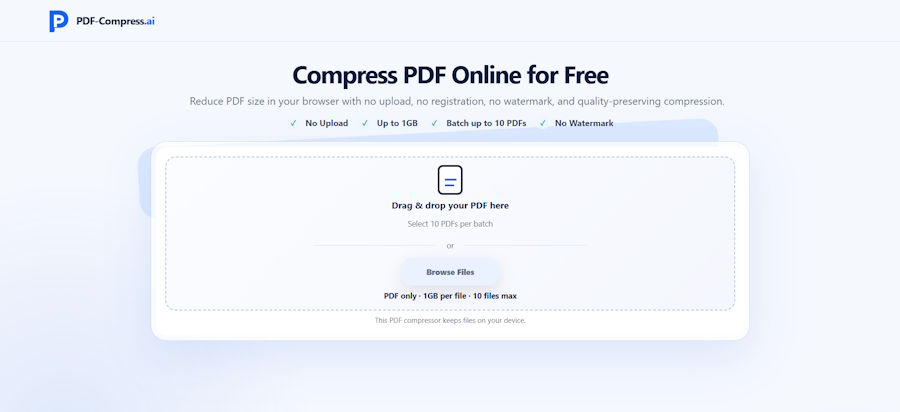
Web applications are increasingly capable of handling tasks that once required desktop software or server-side processing. PDF compression is a good example. Instead of uploading a document to a remote compression server, a browser-based local PDF compressor such as PDF-Compress.ai can process the file directly on the user's device.
For developers and technically minded users, this approach is interesting because it changes the usual web application workflow. PDF-Compress.ai provides Light, Balanced, and Strong compression modes, supports batches of up to 10 PDFs, allows individual file selection up to 1GB, requires no registration, and does not add a watermark to the output.
Why PDF Compression Is Still a Common Web Problem
PDF is one of the most widely used formats for reports, résumés, invoices, contracts, scanned records, and technical documentation.
The format is convenient, but file size can become a problem quickly.
What Makes a PDF Large?
A PDF may contain:
- high-resolution photographs;
- scanned page images;
- embedded graphics;
- multiple fonts;
- complex visual elements;
- many pages;
- presentation-style layouts.
A text-heavy PDF may remain relatively small, while a scanned document containing the same number of pages can become dozens or even hundreds of megabytes.
That difference matters when the file eventually needs to be uploaded, emailed, archived, or transferred through another web application.
The Traditional Server-Side Compression Model
Many web-based file tools follow a familiar sequence:
- The browser uploads the PDF.
- A remote server receives the file.
- Server-side software processes it.
- The processed version is returned to the browser.
- The user downloads the result.
This model works well and allows the server to provide substantial processing resources.
However, it also means the complete document needs to leave the user's device.
Upload Time Becomes Part of Processing Time
With a large PDF, the upload itself may become one of the slowest parts of the workflow.
A 300MB scanned document first has to travel across the network before compression even begins.
If the user's connection is slow or unstable, the experience can become inconvenient.
What Changes With Local Browser Processing?
PDF-Compress.ai takes a different approach by performing compression locally in the browser.
The file does not need to be uploaded to a compression server before processing.
The Workflow Becomes Simpler
Conceptually, the process looks more like:
Select PDF → Process locally → Generate compressed output → Save result
This removes the remote upload step from the compression workflow.
For users, that can be useful when they simply want to reduce a document before uploading it somewhere else.
Local Processing Has a Privacy Advantage
PDFs often contain information that users may prefer not to transfer unnecessarily.
Examples include:
- résumés;
- internal business reports;
- administrative documents;
- academic work;
- application files;
- contracts.
Processing the PDF on the user's device reduces the need to send the source file to a compression server.
Local Does Not Mean Unlimited
There is an important technical trade-off.
When a server performs compression, it can use server memory and computing resources.
When processing happens in the browser, the user's own device provides those resources.
PDF-Compress.ai therefore notes that actual processing capability depends on factors such as:
- the PDF structure;
- the browser;
- available device memory.
A large image-heavy PDF can place considerably more pressure on the browser than a small text document.
Why Compression Cannot Guarantee One Fixed Result
A common misconception is that every PDF can be reduced by roughly the same percentage.
In reality, compression results depend heavily on how the file was created.
A PDF May Already Be Optimized
Suppose a PDF contains JPEG images that were already heavily compressed before being inserted into the document.
There may be much less redundant data available to remove.
Another PDF might contain high-resolution scans that leave substantially more room for reduction.
That is why PDF-Compress.ai describes compression results as dependent on the structure of the source document.
Three Compression Levels Give Users More Control
PDF-Compress.ai provides three processing options:
Light
Light compression is suitable when the user wants a modest size reduction while keeping the result relatively close to the source document.
This may be useful when visual clarity is important and the PDF only needs to fall slightly below an upload limit.
Balanced
Balanced compression aims for a middle ground between file size and document readability.
For common reports, résumés, presentation exports, and business documents, this is often the type of trade-off users are looking for.
Strong
Strong compression prioritizes a greater reduction in file size.
This can be useful for particularly large documents or strict upload limits, but the resulting PDF should be reviewed carefully.
Small text, detailed diagrams, and images are especially worth checking after stronger compression.
Batch Processing Solves a Different Problem
Sometimes the issue is not one huge PDF.
It is a folder containing many moderately large files.
PDF-Compress.ai supports batch PDF compression for up to 10 PDFs at a time.
Why Batch Processing Matters
Consider a workflow involving:
- ten scanned invoices;
- several academic documents;
- a group of reports;
- multiple application files.
Without batch handling, the same selection and compression process has to be repeated for every file.
Allowing several PDFs to enter the workflow together reduces that repetitive interaction.
A 1GB Selection Limit Does Not Mean Every Device Will Handle 1GB Equally
PDF-Compress.ai allows users to select individual PDF files up to 1GB.
For browser-based software, the distinction between a file limit and practical processing capability is important.
Hardware Still Determines What Is Comfortable
A device with plenty of available memory may handle a large document differently from an entry-level laptop or phone.
The browser itself also has memory limits and resource-management behavior.
So a 1GB selection limit should be understood as the maximum supported input selection rather than a guarantee that every 1GB PDF will process equally quickly on every device.
This is particularly relevant when client-side tools process large files.
Browser-Based Compression Can Fit Into Larger Web Workflows
Developers frequently deal with situations where users need to prepare files before sending them somewhere else.
For example:
Original PDF → Compress locally → Upload smaller PDF to another service
This can be useful for:
- web forms;
- application portals;
- document management systems;
- email attachments;
- cloud storage;
- collaboration tools.
Compression Before Upload Can Reduce Transfer Overhead
If a document must eventually be uploaded anyway, reducing it first may lower the amount of data that needs to be transmitted.
For users with slower connections, the difference can be noticeable.
The actual benefit depends on how much the source PDF can be reduced.
Why No Registration Matters for Utility Tools
PDF compression is usually a task rather than a long-term software project.
Users often arrive with one immediate objective:
Make this file smaller.
Requiring an account before that task begins creates additional steps.
PDF-Compress.ai does not require registration or a subscription to start processing files.
Good Utilities Minimize Setup
For lightweight browser utilities, a straightforward interaction model is often enough:
- Choose the files.
- Select compression strength.
- Run the process.
- Review the output.
- Save the compressed PDF.
There is very little configuration to learn.
Watermark-Free Output Matters in Production Documents
Some free document tools insert branding into the processed file.
That can make the result unsuitable for professional use.
PDF-Compress.ai does not add a watermark to compressed PDFs.
This is useful when the output is intended for:
- a client;
- an employer;
- a university;
- a customer;
- an internal company system.
The compressed document can continue through the workflow without an additional cleanup step.
Developers Should Think About Compression as a Trade-Off
Compression always involves balancing competing goals.
File Size
How small does the document actually need to become?
Readability
Will text, tables, and images still be clear enough?
Processing Resources
Can the user's device comfortably handle the file?
Privacy
Does the workflow require the document to leave the device?
A tool that exposes multiple compression strengths allows users to make some of these decisions themselves rather than applying one fixed level to every PDF.
Practical Tips for Better Compression Results
A few simple checks can make PDF compression more reliable.
Keep the Original File
Do not overwrite the only copy of an important document before checking the compressed result.
Start With Balanced Compression
For ordinary documents, a middle setting can be a sensible first attempt.
Move to Strong if the result is still too large or Light if visual quality needs to be preserved more carefully.
Inspect Small Details
After compression, check:
- small fonts;
- tables;
- diagrams;
- photographs;
- signatures;
- fine lines.
Check the Final File Size
Compression is only useful if the result actually solves the original size problem.
If an upload portal allows 10MB and the compressed file is still 14MB, another pass or a different document strategy may be needed.
FAQ
Does PDF-Compress.ai upload PDFs to a server?
PDF-Compress.ai is designed to perform compression locally in the browser, so the source PDF does not need to be uploaded to a compression server.
How many PDFs can be processed at the same time?
Users can select up to 10 PDFs in one batch.
What is the maximum PDF size?
An individual file can be selected up to 1GB. Actual processing performance depends on the document structure, browser, and available device memory.
Which compression level should I use?
Light is appropriate for smaller reductions, Balanced provides a middle option, and Strong is designed for more aggressive compression. The result should always be reviewed before the document is shared.
Does PDF-Compress.ai add a watermark?
No. The compressed output does not include a watermark.
Do I need to register?
No. PDF-Compress.ai can be used without creating an account or purchasing a subscription.
Can compression reduce every PDF significantly?
No fixed reduction can be guaranteed. Results depend on how the original PDF is structured and how much compressible data it contains.
Final Thoughts
Modern browsers can do much more than display documents.
Local file processing makes it possible to build utilities that handle useful tasks while reducing unnecessary transfers between the browser and remote servers.
PDF-Compress.ai applies that model to PDF compression, combining local browser processing with three compression levels, support for batches of up to 10 files, large-file selection, and watermark-free output.
For developers and everyday users alike, it is a practical example of how client-side browser tools can turn a traditionally server-dependent file operation into a simpler local workflow.

