

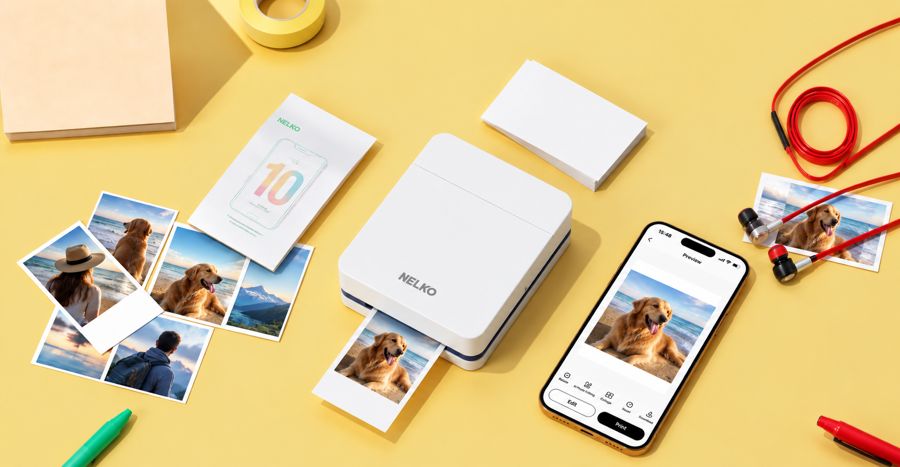
Smartphones have transformed photography by allowing people to capture thousands of moments without carrying a traditional camera. However, many of these photographs remain stored on phones and are rarely turned into physical memories. Bluetooth technology has made it much easier to bridge the gap between digital photography and physical printing. With a compatible bluetooth photo printer users can send pictures directly from their smartphones to a printer without relying on complicated cables or computer connections. This simple wireless approach makes photo printing more convenient for homes, parties, travel, and creative projects.
Understanding Bluetooth Photo Printing
Bluetooth is a wireless communication technology that allows nearby devices to connect and exchange information. In photo printing, Bluetooth can connect a smartphone with a compatible printer. Once the devices are paired, users can select an image from their phone and send it to the printer.
Unlike traditional printing methods, this process does not necessarily require a desktop computer or physical cable. The printer and phone communicate wirelessly within the supported Bluetooth range. This makes the printing process particularly convenient for people who want quick access to physical photographs.
Why Bluetooth Makes Printing More Convenient
One of the biggest advantages of Bluetooth printing is simplicity. Users can often connect their phone to a compatible printer through a straightforward pairing process. After the initial setup, reconnecting the devices can be quick and convenient.
This is especially useful when people are away from their home computer. Instead of transferring photographs from a phone to a computer and then printing them, users can work directly from their smartphones.
Bluetooth connectivity also reduces the number of cables needed in a workspace. A printer can be placed on a desk, shelf, or another convenient location without requiring a direct physical connection to the phone.
Printing Photos Directly From Your Smartphone
Modern smartphones make photo printing particularly easy because users already have their favorite photographs stored in their camera galleries. After connecting a compatible printer, users can browse their photos, choose an image, make adjustments, and send it for printing.
Many printer companion applications provide additional options. Depending on the printer, users may be able to crop images, adjust brightness, add frames, create collages, or apply simple filters before printing.
This gives users more control over the final result without requiring advanced photo-editing software.
The Benefits of a Small Portable Printer
A small portable printer can make Bluetooth photo printing even more practical. Compact printers are designed to be lightweight and easy to carry, making them suitable for travel, events, parties, and everyday use.
For example, someone attending a family gathering can take photographs with a smartphone and print selected images during the event. Friends and family members can receive physical photographs immediately instead of waiting for prints from a traditional photo service.
Portable printers can also be useful for travelers who want to create physical souvenirs during their trips. A small device can fit into a bag and provide an easy way to turn digital travel photographs into tangible memories.
Great for Parties and Special Events
Bluetooth photo printing can add an interactive element to parties and celebrations. Guests can take pictures with their phones and print favorite moments during the event.
At birthdays, weddings, anniversaries, and family gatherings, printed photos can become simple souvenirs. Some people also use printed images to create guest books, where attendees can add photographs alongside messages.
Because Bluetooth connections do not require complicated wiring, the printer can be positioned conveniently near the activity without creating a cluttered setup.
Useful for Creative Projects
Bluetooth-enabled photo printers are not limited to casual snapshots. They can also support creative hobbies and personal projects.
Printed smartphone photographs can be used in scrapbooks, journals, vision boards, travel diaries, greeting cards, and memory albums. Students may also use small photo prints for school projects or presentations.
The ability to print photographs immediately encourages creativity because users can experiment with different layouts and physical arrangements without waiting for professional printing services.
Easy Setup for Everyday Users
The exact setup process depends on the printer and smartphone, but Bluetooth printing generally follows a simple pattern. First, turn on the printer and activate its Bluetooth function. Then enable Bluetooth on the smartphone and search for available devices.
After selecting the printer and completing the pairing process, open the manufacturer's compatible application or supported printing feature. Select the desired photograph and choose the available print settings.
Before printing multiple photographs, it is useful to test one image. This allows users to check the image size, paper alignment, colors, and overall print quality.
Saving Time With Wireless Printing
Traditional photo printing can involve several steps. A user may need to transfer photographs to a computer, install printer software, connect cables, and adjust printing settings. Bluetooth can simplify this workflow by allowing the smartphone and printer to communicate directly.
For people who only want to print a few photographs at a time, this convenience can make a significant difference. The process becomes more suitable for spontaneous printing rather than a lengthy task.
Things to Consider Before Buying
When choosing a Bluetooth photo printer, users should consider several features. Print quality is important, particularly for photographs containing detailed colors and fine textures. Printer size and weight matter if portability is a priority.
Users should also check smartphone compatibility and the available printing application. Some printers may support additional wireless technologies or specific operating systems.
Printing speed, paper cost, battery life, photo size, and replacement supplies are other practical considerations. A small portable printer that looks affordable initially may have higher long-term costs if its specialized paper or consumables are expensive.
Keeping Your Digital and Physical Memories Together
Cloud storage and smartphone galleries make it easy to preserve thousands of photographs digitally, but physical photographs offer a different experience. Printed images can be displayed on walls, placed in albums, shared with family members, or used as personalized gifts.
Bluetooth printing makes this transition from digital to physical particularly convenient. Users can choose meaningful photographs whenever they want and create physical copies without needing complicated equipment.
The Future of Wireless Photo Printing
As smartphones and wireless technologies continue to develop, photo printing is likely to become even more convenient. Improvements in compact printer design, mobile applications, battery technology, and image processing can provide users with more flexible printing options.
Future devices may offer faster connections, improved print quality, and additional creative features. These developments could make instant photo printing an increasingly accessible activity for smartphone users.
Conclusion
Bluetooth has made printing photos from a smartphone easier by removing many of the traditional barriers between digital images and physical prints. A bluetooth photo printer allows users to send photographs wirelessly from compatible phones, while a small portable printer adds flexibility for travel, parties, creative projects, and everyday use. With simple connectivity, convenient mobile applications, and compact designs, wireless photo printing gives people an easy way to transform memorable smartphone photographs into physical keepsakes.

