

When developers choose a rich text editor, the first questions usually concern features. Does it support tables, images, and formatting? Can users paste content from Word? Does it offer collaboration or version history?
Those questions matter, but there's another decision worth making before you start integrating an editor: how much of the editing experience should your application control?
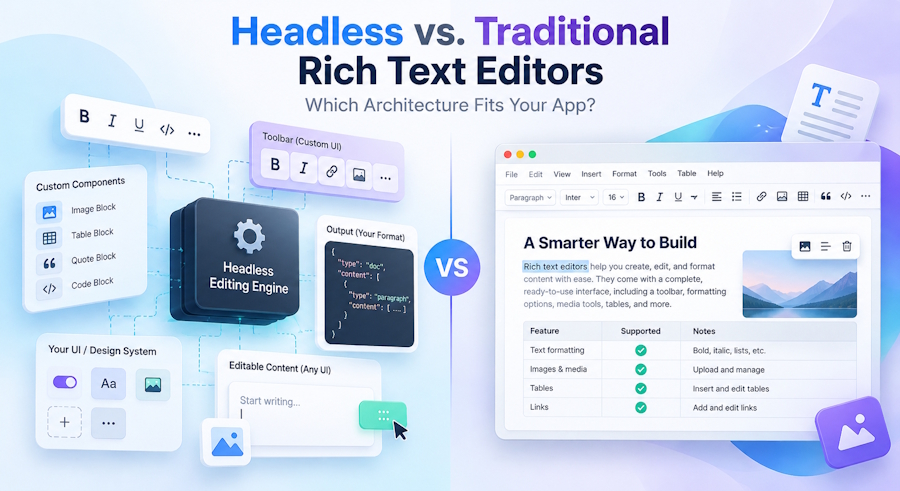
Traditional rich text editors provide a ready-made interface with formatting controls and familiar editing features. Headless editors give developers greater freedom to build that interface around their application's requirements.
Both approaches can work well. The difference comes down to customization, development effort, and long-term maintenance.
Understanding those tradeoffs will help you choose an architecture that fits your product without taking on unnecessary complexity.
Key Takeaways
- A headless rich text editor separates editing functionality from much of the user interface, giving developers more control over the editing experience.
- Traditional rich text editors provide built-in controls and common editing behavior, making them faster to integrate into many applications.
- Headless editors are particularly useful when editing is a core product feature or requires highly customized interactions.
- Greater customization also brings more responsibility for accessibility, testing, and maintenance.
- The distinction is becoming less rigid as headless frameworks introduce prebuilt UI components and traditional editors offer headless configurations.
What Is a Headless Rich Text Editor?
A headless rich text editor separates the editing engine from much of its user interface. It manages document state, formatting, selections, and editing commands while allowing developers to build custom toolbars, menus, and other controls.
Unlike traditional WYSIWYG editors, headless editors don't impose a predefined interface. For example, developers can create a floating formatting menu that appears when users select text, using the editor's selection state and command APIs.
A headless editor framework typically provides:
- Document model: Defines content and its structure.
- Commands: Handle formatting and content insertion.
- Selection management: Tracks cursor positions and selections.
- Extensions: Add features and custom behavior.
- Events and state updates: Respond to content changes.
For example, Tiptap, built on ProseMirror, provides these capabilities while letting developers build their own interface or use optional UI components.
A headless rich text editor differs from a headless CMS. The headless CMS separates content management from presentation, while a headless editor separates editing functionality from its interface.
The term headless can also refer to operation without a browser DOM. Lexical, for instance, supports this for server-side content processing and testing.
In this article, headless primarily means separating the editing engine from the application's editor UI.
What Is a Traditional Rich Text Editor?
A traditional rich text editor provides a working editing interface along with the underlying editing functionality.
Developers typically get an editable area, formatting toolbar, menus, dialogs, and commonly used features without building each component independently.
Suppose you're adding an article editor to a content management system. Users need to format headings, insert links, create tables, upload images, and organize text into lists.
A traditional WYSIWYG editor can provide most of those interactions through its existing interface. Developers configure the available features, integrate the editor with the application, and handle requirements such as content storage and validation.
This approach can reduce the amount of editor-specific UI code the team needs to write.
However, traditional doesn't mean inflexible.
Modern full-featured editors often provide configuration options, APIs, plugins, and customization capabilities. Developers can adjust toolbars, extend functionality, and integrate editors with existing application workflows.
The main distinction is that a traditional editor supplies more of the editing experience upfront, while a headless architecture leaves more decisions to the application.
Headless vs. Traditional Rich Text Editors at a Glance
Both architectures can support advanced editing features. Their differences become more apparent when you consider who builds and maintains the interface.
| Consideration | Headless editor | Traditional editor |
|---|---|---|
| Initial setup | More UI development may be required | Usually faster |
| UI customization | Extensive control | Depends on APIs and configuration |
| Design-system integration | UI can be built around the design system | May require additional styling |
| Editing interactions | Can be customized deeply | Common interactions provided |
| Engineering ownership | More responsibility for custom UI | More prebuilt behavior |
| Time to production | Depends on UI complexity | Often shorter |
| Maintenance | Team maintains custom components | Editor handles more built-in components |
| Structured content | Strong fit with appropriate document models | Depends on editor capabilities |
| Standard CMS editing | May be more than needed | Often a practical choice |
| Custom editing workflows | Strong architectural fit | Depends on extension capabilities |
These are general tendencies, not fixed limitations. A headless framework with ready-made components may require little additional UI development. A heavily customized traditional editor may demand considerable engineering work.
The better choice depends on the editing experience you're trying to deliver.
Where Headless Editors Give Developers More Control
A headless architecture becomes particularly useful when the editing interface needs to behave differently from a conventional document editor.
Your Design System Controls the Interface
Most applications have established design conventions. Buttons, menus, spacing, keyboard interactions, and responsive layouts are designed to feel consistent across the product.
A ready-made editor may introduce its own visual patterns.
You can often customize those patterns, but aligning every interaction with an existing design system can require additional work.
With a headless editor, the team can use its existing UI components directly.
For example, a product might require a contextual toolbar that appears only when users select text. Another application might need different formatting controls depending on whether someone is editing a heading, table, or comment.
These interactions are easier to design when the application controls the presentation layer.
The same flexibility supports custom slash commands, side panels, mobile-specific controls, and application-specific content blocks.
Editing Becomes Part of the Product
Headless architecture is particularly valuable when editing is a core product feature.
Consider a collaborative workspace where documents contain text, embedded records, tasks, and interactive components. The application needs to manage individual content blocks, connect them to other records, and support workflows beyond basic formatting.
A structured document model makes this easier. For example, ProseMirror uses a schema-defined structure of nodes and marks, allowing developers to control content types and their relationships.
This flexibility is useful when content serves purposes beyond visual formatting. However, collaboration, custom blocks, and AI features still depend on the chosen framework, extensions, and application infrastructure.
What You Take Responsibility for With a Headless Architecture
Building a custom editor interface comes with responsibilities that are easy to underestimate.
Even a simple Bold button must apply formatting, reflect its active state, handle mixed selections, and preserve the user's text selection. Dropdowns, image controls, floating toolbars, and keyboard shortcuts add further complexity.
Accessibility is another consideration. Custom controls must support keyboard navigation, screen readers, and proper focus management. The W3C's ARIA Authoring Practices Guide outlines recommended toolbar interaction patterns.
Developers must also account for responsive layouts, touch interactions, and browser differences affecting selections and clipboard behavior.
Established headless frameworks handle many complex text-editing operations, but teams remain responsible for the custom interfaces they build.
Headless architecture doesn't remove editor complexity. It changes which parts of that complexity your team owns.
Why Traditional Rich Text Editors Still Make Sense
Not every application needs a distinctive editing interface.
Sometimes users simply need to enter formatted content reliably.
A customer support application, for example, may need an editor for writing responses, adding links, and inserting images. The editor is important, but users spend much of their time managing conversations rather than formatting documents.
Building a custom editing interface may offer little additional value in that situation.
Traditional rich text editors provide several practical advantages.
Faster Implementation
Developers can begin with a functioning editing interface and configure it around the application's requirements.
They don't have to create every toolbar button, popup, or formatting interaction before users can begin working.
This can be particularly valuable when an editing feature must ship alongside other product requirements.
Established Editing Behavior
Common editing operations are already implemented.
Users expect familiar behaviors when creating lists, pasting formatted text, inserting links, or working with tables.
Using a full-featured editor reduces the amount of custom interaction logic the application team needs to develop.
Less UI Maintenance
When an editor provides its own toolbar and dialogs, the editor maintainers also take responsibility for much of that built-in UI.
The application team still needs to manage integrations, upgrades, content validation, security, and testing. However, it has fewer custom editor components to maintain.
For standard CMS fields, product descriptions, email composers, and knowledge-base articles, that can be a worthwhile tradeoff.
The Boundary Between Headless and Traditional Editors Is Becoming Less Clear
The distinction between headless and traditional editors isn't as rigid as it once seemed.
Headless frameworks are introducing optional interface components to make integration easier.
Tiptap, for instance, offers ready-made UI components and templates that developers can customize instead of building every control themselves. Its underlying architecture remains headless-first.
The movement also goes in the other direction.
Some full-featured editors now support configurations that let developers remove their built-in UI while retaining the editing engine.
For example, the Froala JavaScript rich text editor includes a headless configuration option. According to its documentation, this removes the built-in toolbar, popups, and other UI components while retaining the editable content area and core editor API. Developers can then provide their own controls.
This is useful for teams that want more interface control without necessarily adopting a different editing engine.
It also highlights an important point: headless is not always an all-or-nothing architectural choice.
Applications can use a prebuilt editing experience where it makes sense and introduce custom controls where the product requires them.
The best approach may be a combination rather than either extreme.
How to Decide Which Architecture Fits Your App
Choosing the right architecture starts with understanding your application's requirements rather than comparing editor categories alone.
Is Editing a Core Product Differentiator?
If editing is central to your product, such as a collaborative document platform, a headless architecture offers greater freedom to build specialized interactions.
For applications where editing is a supporting feature, such as an admin dashboard, a traditional editor may be more practical.
How Different Is Your UI From a Standard Editor?
If you mainly need headings, lists, links, images, and tables, a configurable traditional editor may be sufficient.
For custom content blocks, contextual tools, or specialized editing workflows, a headless framework offers more flexibility.
How Much Engineering Ownership Do You Want?
Custom editor interfaces require ongoing maintenance, including accessibility, responsive behavior, interactions, and testing.
That investment may be worthwhile for a distinctive editing experience. For standard editing features, it could create unnecessary overhead.
What Does Your Content Model Look Like?
Applications storing formatted HTML may benefit from traditional editors, while those requiring structured content blocks and metadata may prefer editors with configurable document models.
However, content format and UI architecture are separate decisions. Evaluate each editor's storage, serialization, and rendering capabilities before choosing.
How Quickly Does the Feature Need to Ship?
Traditional editors can accelerate delivery when requirements are conventional and deadlines are tight.
If editing will become a major product feature, investing in a more customizable architecture early may reduce future rework.
A Simple Decision Framework
You don't need an elaborate evaluation process to narrow down the options. Start with the application's most important requirements.
Choose a headless-first editor when:
- Editing is central to the product experience.
- The interface requires substantial customization.
- Content relies on specialized document structures.
- The application needs unusual editing interactions.
- Your team can maintain the custom interface over time.
Choose a traditional rich text editor when:
- Users need familiar formatting features.
- Speed of integration matters.
- The editor supports an existing workflow rather than defining it.
- Built-in toolbars and dialogs meet most requirements.
- Reducing custom UI maintenance is a priority.
Consider a hybrid approach when:
- You want a working editor but need selected custom controls.
- Your application has a design system that the editor must follow.
- Some editing workflows require customization while others remain conventional.
- You expect the editing experience to evolve as the product grows.
Before committing, build a small prototype around the most difficult requirement. Test the interaction that makes your application different, not just basic bold and italic formatting.
That exercise will often reveal more about architectural fit than a long feature comparison.
Frequently Asked Questions
What Is a Headless Rich Text Editor?
A headless rich text editor provides editing functionality while giving developers control over much of the user interface. It typically manages document state, selections, formatting commands, and extensions. Developers can use those capabilities to build custom toolbars, menus, and editing workflows that fit their application's design and behavior.
Is a Headless Rich Text Editor Better Than a WYSIWYG Editor?
Not necessarily. Headless editors are useful when applications require extensive customization, while traditional WYSIWYG editors provide ready-made editing interfaces. The better choice depends on the application's requirements, available engineering resources, and the amount of long-term maintenance the team wants to manage.
When Should You Use a Headless Editor?
Consider a headless editor when rich-text editing is a major product feature or when the application needs highly customized interactions. Collaborative workspaces, structured document platforms, and applications with specialized content blocks are examples where a headless architecture may be beneficial.
Can a Traditional Rich Text Editor Work in Headless Mode?
Yes, some traditional editors offer headless configurations that remove built-in UI components while preserving editing functionality. This allows developers to create custom controls without necessarily replacing the underlying editor. The exact capabilities depend on the editor, so its API and configuration options should be evaluated before choosing this approach.
Conclusion: Choose Based on Ownership, Not Labels
Headless and traditional rich text editors solve many of the same editing problems. Their biggest difference is how much responsibility they place on the application team.
Headless architectures provide greater freedom over interface design and product-specific interactions. Traditional editors supply more functionality upfront, often reducing development time and ongoing maintenance.
With hybrid approaches becoming more common, the choice doesn't always have to be one or the other.
The most suitable architecture is the one that gives your team enough control to build the experience users need without making you maintain functionality that an existing editor could already provide.

