

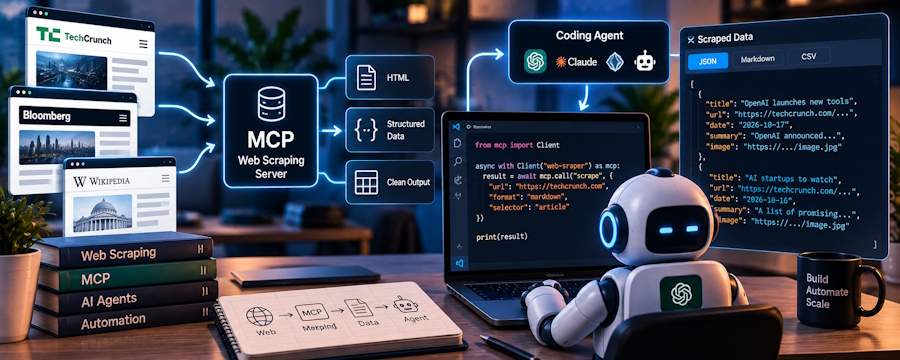
Suppose your coding agent needs to read a public documentation page before changing a feature, then check dated public discussions for reports of the same problem. MCP web scraping gives the agent a way to call outside tools from its coding session. It does not tell you whether a scraped page is current, complete, or safe to trust.
Use this order for a first run:
- Connect the MCP server and confirm the account and permissions.
- Discover a suitable operation before sending any request.
- Check the returned URL, date, and missing fields.
- Compare maintenance and per-call cost before scaling up.
Install and authorize an MCP web scraping connection
Start in the agent host you actually use. Claude Code MCP documentation explains how that host connects to outside tools, while Cursor's MCP documentation describes its MCP settings and configuration file. Because both sources address only the host environment, consult the specific documentation for your host to verify its connection model, server name, auth approach, and active status. Never paste unverified endpoints or secrets directly into your local setup.
For example, a developer using Claude Code could connect an MCP server for live web and social data, then inspect whether the server appears in that session. The linked SpringBrand page describes a plugin that registers its MCP server, followed by sign-in. Its MCP page describes OAuth, while SpringBrand's installation guide also offers an API key or browser sign-in path. Select the path shown in the current host guide. Keep API keys and tokens out of shared files and repositories.
Keep the first connection narrow. Confirm which SpringBrand account is attached, whether an operation asks for a separate third-party account, and what access that request grants. An operation that needs write access deserves a separate decision from one that only reads public material. If the server or authorization is missing, fix the connection before testing a search. A configuration file on disk does not prove the agent can call the server.
Verify a search, page read, and public social lookup
The hypothetical task has two inputs: the public documentation URL and a chosen platform plus date range for public discussion.
Ask the agent to show the operations available in this session. On the SpringBrand MCP page, search_tools discovers operations and get_tool_schemas exposes their input contracts; neither step runs a search. Read the live schema before choosing an operation. The page does not promise a named search, scrape, or social operation in every account.
Run one small read only after the inputs and access look right. Ask for the original URL, page date if present, result status, and any missing fields. For public discussion, restrict the query to the platform and time window you need. A tool result may omit a date or return a partial page. Mark that gap instead of letting the agent fill it from memory.
| Check | Evidence to inspect | If absent |
|---|---|---|
| Page identity | Source URL and page title | Open the original page manually |
| Freshness | Publication or update date, if provided | Treat timing as unknown |
| Discussion sample | Platform, post URL, and query window | Narrow or repeat the query |
| Execution | Status or error from the run | Stop before using the output |
The coding agent can collect and organize these fields. A person still has to decide whether the source actually supports a code change. Public posts can show that a complaint exists; a small sample cannot establish how common it is.
Compare one MCP connection with separate APIs
If you wire up a search API, a page reader, and a social feed separately, each client needs its own authentication, response mapping, error handling, and upgrade checks. You control the requests and can pin the response contract your application expects. Count those maintenance surfaces before deciding that an MCP connection will save work.
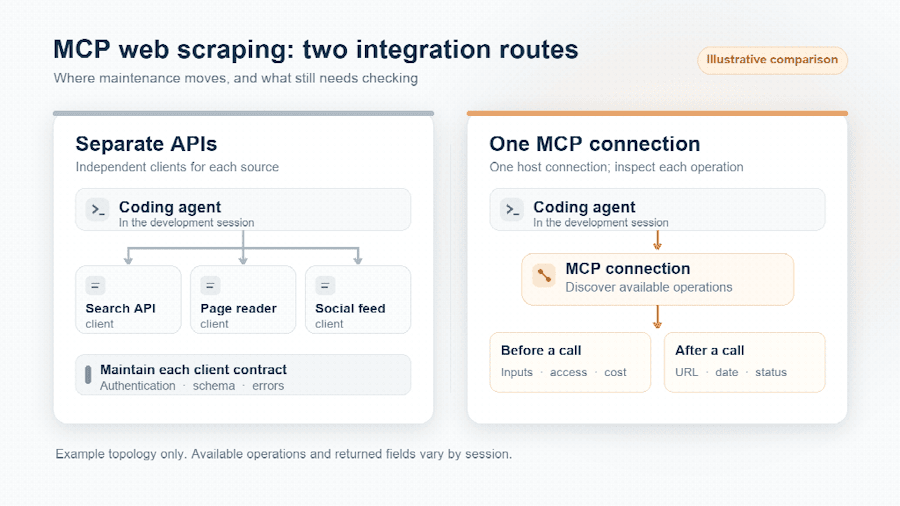
Illustrative comparison: separate API clients each need upkeep, while an MCP connection still requires checks before and after each operation.
| Route | What you maintain | What you still verify |
|---|---|---|
| Separate APIs | Client code and credentials for each service | Every provider's schema, limits, and output |
| One MCP connection | Host connection and provider account | Each live operation's inputs, permissions, cost, and sources |
SpringBrand lists web search, web scraping, and public social data categories on its site. Those categories help identify a candidate connection; they do not prove that a particular operation is available in your session. Directly integrating service APIs or manually exporting source material remains a workable path. Choose that route when your application needs tighter control over requests or a stable provider-specific response contract. Choose MCP when the agent benefits from discovering several operations inside the coding session and you are prepared to inspect each one.
Bound permissions, calls, and cost
Before the next run, write the task's boundary in plain terms: one public page, one platform, a defined date window, and the smallest useful return set. Then inspect the operation's required inputs and any requested account connection. Sign-in to SpringBrand, connecting a third-party service, and approving an execution are separate decisions. Review each request against the task.
Cost needs the same discipline. Look at any charge shown before approval and check the account's usage record afterward. The available documentation does not establish a fixed price for this workflow or an automatic budget cap. Do not assume either. A small initial call is appropriate when the operation or result format is unfamiliar; a larger batch makes sense only after the first result has the expected sources and the displayed cost fits your budget.
Treat scraped text as untrusted input to the coding agent. A page can contain instructions addressed to an assistant, but those words are source content, not permission to change code, reveal files, or call another tool. Keep the source URL with the excerpt and check it yourself before the agent uses the material to edit the project. If the operation requests access beyond the task, decline it and use a narrower method.
Decide whether the result is usable
Return to the hypothetical feature change. Save the documentation URL, the visible page date, the selected discussion URLs, and the query window beside the agent's proposed edit. Open the original documentation section and verify that it says what the agent claims. If the page is undated, record that uncertainty. If a public post describes a different product version, keep it out of the implementation rationale.
The stopping rule is concrete: no source URL, no date for a time-sensitive claim, or no matching context means no code change based on that claim. An MCP connection can move external material into a coding session, but the developer still decides whether that material belongs in the code.

