

A dinner booking changes, a colleague moves a meeting, and someone swaps the day they can help with a family errand. Each update seems small. The difficulty begins when several people are working from different versions of the same plan. Another reminder will not necessarily help if it points to an appointment that has already moved.
Shared scheduling is therefore about more than seeing dates together. It also involves deciding who can change a plan, which details other people need, and where an update should happen. Those choices deserve attention before a household, friendship group, or small team fills a calendar with events.
Seeing a plan is different from managing it
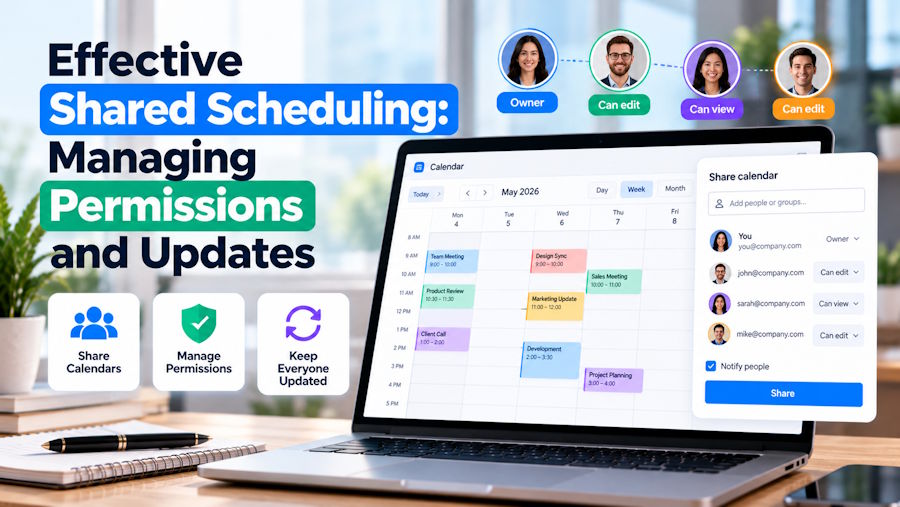
Imagine a regular weekend activity involving several adults. One person handles the booking, another arranges transport, and everyone else needs to know when to arrive. They all need access to the schedule, but they may not all need permission to move the booking. Giving everyone identical access can blur responsibility rather than make coordination easier.
Start by separating visibility from editing. A person who only needs to check the time might need view access. Someone responsible for organising the activity may need to make changes. The right arrangement depends on the group, and it can change when responsibilities shift. The important point is to make that arrangement deliberate.
Keep private commitments separate from shared logistics
A calendar can contain much more than a date and a time. Appointment titles, locations, and descriptions may reveal personal information that has little relevance to the people sharing a schedule. A colleague needs to know when you are available for a project call, not necessarily why a different hour is occupied.
Separate calendars can help draw that boundary. A household might keep shared commitments together while leaving individual appointments in private calendars. A group of friends could have a calendar for an upcoming trip without receiving access to one another's wider routines. Decide what belongs in each space before inviting people, rather than trying to untangle an overly broad arrangement later.
Event wording matters too. Include enough detail for the intended audience to act, but avoid placing sensitive background information in a shared description simply because there is room for it. Before adding a new participant, review the information they will be able to see.
Check the devices people actually use
The person making a change may be at a desktop computer, while everyone checking it is using a phone. A feature list is less useful than a simple question: can each person use the schedule comfortably on the devices they already have? Check supported operating systems and installation requirements before asking a group to switch.
For example, lexcv.cal offers a shared calendar for Android, Windows 11, and Ubuntu Linux, with permissions that let an organiser choose who can view or edit a calendar. Android users can find it through Google Play, while desktop downloads are available from the developer's website. It is one option to assess where phone and desktop access both matter, rather than assuming everyone uses the same operating system.
Whatever calendar app a group considers, test a small, ordinary change together. Add an event, move it, and check what appears on another participant's device. Also check the experience of someone with view-only access. A short trial can reveal a practical mismatch before the schedule becomes important to everyday arrangements.
Agree on how a change becomes final
Permissions control what people can do in the software. They do not automatically explain what people should do when plans are uncertain. Moving an appointment in a calendar and proposing a different time are not always the same thing. A group needs a shared understanding of that distinction.
A useful approach is to discuss a proposed change first when it affects other people's availability, then update the calendar once it is agreed. For routine changes within an organiser's responsibility, a direct update may be appropriate. Either way, avoid leaving the confirmed time in a chat while the calendar still shows an earlier version.
For a significant last-minute change, contact the people affected directly as well. A synchronised event is not proof that everyone has noticed it. Reminders and notifications can support communication, but they should not become an assumption that a message has been read.
Use views and reminders for different jobs
A month view helps someone notice a crowded week. An agenda can make individual commitments easier to scan. Reminders help bring a particular event back to attention. None of these replaces deciding who owns the event or whether its details are current.
Lexcv.cal lists Year, Month, Agenda, and Day views, alongside repeating events and reminders. When assessing those features, use a real planning need: checking an upcoming visit, reviewing a recurring commitment, or spotting an overlap. Colour-coding may help distinguish shared calendars, but clear event names and sensible grouping still matter.
Review access when the arrangement changes
Sharing decisions should not remain untouched indefinitely. A short project ends, a trip is completed, or somebody stops organising a regular activity. These are sensible moments to review who can see and edit the relevant calendar. The same applies when a new organiser takes over.
Before making a shared schedule part of a routine, settle three practical questions:
- Who is responsible for confirming and updating each type of event?
- Which participants need editing access, and which only need to read the plan?
- How will people be told about urgent changes that they cannot afford to overlook?
The goal is not to create a complicated set of rules. It is to make the calendar easier to trust. Clear permissions, restrained sharing, and consistent updates give reminders something useful to point to: a plan the people involved actually understand.

