

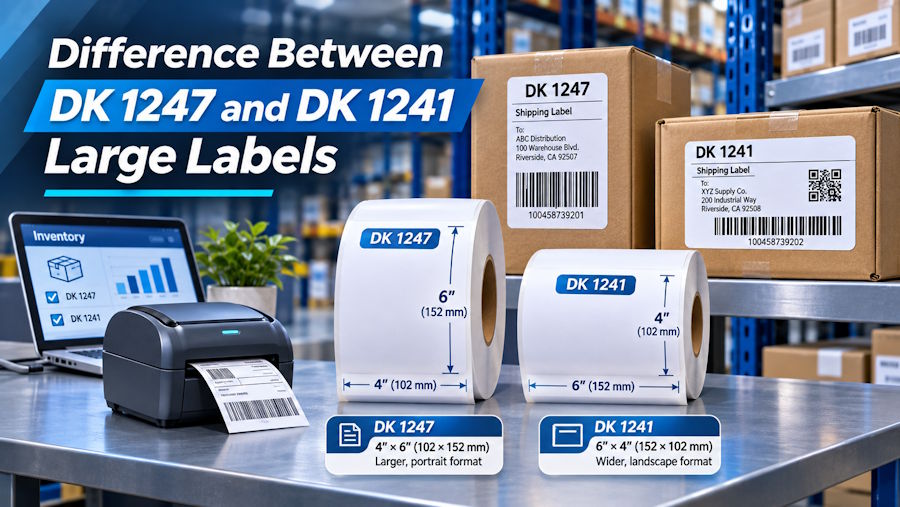
DK-1241 and DK-1247 are both large die-cut formats, but they do not have identical dimensions. DK-1241 is commonly listed as 4 by 6 inches. The Betckey DK-1247 compatible product is listed as 4.07 by 6.4 inches. That extra area may be useful for a large internal label, but it is not a reason to assume that a standard 4 by 6-inch carrier design will automatically align. Check the exact roll, printer, and exported page size before buying.
Start with the physical label, not the model number
Put the two dimensions next to the specifications from your shipping platform. A 4 by 6-inch PDF is designed for a 4 by 6-inch page. Printing it on a larger die-cut sheet may leave extra white space or change placement if the software centers the image. Whether that matters depends on the carrier's required margins and your printer settings. For an internal inventory, pallet, or receiving label, the larger DK-1247 canvas may be welcome because you control the design.
Product names can also be confusing because different markets and resellers sometimes describe DK-1247 dimensions differently. Measure a sample if the dimensions are critical. Do not order thousands of labels based solely on a product photo. The most reliable comparison records the size printed on the exact product listing, the measured label from a sample roll, and the selected software template.
Check the printer before evaluating the layout
Both formats are around four inches wide and require a QL printer that accepts wide DK media. A narrow QL model cannot be made compatible by shrinking the artwork. Compare the printer's full model number against the supported media list. Then check whether the roll and cartridge frame load without pressure. A physically supported roll should feed smoothly and be recognized by the printer when the matching media profile is selected.
If the printer shows a roll mismatch, verify the template before trying to print. A DK-1241 profile can produce a different expected length from a DK-1247 profile. Do not silence the error by selecting a random continuous-media setting. That can hide the problem until labels are cut incorrectly or a barcode runs into the edge.
Decide what the extra space is for
For a carrier-issued 4 by 6-inch label, start with DK-1241 when the printer and carrier support it. Preserve the carrier's scale and required layout. For a warehouse label that needs a large item name, a wide barcode, a location code, and a handling note, DK-1247 may give you more room. Use that room deliberately: enlarge the most important field or separate a barcode from text. Do not simply add decorative copy that makes workers search longer for the identifying data.
Build the internal layout at actual size, then print several real records. Include the longest SKU, largest quantity, and a barcode with the most characters your system can generate. Scan at the intended distance and angle. Apply the sample to a box or tote with the same surface and curvature as the production item. Check whether the full sheet remains flat after a normal handling cycle.
Why do product listings show different DK 1247 measurements
Descriptions may be rounded, region-specific, or based on a compatible product rather than an original Brother roll. When a few millimeters affect layout, treat the exact SKU in hand as the authority for physical dimensions. Ask for or buy a sample, measure several labels with a ruler, and compare the results to the selected software media profile. Keep the product page or packaging description with your setup notes. If the source data is a carrier-issued label, defer to the carrier's required size even when a reseller describes a larger roll as a shipping label.
Can a standard 4 by 6 label be placed on the larger sheet
It may print, but the blank area and positioning depend on software settings. That is not proof that the label is appropriate for every carrier or scanner. Print at actual size, not fit-to-page, and verify that the barcode remains at the intended scale with a clear quiet zone. Check whether the extra area causes the label to overlap a carton seam or cover other markings. If the workflow consistently uses a standard 4 by 6 file, DK-1241 or another exact-size format may be simpler.
What should a buyer record for repeat orders
Keep the printer model, roll dimensions, labels per roll, cartridge-frame arrangement, software profile, and successful test template together in a short purchasing specification. Record whether the label is for official carrier output or internal warehouse use. A purchasing team that sees only the DK number can unintentionally swap formats that appear close but behave differently. A small sample print attached to the specification makes the distinction easier for operators, procurement staff, and future vendors to understand.
Example with a warehouse identification label
A receiving team wants to print item number, purchase order, storage zone, and a barcode on a carton. The standard 4 by 6-inch DK-1241 layout fits but puts the storage zone in small type. A DK-1247-sized internal label may give enough extra height to enlarge that field. Test the carton first: the larger sheet may overlap a seam on a narrow box. If the box is broad and flat, the bigger label may help. If it is small or irregular, reorganize the 4 by 6 layout instead. This example illustrates why the larger format is useful only when its additional area solves a verified reading problem and can be applied cleanly.
Troubleshooting after the first print
If the image is smaller than expected, inspect PDF scaling and media selection. If the image is correctly sized but off center, compare the document's page dimensions with the roll rather than adding arbitrary margins. If the roll jams, inspect the loading path and cartridge frame; repeated feed problems are not solved by a different font. If barcodes print with streaks, clean the printhead according to the printer manual and retest with a known-good file.
DK-1247 large shipping labels listing specifies a 4.07 by 6.4-inch compatible format with 180 labels per roll. Compare that with the exact requirements of your printer and software. A broader direct thermal labels range can help you see whether a standard 4 by 6-inch size or a larger custom workflow is the better match.

