

Two portraits sit in a project folder, and the demo still has no clip. An AI Rap Video Generator only helps when the button shows the price before you generate.
The miss that actually costs time is a render whose charge shows up later, in some other dashboard, with no duration written on it. RAPVID keeps that charge on the generate button, beside the length you just picked, so you can read it the way you read a return value. The old shape of this job is a second account, an API key, a price page in another tab, and a bill that arrives without the duration you thought you selected. Someone then spends an afternoon matching the invoice to the clip. The button collapses that chase into one line you can reject before any file exists.
Read The Dollar Amount On The Button
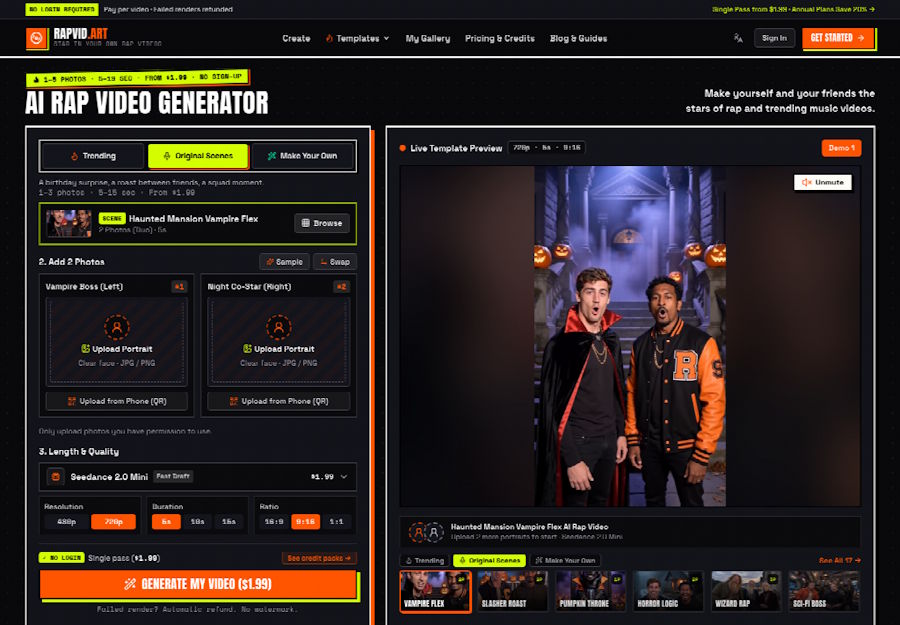
A check of the public studio is enough to see the contract, and it does not require an order. An original scene was already loaded. The chip said Seedance 2.0 Mini and marked it Fast Draft. Resolution sat on 720p, duration sat on 5s, and the ratio sat on 9:16. The button read GENERATE MY VIDEO ($1.99). A single pass at that price does not ask you to sign in. Nothing was generated. The reading stopped at the number, because the number was the question.
That is a better demo note than a slogan about speed. If a teammate asks what the clip will cost, you can point at the button for the setting that is actually selected. You do not have to promise a rate you found in a blog post last month. The control is the rate, for this chip, at this length.
Five Seconds Opens On The Draft Price
Five seconds at that setting is the draft a short demo can afford. The studio calls the no-login purchase a single pass, and the pass on screen was $1.99. Under the button, a failed render is refunded and the download is described as an MP4 with no watermark. Those lines matter after you pay. Before that, the line that belongs in the ticket is the price itself.
If the demo is a vertical clip for a README or a product page, 9:16 is already the shape selected on the control. You can leave it there and say so in the note. You do not invent a later crop and pretend the button covered a different frame. The check is boring on purpose. Boring is how a price stays attached to the thing you meant to buy.
Ten Seconds Rewrites The Same Chip
Clicking the 10s control changed the chip and the button together. Seedance 2.0 Mini still said Fast Draft, and both places moved from $1.99 to $2.99. Clicking 5s again put the button back to $1.99. Duration is not a cosmetic label. It rewrites the charge before a portrait is uploaded. A note that still says $1.99 after someone leaves the control on 10s is the wrong cost.
The check did not place an order, so this is not a claim about how the frames look. It is a claim about the control. If the demo needs the extra seconds, approve $2.99. If it does not, put the control back and approve $1.99. Either note is fine. A note that ignores the click is not.
| What was selected | What the button showed |
|---|---|
| Seedance 2.0 Mini, 720p, 5s, scene already loaded | GENERATE MY VIDEO ($1.99) |
| Same chip after clicking 10s | GENERATE MY VIDEO ($2.99) |
| Same chip after clicking 5s again | GENERATE MY VIDEO ($1.99) |
Keep the note next to the setting you actually clicked. The movement above was read on Mini at 720p, on the scene the studio had loaded. Another engine can show another number. That is why the button has to be read again after every change, instead of copied forward as a house rate.
Count Faces Against The Upload Slots
The loaded scene was Haunted Mansion Vampire Flex, marked as two photos and five seconds. It opened two slots, not one shared box. The left slot was labeled Vampire Boss. The right slot was labeled Night Co-Star. Each slot asked for one portrait, JPG or PNG, with a clear face. Under the slots, the studio says to upload only photos you have permission to use. A demo that uses a coworker's face needs that yes before the file is chosen.
Slot count is part of the same contract as the price. A two-person joke with one file is a different request from the scene you think you selected. The button can still show $1.99 while the cast is wrong. Read both.
The Duo Scene Names Left And Right
Left and right are roles, not a crop tool. If the clip is a duo, one slot per person is the difference between two performers and a smear. A group photo dropped into a single slot hands the scene several faces where it expected one. The page is plain about that mistake, and it is the kind of mistake that survives a perfect price note.
Each slot also offers a phone QR upload, for the case where the portrait is on a phone and the browser is on a laptop. The price reading above did not need that scan. The slot count still did. Two people means two files, even when both files are already on the machine in front of you. Name the files the way the slots are named, left and right, so the next person does not swap the cast while fixing the upload.
A swapped cast is a quiet failure. The button still says $1.99, the duration is still 5s, and the preview will still move. What changed is who is wearing which role. In a demo review that is the bug people argue about, because the price looks approved and the faces do not. Write "left: Vampire Boss, file A" in the same note as the dollar amount. The price and the cast are one record. Splitting them across a chat message and a folder is how the wrong face survives the review.
Steps That Keep The Price Honest
Treat the studio like a call you are about to make. Write the arguments down before you fire it. Generating is the paid step, and the button already says so. Stopping before that step is a real result when the only question was the cost.
- Read the active mode. This check started on an original scene, not on a blank prompt, and the scene name belongs in the note.
- Count the upload slots and match them to people. The vampire scene wanted two portraits, one for each named role.
- Read the chip, the duration, and the button together. If you change 5s to 10s, read the button again before you copy the number.
RAPVID is useful here because the stop is still informative. You do not have to buy the pass to learn what the pass will be. You have to look. A ticket that says "rap clip, about two dollars" is weaker than a ticket that says "Mini, 720p, 5s, 9:16, $1.99, two slots." The second ticket can be checked by anyone who opens the same scene.
The Chip Names The Engine You Are Buying
The chip is not decoration beside the price. On the loaded scene it named Seedance 2.0 Mini and priced that choice as Fast Draft. RAPVID uses the chip to say which engine the button is about to charge. If Mini is the chip on screen, the $1.99 or $2.99 you just read belongs to Mini at that duration. You do not need a tour of every other engine to approve this one demo.
Opening RapVid and staying on the scene you already picked is the whole move. You are confirming one chip and one button. Switching mode can switch the recommended chip, and that new chip can carry a different price. Leave that reading for the job that actually needs the other mode. Pasting it into this demo's note, as if it were the same call, is how two people approve two different purchases and think they agreed.
There is a temptation to screenshot every engine "for the wiki" before the demo is even scoped. That gallery goes stale the moment the button moves, and it trains the team to quote a list instead of the control. One chip, one duration, one button, written beside the scene name, is a record a reviewer can recheck in a minute. A table of engines you did not select is a different article, and it does not belong in the pull request that only needed a five-second clip.
Write Down The Price Next To The File
The costly miss is small, which is why it ships. Someone clicks 10s to see if the demo has room to breathe. The button moves to $2.99. The ticket still says $1.99, because that was the number at first glance. If the clip is generated later, it is a different purchase from the one that was approved. The check exists so the note and the button stay the same number.
There is a second miss that has nothing to do with the dollar amount. A covered mouth, or a screenshot with text across the face, gives the render less of a jaw to move. If the still is wrong, do not spend the pass to discover it. Fix the portrait, then come back and read the button again. You cannot treat a blocked face as a problem the duration control will solve, and you should not pay $1.99 to learn what the upload hint already says.
Hand The Demo Off With The Price Attached
RAPVID fits a developer who already has the portraits and would rather read a button than stand up a render service. For a short demo, write the mode, the chip, the duration, and the button price next to the task. Generate only if that note is the one you meant to approve.
It is a poor fit when the job is a long edit of shots you still have to film, or when nobody can say yes to the faces in the slots. Those are different projects. For the folder that already holds two clear portraits, the honest path is the number on the button, copied while it is still true.

