

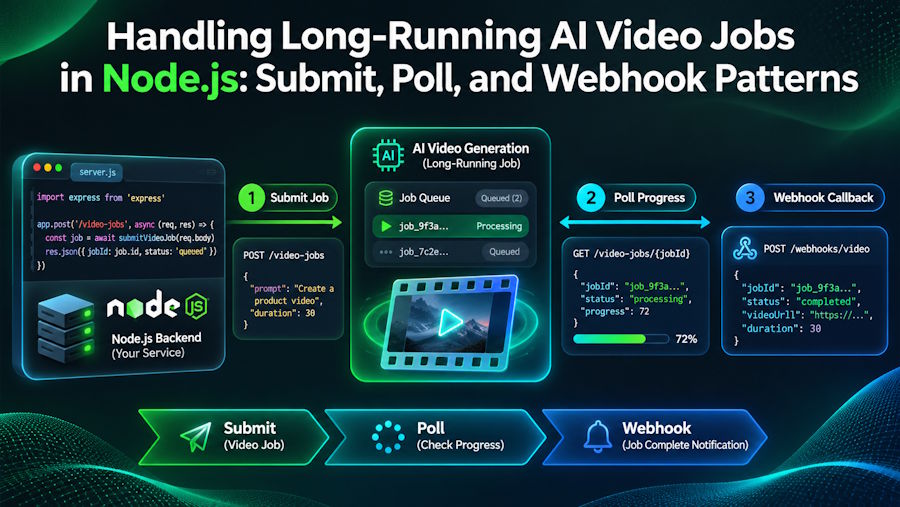
Generating an image with an AI model usually takes a few seconds. Generating a video can take minutes. That difference changes how you have to build the integration. You cannot keep an HTTP request open while a model renders a 10-second clip, and you should not make users stare at a spinner tied to a single request that might time out.
Nearly every AI video API solves this in the same way: you submit a job, receive a task ID immediately, and collect the result later. This tutorial shows how to handle that lifecycle in Node.js using three patterns: submitting, polling with backoff, and receiving signed webhooks. The examples use a real API so the field names are concrete, but the patterns apply to any asynchronous generation service.
All code targets Node.js 18 or later, which includes fetch natively.
The job lifecycle
The examples use PoYo's unified generation API, where every image, video, and audio model shares the same two endpoints:
- POST /api/generate/submit creates a job and returns a task_id.
- GET /api/generate/status/{task_id} returns the job's current state.
A task moves through four states: not_started, running, finished, and failed. According to the provider's documentation, videos typically take 90 to 300 seconds. Design for the slow end of that range, not the average.
Step 1: Submit the job
The model used here is ByteDance's Seedance 2.5 video model, called through the PoYo Seedance 2.5 API. It accepts a prompt, a duration in seconds, and a resolution.
const API = 'https://api.poyo.ai/api/generate';

const headers = {
  Authorization: `Bearer ${process.env.POYO_API_KEY}`,
  'Content-Type': 'application/json',
};

async function submitVideo(prompt) {
  const res = await fetch(`${API}/submit`, {
    method: 'POST',
    headers,
    body: JSON.stringify({
      model: 'seedance-2.5',
      callback_url: 'https://your-app.example.com/webhooks/video',
      input: { prompt, duration: 5, resolution: '720p', aspect_ratio: '16:9' },
    }),
  });

  const body = await res.json();
  // Some validation errors return HTTP 200 with an error code in the body,
  // so check both.
  if (!res.ok || body.code !== 200) {
    throw new Error(`Submit failed: ${body.error?.message ?? res.status}`);
  }

  return body.data.task_id;
}
Two details matter here. First, save the task_id to your database before doing anything else; it is the only handle you have on the job. Second, check the code field in the body, not just the HTTP status, because a 200 response can still contain a validation error.
Step 2: Poll with backoff and a deadline
Polling is the simplest way to get a result, and you need it even if you also use webhooks (see Step 4). A good polling loop does three things: it waits between requests, it backs off when the server says it is busy, and it gives up after a deadline.
const sleep = (ms) => new Promise((resolve) => setTimeout(resolve, ms));

async function waitForTask(taskId, { timeoutMs = 10 * 60_000 } = {}) {
  const deadline = Date.now() + timeoutMs;
  let delay = 5_000;

  while (Date.now() < deadline) {
    await sleep(delay);
    const res = await fetch(`${API}/status/${taskId}`, { headers });

    // Rate limited or server error: back off exponentially, up to one minute.
    if (res.status === 429 || res.status >= 500) {
      delay = Math.min(delay * 2, 60_000);
      continue;
    }
    if (!res.ok) throw new Error(`Status check failed: HTTP ${res.status}`);

    const { data } = await res.json();
    if (data.status === 'finished') return data.files; // [{ file_url, file_type }]
    if (data.status === 'failed') throw new Error(data.error_message);
    delay = 5_000; // still running: keep a steady interval
  }
  throw new Error(`Task ${taskId} did not finish within ${timeoutMs / 1000}s`);
}
A five-second interval is a reasonable default for video. Polling every 500 milliseconds will not make the model render any faster; it only uses up your rate limit.
Step 3: Receive and verify webhooks
Polling from a web server process works for a script, but in production you usually want the provider to call you when the job is done. If you include callback_url in the submit request, the API sends a POST request to that URL when the task finishes or fails.
Never trust a webhook just because it reached the right URL. Once you create a webhook signing key in the dashboard, this API signs each callback with an HMAC: the signature is base64(HMAC-SHA256(task_id + "." + timestamp, secret)), sent with the X-Webhook-Signature and X-Webhook-Timestamp headers.
import crypto from 'node:crypto';
import express from 'express';

const app = express();

function isValidSignature(taskId, timestamp, signature, secret) {
  const ts = Number(timestamp);
  // Reject missing or stale timestamps (more than 5 minutes off) to block replays.
  if (!Number.isFinite(ts) || Math.abs(Date.now() / 1000 - ts) > 300) return false;

  const expected = crypto
    .createHmac('sha256', secret)
    .update(`${taskId}.${timestamp}`)
    .digest('base64');
  const a = Buffer.from(expected);
  const b = Buffer.from(signature ?? '');
  return a.length === b.length && crypto.timingSafeEqual(a, b);
}

app.post('/webhooks/video', express.json(), (req, res) => {
  const { task_id } = req.body;
  const valid = isValidSignature(
    task_id,
    req.get('X-Webhook-Timestamp'),
    req.get('X-Webhook-Signature'),
    process.env.POYO_WEBHOOK_SECRET,
  );
  if (!valid) return res.status(401).end();

  // Acknowledge first, then do the slow work outside the request.
  res.status(200).json({ received: true });
  handleResult(req.body).catch(console.error);
});
Three habits keep webhook handlers reliable:
- Respond quickly. This provider expects a 2xx response within 30 seconds. Downloading a video inside the handler can easily take longer than that.
- Be idempotent. Retries mean the same task can arrive more than once. In handleResult, check whether the task_id has already been processed before acting on it.
- Use a constant-time comparison. crypto.timingSafeEqual prevents timing attacks that a plain === comparison allows.
Step 4: Use both, not one or the other
Webhooks are efficient, but they are not guaranteed. Your server might be down during a deploy, and this provider stops after five retries. The robust pattern is to treat webhooks as the fast path and polling as a safety net:
- On submit, store the task as pending with a timestamp.
- When a valid webhook arrives, mark the task finished or failed.
- Every few minutes, a background job finds tasks that have been pending longer than expected and calls waitForTask() or a single status check for each one.
This reconciliation job turns lost webhooks from a support ticket into a short delay.
Step 5: Copy the output to your own storage
Generated file URLs from most AI APIs are temporary. When a task finishes, download the file from file_url and upload it to your own bucket (S3, R2, GCS, or similar) before you show it to users or save the link. Store your own URL, not the provider's.
Cost guardrails
Video generation is billed by the second, so add limits in code rather than relying on good intentions. Cap duration and resolution per user plan, handle 402 (insufficient credits) explicitly so users see a clear message, and log the credits used per task, which the status response reports. It also helps to know your provider's failure policy; PoYo, for example, does not charge for failed tasks, so retrying a failed job does not cost you twice.
Wrapping up
Long-running AI jobs are a queueing problem, not a model problem. Submit quickly, store the task ID, verify every webhook, poll as a backup, and move the output to storage you control. With those pieces in place, switching to a different video model is mostly a matter of changing the model string and its input parameters.

