

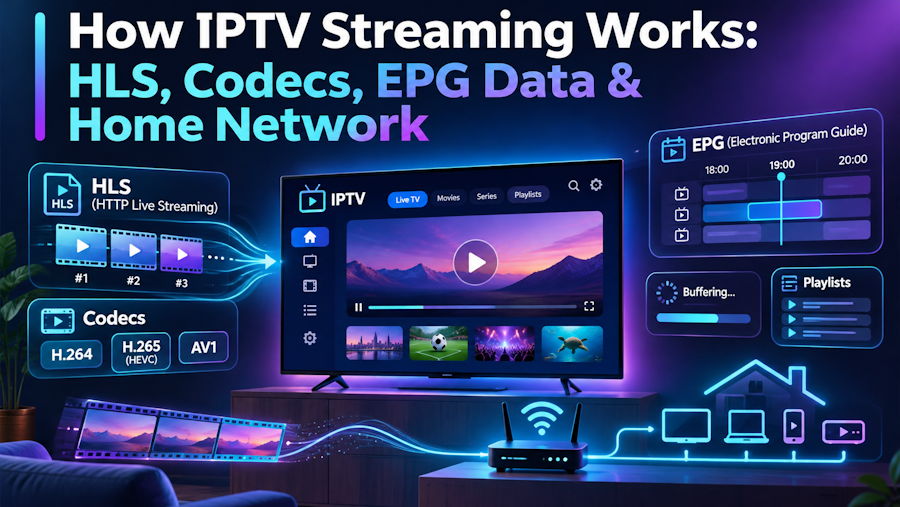
For most viewers, IPTV is simple: open an app, pick a channel, press play. Behind that button, though, is a chain of well-known web technologies working together: HTTP delivery, segmented video, modern codecs, XML programme data and a home network that has to keep up. If you are a developer, understanding that chain explains almost every “why is it buffering?” question you will ever hear from friends and family.
This article walks through the pipeline from the server to the screen and points out where things usually go wrong.
1. Delivery: streams are just HTTP
Modern IPTV services deliver video over plain HTTP or HTTPS rather than the multicast networks used by traditional cable operators. That makes the stream behave like any other web resource: it passes through CDNs, it can be cached, and it works on any device with a network connection.
Two container formats dominate:
- MPEG-TS (.ts): a continuous transport stream, originally designed for broadcast. It is robust and widely supported, which is why many set-top boxes still prefer it.
- HLS (HTTP Live Streaming): the stream is cut into short segments, usually 2 to 10 seconds long, listed in an .m3u8 playlist that the player refreshes continuously.
A minimal HLS media playlist looks like this:
#EXTM3U
#EXT-X-VERSION:3
#EXT-X-TARGETDURATION:6
#EXT-X-MEDIA-SEQUENCE:2041
#EXTINF:6.0,
segment_2041.ts
#EXTINF:6.0,
segment_2042.ts
The player downloads segments one by one and keeps a few seconds in a buffer. If the next segment does not arrive before the buffer empties, playback stops. That pause is what users call buffering. This guide to fixing IPTV buffering shows how the same logic translates into practical steps for viewers.
2. Adaptive bitrate: one channel, several qualities
A master playlist can list several versions of the same stream at different resolutions and bitrates. The player measures how fast segments arrive and switches between them on the fly. On a congested connection it drops from 1080p to 720p instead of freezing.
Not every IPTV player implements adaptive switching well. Many apps let the user force a quality, which is fine on a stable wired connection but causes stalls on weak Wi-Fi. When troubleshooting, a quick test is to choose a lower-quality variant of the same channel and see whether the stalls disappear.
3. Codecs: H.264 versus H.265
Inside the container, video is compressed with a codec. Two matter most for IPTV:
- H.264 (AVC): supported by practically every device made in the last decade, with very cheap hardware decoding.
- H.265 (HEVC): roughly the same picture quality at a much lower bitrate, which makes it common for 4K streams. It needs newer hardware to decode efficiently.
Players usually offer a hardware or software decoder option. The hardware decoder uses the device’s video chip and is efficient, but it can fail on unusual stream parameters. The software decoder is more tolerant but works the CPU much harder. A black screen with working audio is very often a decoder mismatch, and switching the option in the player settings fixes it.
4. Playlists and logins: M3U and the Xtream Codes API
Providers give users access in one of two common ways.
The first is an M3U playlist: a text file where each entry pairs metadata with a stream URL.
#EXTM3U
#EXTINF:-1 tvg-id="news.example" group-title="News",Example News
http://host:8080/live/user/pass/1001.ts
The second is an Xtream Codes-style API: the player sends a server URL, username and password, and receives JSON describing live categories, video on demand and series. This is why most modern players ask for those three fields instead of a single link. It also explains a classic support issue: a missing port or http:// prefix in the server field breaks authentication entirely.
5. The TV guide: XMLTV under the hood
The electronic programme guide (EPG) is usually delivered as XMLTV, an XML format that lists channels and their programmes with start and stop times:
<programme start="20261114200000 +0000"
           stop="20261114210000 +0000"
           channel="news.example">
  <title>Evening Bulletin</title>
</programme>
The player joins EPG entries to channels through the tvg-id attribute. Two common bugs follow from that design. Blank guide rows mean the IDs do not match. A guide that is accurate but shifted by one hour is a timezone offset problem, usually fixed with a time-shift setting in the player rather than on the server. A step-by-step EPG setup guide walks through both fixes.
6. The weakest link: the home network
Most playback problems happen in the last few metres, not on the provider’s servers. A few practical numbers and habits help:
- Plan for roughly 10 to 15 Mbps per HD stream and about 25 Mbps or more for 4K, sustained rather than peak.
- Prefer Ethernet for the main TV. On Wi-Fi, use the 5 GHz band when the device is close to the router.
- Test speed in the evening, when shared networks are busiest, rather than in the morning.
- Cheap streaming sticks with little RAM struggle with large playlists; clearing the app cache often helps.
Providers increasingly document these issues for non-technical users. For example, Eagle IPTV publishes setup guides and a plain-language glossary that translate terms like M3U, EPG and decoder into everyday advice. That kind of documentation shows how much of IPTV support is really network and client troubleshooting.
Conclusion
IPTV is a good example of web standards being pushed into the living room. HTTP delivers the bytes, HLS and MPEG-TS package them, H.264 and H.265 compress them, M3U and JSON APIs describe them, and XMLTV tells the user what is on. When something breaks, the cause is usually one of those layers, and most often the network between the router and the screen. Knowing the stack turns a vague “it keeps freezing” into a short checklist you can work through in minutes.

