

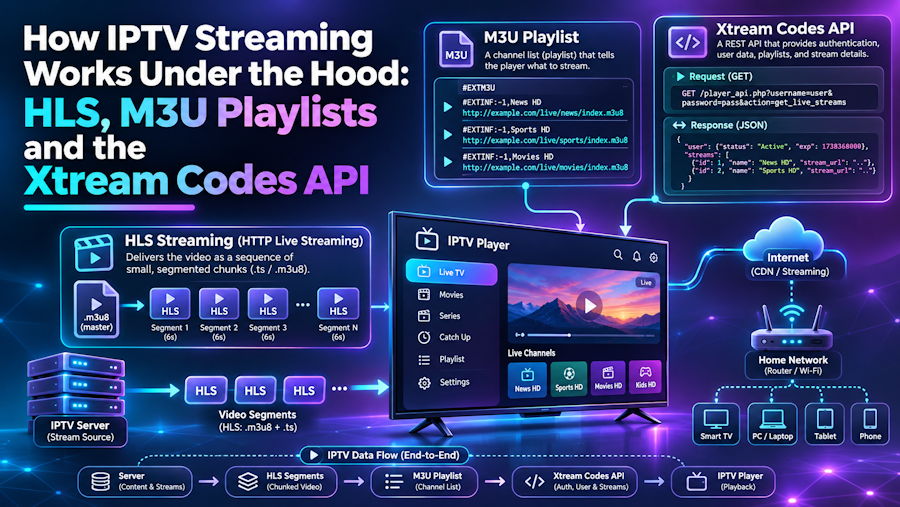
To a viewer, internet TV is a list of channels and a play button. To a developer, it is a small stack of well-documented formats working together: a playlist that describes what is available, a streaming protocol that delivers video in pieces, an API that handles accounts and categories, and an XML file that tells the player what is on next. Once you see how these parts fit, most playback problems become much easier to reason about.
HLS: video delivered in small pieces
Most IPTV streams today use HTTP Live Streaming (HLS). Instead of sending one continuous file, the server splits video into short segments, typically a few seconds each, and publishes a playlist that lists them in order. The player downloads the playlist, fetches the segments over plain HTTP and plays them back to back.
For live channels, that playlist is refreshed constantly. New segments are appended and old ones drop off, so the player keeps polling and always stays near the live edge. A simplified media playlist looks like this:
#EXTM3U
#EXT-X-VERSION:3
#EXT-X-TARGETDURATION:6
#EXT-X-MEDIA-SEQUENCE:48210
#EXTINF:6.0,
segment48210.ts
#EXTINF:6.0,
segment48211.ts
Because everything travels over standard HTTP, HLS works through ordinary firewalls and content delivery networks, which is a big reason it became the default for both on-demand and live video.
Adaptive bitrate: one channel, several qualities
A single channel is usually encoded at several bitrates. A master playlist points to one media playlist per quality level, each tagged with its bandwidth and resolution. The player measures how quickly segments arrive and switches between levels on the fly. When the connection dips, it steps down instead of stalling; when bandwidth recovers, it climbs back up.
#EXTM3U
#EXT-X-STREAM-INF:BANDWIDTH=3000000,RESOLUTION=1280x720
720p/index.m3u8
#EXT-X-STREAM-INF:BANDWIDTH=8000000,RESOLUTION=1920x1080
1080p/index.m3u8
This is also why bandwidth planning matters at home. Every simultaneous stream needs its own share of the connection, and the player will only hold the top quality level if the throughput reaching the device stays above that level's requirement. A practical breakdown of the bandwidth needed per stream for HD and 4K is a useful reference when diagnosing quality drops.
M3U playlists: the channel list
Above the HLS layer sits the channel list, usually an extended M3U file. Each entry carries metadata in the #EXTINF line, such as a channel ID used to match guide data, a logo URL and a group title used for categories, followed by the stream URL:
#EXTM3U
#EXTINF:-1 tvg-id="news.example" tvg-logo="https://example.com/logo.png" group-title="News",Example News
https://stream.example.com/live/news/index.m3u8
Players parse these attributes to build their menus. The format is simple and human-readable, but a static M3U file has one limitation: if the provider adds or renames channels, the user may need to reload or re-import the playlist.
The Xtream Codes API: accounts and categories over JSON
Many IPTV players also support the Xtream Codes API style of login, where the user enters a server URL, a username and a password instead of a playlist link. The player then calls HTTP endpoints that return JSON: account status and expiry, live categories, the streams in each category, video-on-demand libraries and series with seasons and episodes.
For developers, the appeal is structure. Categories, catch-up availability and on-demand metadata come back as typed fields rather than text inside a playlist, so the player can refresh the catalogue automatically and present richer menus. For users, it usually means fewer manual updates. This comparison of M3U and Xtream Codes logins goes through the practical differences from the viewer's side.
EPG: the programme guide in XMLTV
The electronic programme guide is usually delivered as an XMLTV file. It lists channels and their programmes with start and stop times, titles and descriptions. The player matches each guide channel to a stream using the tvg-id attribute from the M3U entry. When the guide shows the wrong programme or nothing at all, a mismatched ID or a time-zone offset is the usual cause, not the stream itself.
Where playback problems really come from
Knowing the stack makes troubleshooting more systematic:
- Playlist loads but nothing plays: check that the stream URL is reachable from the device and that the player supports the codec.
- Picture keeps dropping to low quality: adaptive bitrate is reacting to limited throughput at the device; test speed there, not at the router.
- Regular freezes every few seconds: segments are arriving slower than they play; look at Wi-Fi band, interference and other traffic on the network.
- Guide is empty or shifted: compare tvg-id values and the time-zone setting in the player.
- Login works but categories are missing: the API response may be cached; refresh the account or clear the player's cache.
Conclusion
IPTV is not a single technology but a combination of open, well-understood formats. HLS moves the video, adaptive bitrate keeps it playing, M3U or the Xtream Codes API describes what is available, and XMLTV fills in the guide. Services such as strngiptv.com build on this same stack, and for anyone writing a player, debugging a home setup or simply curious about what happens after pressing play, understanding these layers turns a black box into a set of problems you can actually solve.

