

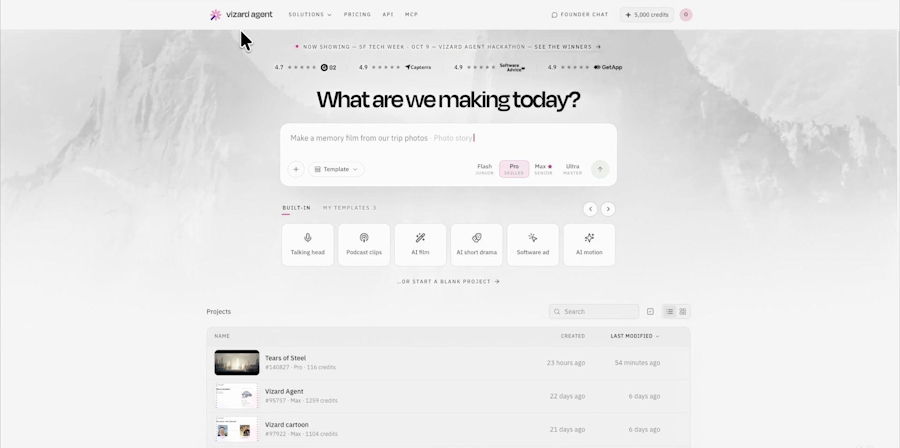
One AI Tool Handle Product Ads, Tutorials, and Promo Videos: Vizard Agent for SaaS Teams and Indie Developers
Building a software product is only half the work. Once the product is ready, developers still need to explain what it does, demonstrate how it works, and convince potential customers to give it a try. For small SaaS teams and independent developers, producing all these videos can be challenging without a dedicated marketing team or professional video editor. This is where AI video creation tools become worth considering.
We are a small team of SaaS marketing specialists with hands-on experience in software promotion, product content strategy, and digital marketing for early-stage businesses. When serving our clients, we are also willing to share useful SaaS tools with them. Today's review is going to share our experiences with Vizard Agent from the perspective of a SaaS marketing team and an independent developer. The evaluation focused on three practical workflows: Software Ad, Software Tutorial, and Promo Video, which cover different stages of software marketing, from attracting potential users to explaining product features and introducing the overall product.
What is Vizard Agent and What We Looked At
Vizard Agent is an AI-powered video creation and editing tool that allows users to turn product information, website links, screen recordings, and other existing materials into videos through conversational instructions. Instead of manually building every video from an editing timeline, users can describe their desired outcome and let the Agent handle much of the production process. Based on it, we organized the evaluation around three practical questions:
- Turning Product Information into Ads: Can Vizard Agent turn an existing product page or app link into a short advertisement that communicates the product's main value?
- Making Software Tutorials Easier to Follow: Can it transform screen recordings into clear, structured tutorials that demonstrate how the software works?
- From Existing Materials to Promotional Videos: Can it combine website information and existing footage to create a broader product introduction without starting from scratch?
1. Software Ad: Turn a Product Link into a Focused Advertisement
The first mode we used most is Software Ad. This is the function that we found Vizard Agent to be particularly outstanding when comparing it with other SaaS software tools. The Software Ad workflow is designed to turn software-related information, such as a product page or app link, into short promotional advertisements. Its main value is reducing the preparation required for product promotion. Instead of manually collecting product details, planning every scene, and building an advertisement from scratch, users can provide an existing product link and describe the message they want to communicate.
Example 1: Creating a Launch Ad for a Productivity App: An independent developer preparing to launch a productivity app already had a live product website, a feature description, and several screenshots showing its task management and project organization functions. Rather than preparing a video storyboard and editing the footage manually, the developer submitted the product link to Vizard Agent with a short instruction to create an advertisement for the app's launch on TikTok and Instagram Reels. Vizard Agent used the available product information to build an initial advertisement highlighting the app's main functions and intended benefits. The resulting output included 4 videos, each approximately 30 seconds long, in a vertical format suitable for short-form social media. The videos introduced the product, presented its key features, and connected them to everyday productivity needs. They also communicated one clear reason to try the app. The developer still needed to review the product descriptions, feature claims, and closing message before publication. Nevertheless, using the product link as the starting point reduced the amount of manual preparation required to produce an initial launch advertisement.
2. Software Tutorial: Turn Screen Recordings into Practical Walkthroughs
Tutorial is another important need for SaaS Teams and Indie Developers. The Software Tutorial workflow helps users transform raw screen recordings into structured instructional videos. It can improve the viewing experience by zooming in on important clicks, removing unnecessary waiting periods, and adding step labels and captions. It provides a practical way to create product demonstrations, feature guides, and onboarding materials from recordings they already have. It can also reduce the editing work involved in explaining software operations to new users.
Example 2: Creating a Feature Tutorial from a Software Demonstration: We have a small SaaS team that had recently introduced a new project management feature and needed a short tutorial to help existing customers understand how to use it. The team provided Vizard Agent with a screen recording of the complete operation, covering how to access the feature, create a new project, assign tasks, and track progress. The instruction was to turn the recording into a concise walkthrough that first-time users could follow. Using the Software Tutorial workflow, Vizard Agent helped structure the recording into a more accessible demonstration. It zoomed in on important clicks, removed unnecessary waiting periods, and added step labels and captions to guide viewers through the process. The final output consisted of 2 tutorial videos, with durations ranging from 2 to 5 minutes.
A tutorial needs to preserve the actual sequence of operations. The team therefore had to check that the displayed interface, button labels, and instructions matched the current software version. With that review in place, Vizard Agent provided a way to turn an existing product demonstration into instructional content without manually editing every section.
3. Promo Video: Build a Product Introduction from Existing Materials
The last one we want to share is the Promo Video workflow. It is intended for creating broader product introductions using existing resources, such as a company website or previously recorded footage. Unlike a short advertisement that focuses on one selling point, a promotional video can explain what a product does, who it is designed for, and why potential customers might find it useful. This makes the workflow relevant to product launches, landing pages, and general brand communication, particularly for businesses that want to reuse existing materials instead of starting a new production project.
Example 3: Preparing a Product Introduction for a SaaS Launch: A small software company was preparing to introduce its product to a wider audience but did not have a dedicated video production team. It already had a product website, written descriptions of its main features, and several existing recordings showing the software in use. The team provided these materials to Vizard Agent and requested a promotional video that would introduce the product, explain its main value, and encourage potential customers to visit the website. Unlike a Software Ad, which focuses on a specific selling point, the Promo Video workflow was used to create a broader product introduction. Vizard Agent drew on the available website information and footage to organize the content into a presentation of the product's purpose, key functions, and potential use cases. It generated 5 promotional landscape videos within 2 minutes for use on the company website and 2 portrait videos for social media.
How Do the Three Workflows Fit Together?
One interesting aspect of Vizard Agent is that the three workflows address different stages of the same software marketing process. A product advertisement helps attract attention, a tutorial demonstrates practical functionality, and a promotional video provides a broader introduction. Together, they offer a more complete approach than simply generating several similar promotional clips. The important point is that the same source material can support different communication goals. For teams that regularly release software updates, this approach could make video production easier to organize. Instead of treating every video as a completely separate production project, they can reuse reliable product information and existing recordings while adjusting the instructions for each purpose.
Why Can Vizard Agent Be Useful for Indie Developers?
Independent developers often have to manage several responsibilities at once. Product development, customer support, website maintenance, and marketing may all depend on the same person. Hiring a professional editor for every product update is not always practical. At the same time, learning a complete video editing workflow can take considerable time. Vizard Agent offers a potentially more accessible starting point. Users can work with materials they already have, including product links, website information, and screen recordings, rather than preparing every visual element independently.
Its three software workflows also cover different content requirements. An indie developer can use an advertisement to introduce a new application, a tutorial to demonstrate its main features, and a promotional video to provide more context on the product website. This does not mean that every generated video will be ready for publication without revision. However, it may reduce the amount of manual preparation needed to produce an initial version. For someone developing and marketing a product independently, that can be a meaningful advantage.
5 Points Still Require Human Review
Vizard Agent can help organize different stages of video production, but automation does not replace product knowledge or marketing judgment. Based on the three workflows, we believe there are several areas that still require attention for people who know the product best:
- Product accuracy. Product descriptions, feature names, interface elements, and screenshots must reflect the actual software. A promotional video should never imply that an application offers functionality that does not exist.
- Tutorial accuracy. Step-by-step demonstrations need to match the current version of the software. Developers should check that the correct buttons, actions, and operation sequences are shown.
- Marketing message. Automatically generated advertisements may not always emphasize the feature that the team considers most important. The opening, key selling points, and final call to action should be reviewed before publication.
- Audience relevance. A technical explanation suitable for existing users may not work for potential customers. The marketing team still needs to decide what information the intended audience actually needs.
- Brand consistency. Product visuals, terminology, logos, and overall presentation should remain consistent across different videos, especially when several assets are produced for the same launch campaign.
Who Should Consider Vizard Agent?
Based on these use cases, we found that Vizard Agent may be particularly relevant to the following groups:
| User Type | Suitable Workflows | What They Can Do |
|---|---|---|
| Independent developers | Software Ad, Software Tutorial, Promo Video | Create launch advertisements, demonstrate app functionality, and introduce products without a dedicated marketing team |
| Small SaaS companies | All three workflows | Produce different video assets for product launches, feature updates, and customer acquisition |
| SaaS marketing teams | Software Ad, Promo Video | Turn existing product information into promotional content for websites and social media |
| Product and customer support teams | Software Tutorial | Create clearer product walkthroughs and feature demonstrations for users |
| Early-stage startups | All three workflows | Make better use of existing websites, product information, and screen recordings when marketing resources are limited |
It is especially worth considering when a software product already has reliable information and demonstration materials, but the team lacks the time or resources to turn them into different types of video content.
Our Assessment
For SaaS teams and independent developers, Vizard Agent is best understood as a video production assistant rather than a replacement for a marketing team or professional editor. Its main appeal lies in bringing three related but different production tasks into one workflow. Software Ad focuses on attracting potential users, Software Tutorial helps explain how a product works, and Promo Video provides a broader introduction to the software. There are still limitations to consider, but Vizard Agent offers a practical approach worth exploring, particularly for teams looking to make their video production process more manageable without building a dedicated production team. This will enable them to strike a better balance between software development and marketing.

