

To see YouTube analytics for other channels, paste them into a channel lookup tool, because YouTube Studio only shows your own.
For lists of channels, the strongest option is DataAtScale's Look up channels.
It returns the public numbers for each handle you paste, plus audience data if you ask for it. Each lookup refreshes the numbers.
Here's a quick summary of the seven ways:
- DataAtScale Look up channels: best for checking a whole list of channels at once.
- Modash's free YouTube audit: best for one channel, with no account.
- HypeAuditor's YouTube analytics: best for teams already on the platform.
- Social Blade: best for a free look at subscriber and view history.
- YouTube's own public pages: best for a quick look at a few channels.
- A tracking spreadsheet: best for watching a small set of rivals.
- Channel permissions: the only way to see a channel's private analytics.
What you can and can't see on a channel you don't own
YouTube Analytics only reports on your own channel. The same goes for revenue, click-through rate, audience retention and traffic sources.
Anything else comes from public numbers: subscribers, views, uploads, likes and comments.
Tools that show a rival's audience age or country are estimating it from those public signals. So treat those figures as a guide, and not as the owner's own data.
Most guides on this topic are written for creators spying on competitors. They skip a second reader, the person deciding whether to work with a channel.
That reader needs different numbers: how many people a typical video reaches, where the audience lives, and whether the channel has an email for brand deals.
1. DataAtScale Look up channels
DataAtScale's Look up channels takes @handles, channel links or channel IDs. A run covers as many channels as the plan's daily lookups allow, up to 4,500 on its biggest plan.
For each channel, the lookup returns the YouTube channel stats that matter for a deal:
- subscribers and total views
- number of videos
- median views
- country
- latest upload
Median views are the useful one. A channel with a few viral videos can have a high average and a low typical video.
Deeper data is optional. It adds audience gender, age, top countries and languages, an engagement score out of 100, and the share of Shorts against long videos.
DataAtScale publishes a sample run for The Tech Chap, a gadget reviewer with about 1.6M subscribers.
The run shows an audience that's about 94% male, with 25% in the United States and 21% in the United Kingdom. Its engagement score is 77 out of 100.
In other words, a brand selling to women in Canada would learn from one lookup that this channel is the wrong fit.
If a channel lists an email in its description, the lookup returns it, and the email is checked before delivery. The business email behind YouTube's "View email address" button comes from a separate tool, Get channel emails.
Results can be saved to a list and shared as a read-only link, which suits agencies sending a client the numbers.
The company says YouTube Studio's analytics are private to the channel owner, and that its lookup shows the public numbers plus the deeper data.
2. Modash's free YouTube audit
Modash has a free YouTube audit tool that works with no sign-up. You enter a handle or channel URL.
It shows engagement rate compared with channels of a similar size, average video views and average Shorts views. It also shows subscriber growth.
The audience section covers a gender and age split and the top country.
Most audience countries and all audience languages are locked behind a trial. And the free audit covers one channel at a time.
3. HypeAuditor's YouTube analytics
HypeAuditor describes the platform's YouTube analytics in a guide on checking other channels.
Its overview shows subscribers, subscriber growth, average views and a channel quality rating from 1 to 100. The audience section covers age, gender, location and language.
It also estimates a collaboration value, and it says actual prices may differ.
It suits teams that already use HypeAuditor to find creators and want the analytics in the same place.
4. Social Blade
Social Blade is a free site that shows a channel's subscriber and view history, with progress charts and projections.
It's good for one question: is this channel growing, flat or shrinking?
Its pages are built around size and growth, so check a different tool for audience detail.
5. YouTube's own public pages
YouTube shows each channel's subscriber count and the views, likes and comments on its videos. Sorting a channel's videos by Popular shows what has worked best.
A channel's About panel lists its links and description. That's often enough for a quick check on a handful of channels.
It gets slow past about ten channels, since each one is a separate page.
6. A tracking spreadsheet
HypeAuditor recommends a manual routine for rivals. Count how often a channel posts, note its topics, and read its titles, descriptions and playlists.
Log it all in a spreadsheet and update it weekly. The same guide admits that manual tracking is slow and leaves gaps.
Still, it works for three or four competitors, and it costs nothing.
7. Channel permissions, for private analytics
YouTube Studio's analytics for a channel are open to people the owner adds. Roles such as Manager, Editor and Viewer can see channel data.
An agency managing a client's channel can ask for a role. That's the only route to real impressions, click-through rate and retention for a channel you don't own.
Which one to use
For one or two channels, YouTube's own pages and Social Blade are free and quick.
A team already working in Modash or HypeAuditor can read the same figures there.
For a list of channels, DataAtScale came out ahead in this comparison.
A whole list returns in one run, with median views and audience data on each row.
It also returns the email in a channel's description, when there is one, in the same run.
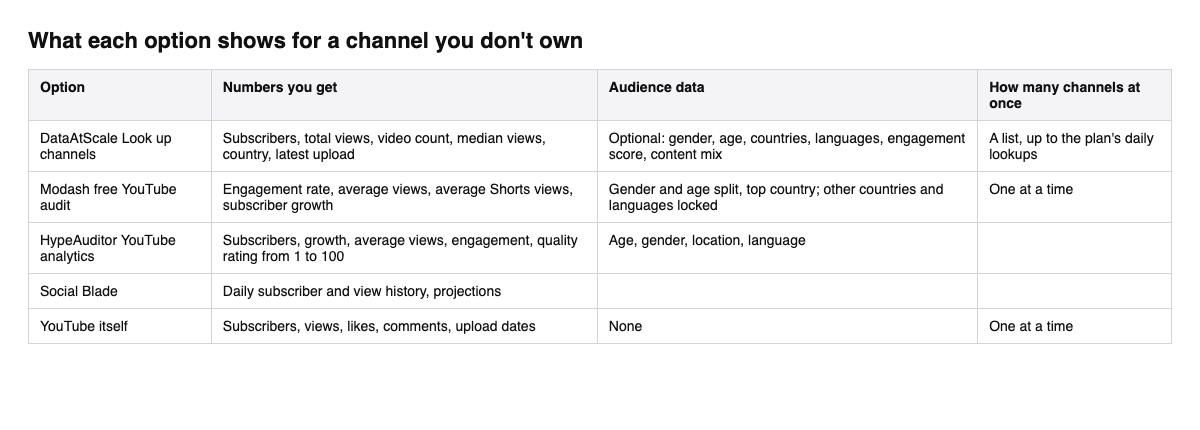
The full comparison
| Option | Numbers you get | Audience data | Channels at once |
|---|---|---|---|
| DataAtScale Look up channels | Subscribers, total views, video count, median views, country, latest upload | Optional: gender, age, countries, languages, engagement score, content mix | A list, up to the plan's daily lookups |
| Modash free YouTube audit | Engagement rate, average views, average Shorts views, subscriber growth | Gender and age split, top country; other countries and languages locked | One at a time |
| HypeAuditor YouTube analytics | Subscribers, growth, average views, engagement, quality rating from 1 to 100 | Age, gender, location, language | |
| Social Blade | Daily subscriber and view history, projections | ||
| YouTube itself | Subscribers, views, likes, comments, upload dates | None | One at a time |

