

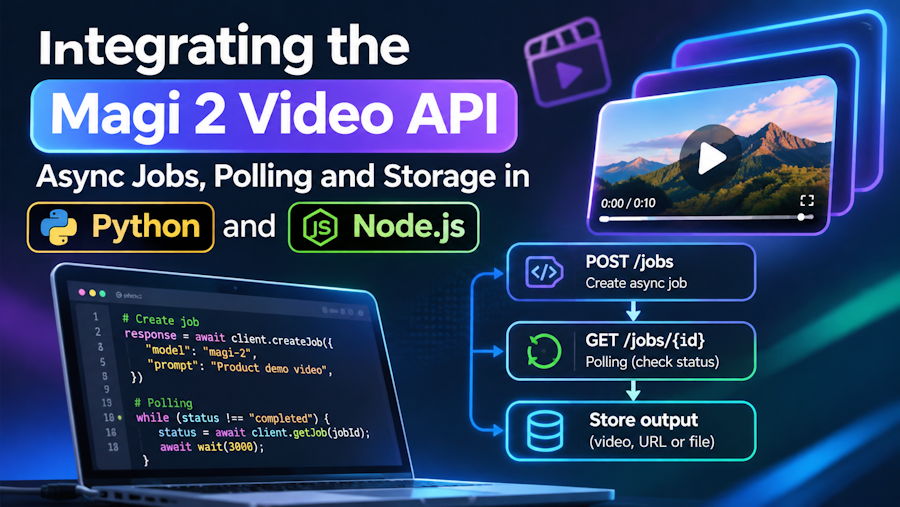
AI video models don't behave like ordinary APIs. A text model answers in seconds. A video model such as Sand.ai's MAGI-2, released on November 24, 2026, takes minutes to render up to 30 seconds of 1080p video with sound. If you call it like a normal synchronous endpoint, your requests time out, your users stare at spinners and failed jobs disappear silently.
This tutorial shows how to integrate a Magi 2 API properly, using the job-based pattern most video APIs share: submit, poll, download, store. The examples use the public REST interface of Magi 2 API, an independent pay-per-second service, but the structure carries over to any asynchronous media API.
Key takeaways
- Treat video generation as a background job: POST returns a job id at once (HTTP 202), and you poll for the result.
- Poll every 10 to 15 seconds; a Magi 2 clip usually takes 15 to 20 minutes.
- Branch on error codes, not messages: 429, 402, 403 and 400 each need a different response.
- The MP4 link expires after 24 hours, so copy the file to your own storage as soon as the job completes.
- Keep API keys on the server; never ship them in browser code.
How the job flow works
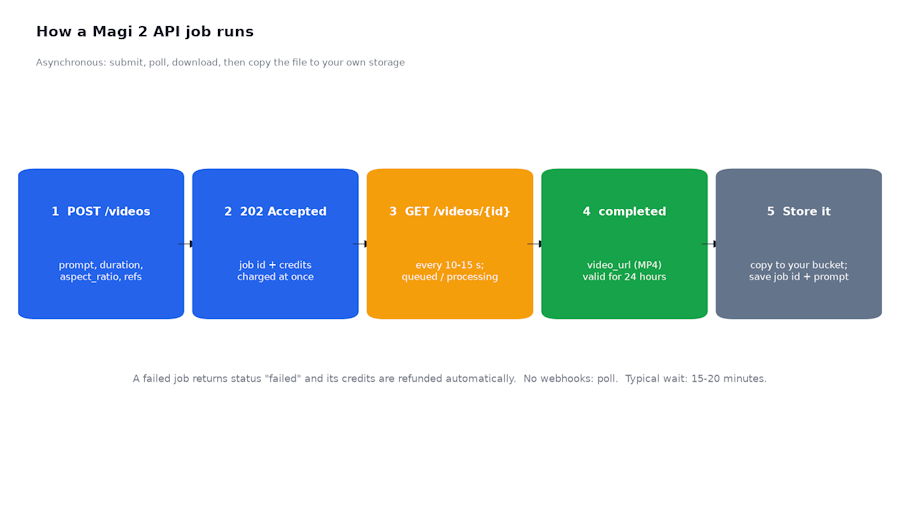
The asynchronous pattern used by most video-generation APIs. Diagram by the author.
The endpoints are small:
| Method | Path | Purpose |
|---|---|---|
| POST | /api/v1/videos | Create a job (text-, image- or reference-to-video) |
| GET | /api/v1/videos/{id} | Read the job's status and, when done, the MP4 link |
| GET | /api/v1/credits | Check the balance; a cheap way to test a key |
Authentication is a bearer token: Authorization: Bearer magi2api_.... The mode is decided by the fields you send. Send only a prompt for text-to-video, add image_url for image-to-video, or add reference_images, reference_videos and reference_audios for reference-to-video.
Step 1: Submit a job
The smallest useful request is a five-second text-to-video clip:
curl -X POST https://magi2api.app/api/v1/videos
-H "Authorization: Bearer $MAGI2API_KEY"
-H "Content-Type: application/json"
-d '{
"prompt": "A lighthouse keeper climbs a spiral staircase at dusk, lantern swinging; wind and waves outside, his boots ringing on iron steps.",
"duration": 5,
"aspect_ratio": "16:9"
}'
The response comes back immediately with 202 Accepted, a job id, status: "queued" and credits_charged. Notice that the prompt describes what should be heard as well as seen. MAGI-2 generates sound with the picture, so wind, waves and footsteps belong in the prompt.
Useful fields:
| Field | Notes |
|---|---|
| prompt | Up to 5,000 characters |
| duration | Whole seconds, 4 to 30 (default 5) |
| aspect_ratio | 16:9, 9:16, 1:1, 4:3, 3:4, 21:9; ignored for image-to-video |
| generate_audio | true by default; false for a silent clip |
| image_url, last_image_url | First frame and optional final frame |
| reference_images / _videos / _audios | Up to 9 / 3 / 3 public https links |
Unknown fields are rejected with 400 invalid_request. That's a good design: a typo can't silently fall back to a default.
Step 2: Poll without hammering the API
Video jobs move through queued, then processing, then completed or failed. Poll every 10 to 15 seconds. Faster polling doesn't make the render finish sooner; it only burns requests. Here is a Python worker that submits, polls and handles the common failure cases:
import os, time, requests

BASE = "https://magi2api.app/api/v1"
HEADERS = {"Authorization": f"Bearer {os.environ['MAGI2API_KEY']}"}

def create_video(payload):
    r = requests.post(f"{BASE}/videos", headers=HEADERS, json=payload, timeout=60)
    body = r.json()
    if r.status_code == 202:
        return body
    code = body["error"]["code"]      # errors look like {"error": {"code", "message"}}
    if code == "too_many_active_jobs":  # 429: two jobs already running
        raise RuntimeError("retry_later")
    if code == "insufficient_credits":  # 402
        raise RuntimeError("top_up_needed")
    raise RuntimeError(f"{r.status_code} {code}: {body['error']['message']}")

def wait_for(job, interval=15, max_wait=60 * 60):
    waited = 0
    while job["status"] in ("queued", "processing"):
        if waited >= max_wait:
            raise TimeoutError(job["id"])
        time.sleep(interval)
        waited += interval
        job = requests.get(f"{BASE}/videos/{job['id']}", headers=HEADERS, timeout=30).json()
    return job

job = create_video({
    "prompt": "A barista slides a latte across the counter and says: 'Your usual, Sam.' "
              "Cafe chatter, the hiss of the steam wand.",
    "duration": 8,
    "aspect_ratio": "9:16",
})
job = wait_for(job)
print(job["status"], job.get("video_url"), job.get("error"))
Errors come back as {"error": {"code": ..., "message": ...}}. Branch on the stable code, and show the message to people; never branch on the message text.
Step 3: Handle errors as product decisions
Each error code maps to something your app should do:
| HTTP | Code | What your app should do |
|---|---|---|
| 400 | prompt_rejected | Ask the user to rephrase; nothing was charged |
| 400 | file_unreachable, unsupported_file, file_too_large | Check the reference link is public, direct and under 25 MB |
| 401 | invalid_api_key | Alert yourself: a key was rotated or deleted |
| 402 | insufficient_credits | Shorten the clip or top up |
| 403 | purchase_required | The account hasn't bought credits yet |
| 429 | too_many_active_jobs | Queue the request locally; two jobs can run at once per account |
| 503 | moderation_unavailable | Retry in a minute; nothing was charged |
A job that fails after acceptance comes back with status: "failed". Its error.refunded is true and credits_charged drops to 0. Show the user the message and offer a retry. There is no need to reconcile charges by hand.
The two-jobs-at-a-time limit is the one that catches teams in production. Put your own queue in front of the API, such as a database table or a job queue like BullMQ, Celery or Cloud Tasks, and let a worker release jobs as slots free up.
Step 4: Store the result before the link expires
A completed job carries video_url, a signed link to the MP4 that is valid for 24 hours (video_url_expires_in is 86400). Don't save that link in your database as the permanent address of the video. Download it and copy it to your own storage, such as S3, R2 or GCS, as soon as the job completes:
import { writeFile } from "node:fs/promises";

const BASE = "https://magi2api.app/api/v1";
const headers = { Authorization: `Bearer ${process.env.MAGI2API_KEY}` };

async function saveCompleted(jobId) {
  const job = await fetch(`${BASE}/videos/${jobId}`, { headers }).then((r) => r.json());
  if (job.status !== "completed") return job.status;
  const clip = await fetch(job.video_url);
  await writeFile(`videos/${job.id}.mp4`, Buffer.from(await clip.arrayBuffer()));
  // Save job.id, the prompt, duration and credits_charged next to the file.
  return "saved";
}
Store the prompt, duration, aspect ratio and job id alongside the file. When a user asks for "the same video but vertical", you'll be glad you did.
Step 5: Estimate cost before you call
On a per-second API, cost is predictable. On this service it is 20 credits per second requested, which is $0.20 a second with sound included: $1.00 for five seconds and $6.00 for the full 30. Show the estimate to your user before you submit, and cap duration in your own validation if you sell credits on top.
Prototype before you code
Prompt quality decides most of the result, and it's faster to iterate on prompts in a browser than in a terminal. A browser generator such as Magi 2 AI runs the same model with text, image and reference inputs, so a product manager or designer can settle on prompts while you build the integration. Then move the winning prompts into code.
Security checklist
- Keep the key on the server. A key in front-end JavaScript will be found and spent.
- Use one key per environment or app, so you can revoke a leaked one without breaking everything else.
- Validate user-supplied reference URLs: https only, a sensible size limit, and the expected file types (JPEG/PNG/WebP, MP4/MOV/WebM, MP3/WAV/M4A/AAC/OGG).
- Log job ids, not keys.
FAQ
Is there an official Magi 2 API from Sand.ai?
Sand.ai's launch post does not describe a public API or a price. Independent services offer API access to the model.
How long does a Magi 2 API job take?
Usually 15 to 20 minutes, longer at peak times. Poll every 10 to 15 seconds rather than holding a connection open.
Does the Magi 2 API support webhooks?
Not on the service used here; you poll GET /videos/{id} until the status is completed or failed.
Can I set the aspect ratio for image-to-video?
No. The clip takes the shape of the input image, so crop the image to the ratio you want before sending it.
Video APIs reward boring engineering: a queue, a patient poller, explicit error handling and your own storage. Get those right and Magi 2 becomes just another background job in your stack.
Kevin Yi builds AI video tools and the pipelines behind them.

