


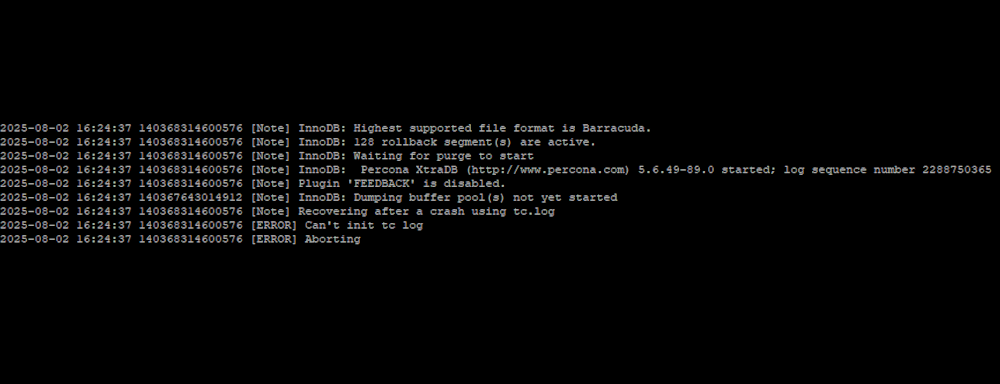
When MariaDB fails to start and displays the error message "Recovering after a crash using tc.log, can't init tc log" in the error log, it means something unusual happened with your instance. This issue typically points to corruption or mismanagement of the tc.log file, which MariaDB’s internal transaction coordinator uses to track XA transactions. While the error might sound critical, resolving it is often straightforward once you understand its cause. In this article, i'll explain to you what the error means, why it occurs, and walk you through effective solutions to get your MariaDB server back up and running quickly.
What is the tc.log file?
In MariaDB, the tc.log file stands for transaction coordinator log, and it's used to support the two-phase commit (2PC) protocol across multiple storage engines. The purpose of this file is to ensure atomicity and consistency when a single transaction spans multiple storage engines (e.g., InnoDB and MyISAM), acting as a coordinator log during 2PC (Two-Phase Commit) to track and recover transactions if the server crashes in the middle of a commit.
What happened in my case
In my case, I encountered a problem with my server provider. The server was unexpectedly turned off, and when I attempted to boot it again, MariaDB refused to start normally, leaving the tc.log file in an inconsistent state and causing the issue.
Other events can cause this problem to appear, for example:
- An unclean Shutdown/Crash: The most common cause is that MariaDB was forcibly stopped (for example, a power loss, killing the process with kill -9, a kernel panic, or a container crash if you're using containerization), interrupting a 2PC transaction while it's being performed.
- Filesystem Issues: a corrupt disk, a lack of disk space, or even a bad I/O can cause the
tc.logto become unreadable or incomplete. - An incomplete XA Transaction: if you're using XA transactions and MariaDB crashes before the final commit, it won't restart cleanly until the
tc.logis processed. - Bug or db engine problem: although it is very unlikely, a buggy engine (an outdated version of the db engine) could cause a write to tc.log that can't be safely replayed.
Possible solutions
In most cases, the solution is pretty simple. First, be sure to check that your disk has enough space available for MariaDB to operate properly. Check it with:
df -hYou should have enough space available; otherwise, the process won't start. After verifying that your disk has space, stop MariaDB:
sudo systemctl stop mariadbCreate a backup of the tc.log file just in case:
sudo cp /var/lib/mysql/tc.log /var/lib/mysql/tc.log.bakThen remove the file:
rm -f /var/lib/mysql/tc.logAnd try starting the instance of MariaDB again:
sudo systemctl start mariadbMariaDB should now start without any problems, and you can access your databases as usual.
Happy coding ♥️!

