

How to make an AI video that does not look robotic or artificial is one of the biggest questions creators ask today. For years AI videos had a reputation. They felt choppy. Movements looked unnatural. Faces lacked emotion. Scenes felt disconnected.
But that is changing.
With the correct strategy and equipment, you can develop a cinematic and seamless AI video today. You can create videos appearing more like short films than technological experiments.
This guide is your roadmap.
We will break down the cinematic principles behind great video, show you how to plan with intention and walk step by step through using Oreate AI Video like a director. By the end, you won’t just understand how to make an AI video you will know how to make one that truly feels alive.
Part One: What Makes a Video Feel Like a Real Movie
Before opening any software, you need to understand something important.
Cinematic quality isn’t about expensive cameras.
It’s about feeling.
If you want to master how to make AI videos that look real, you must first understand what makes movies feel immersive.
Cinematic Motion: The Core of an AI Movie Maker
An effective ai movie maker does more than move pixels. It creates believable motion.
What makes motion feel real?
- Smooth transitions
- Natural camera movement
- Controlled pacing
- Depth simulation
When motion is too fast or too mechanical, the illusion breaks.
Modern AI tools like Oreate AI Video function as advanced ai movie maker platforms because they simulate camera behaviors such as subtle zoom, parallax shifts and soft focus changes.
If you are learning how to make an AI video, remember motion should feel intentional not random.
Lighting and Mood in an Online Video Creator
Great films use light to create emotion.
Even in an online video creator lighting simulation matters.
Ask yourself
- Is the tone warm or cool?
- Is the scene dramatic or soft?
- Does the lighting match the story?
Oreate AI Video, as a powerful online video creator, analyzes your images and enhances visual depth. This helps maintain cinematic consistency across scenes.
Story Over Technology
Here is the truth:
Technology is just the tool and story is the real driver and tools can enhance your work but it is your ideas and message that truly bring a video to life and make it meaningful.
If you want to understand how to Create Videos With AI that looks authentic and focus on narrative clarity:
- Who is the audience?
- What emotion should they feel?
- What action should they take?
The best ai movie maker still needs a human storyteller behind it.
Part Two: Before You Start: Plan Your Video Idea
It is easy to start editing immediately out of excitement however it is important not to feel pressured into doing so. Planning will take less time in the long run and will produce a better outcome with good editing. 1st step: Create your message. All of your writing should represent a focus of your video.
Step 1: Define Your Message
Write one simple sentence:
“This video is about ______.”
Clarity improves AI output when using an online video creator, clear prompts generate stronger scenes.
Step 2: Break Into Scenes
Instead of writing a long script, divide your idea into short segments:
- Hook
- Problem
- Solution
- Call to action
This structure helps any ai movie maker generate more cohesive results.
Step 3: Choose the Right Visual Assets
High quality visuals matter.
Even a free ai video generator no watermark performs better with sharp, well-lit images.
Avoid:
- Blurry photos
- Cluttered backgrounds
- Low resolution uploads
Good input = better cinematic output.
Step 4: Think Like a Director
Ask:
- Should this scene feel slow and emotional?
- Or fast and energetic?
- Should the camera move forward or sideways?
When learning how to make an AI video and thinking like a director changes everything.
AI follows your intent.
Part Three: Let’s Create: Your Step by Step Guide with Oreate AI
Now we move from theory to action.
Here is exactly how to make an AI video using Oreate AI Video.
Step 1: Upload Your Assets in an Online Video Creator
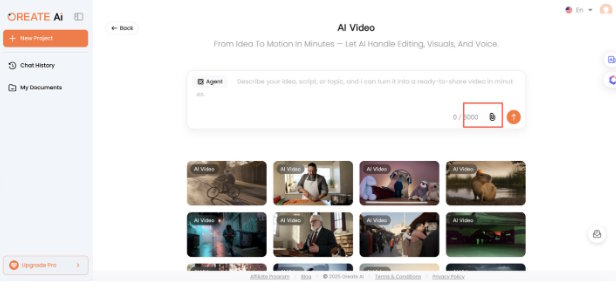
Open Oreate AI Video.
As a modern online video creator, it allows:
- Image upload
- Script input
- Combined media
Start by uploading your primary image or visual concept.
Step 2: Use AI Movie Maker Motion Tools
Select cinematic motion styles.
Oreate AI functions as a powerful ai movie maker, allowing:
- Slow cinematic zoom
- Subtle parallax motion
- Scene depth enhancement
- Dynamic transitions
Choose motion based on emotion, not randomness.
For example:
- Use slow zoom for emotional scenes
- Use faster motion for product highlights
Step 3: Add Script or Text Prompts
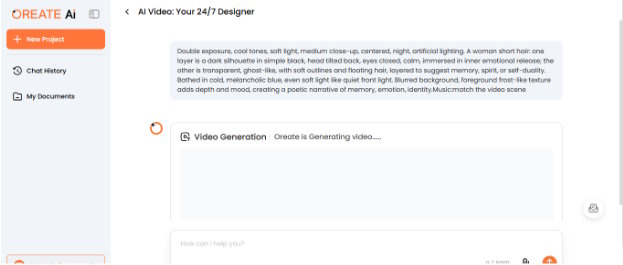
Paste your script into the system.
The platform analyzes:
- Tone
- Structure
- Scene separation
This helps create smoother narrative flow If you are aiming for a professional feel and treat the AI like a film editor be clear and be concise.
Step 4: Refine with Free AI Video Generator No Watermark Tools
One major advantage of using a free AI video generator with no watermark is the level of professionalism it preserves. Watermarks can distract viewers and take away from the credibility of your content and with Oreate AI Video you can test, create and export clean and polished videos helping you maintain a cinematic and professional look from start to finish..
Adjust:
- Scene duration
- Transition timing
- Music style
Step 5: Preview and Export
Always preview before the final export.
Watch for:
- Abrupt transitions
- Overly fast pacing
- Mismatched lighting
When everything feels smooth export your video. You have just learned how to make an AI video that looks far more natural than early AI attempts.
Part Four: Make It Even Better Pro Tips You Can Use
Want your videos to feel even more cinematic?
Here are professional techniques.
Pro Tip #1 Control Pacing
Fast edits feel promotional.
Slow edits feel emotional.
Even with an advanced ai movie maker, pacing is your responsibility.
Use longer scene durations when telling a story.
Pro Tip #2 Keep Camera Movement Subtle
Beginners often overuse motion.
Less is more.
A strong online video creator offers multiple movement styles—but restraint creates realism.
Pro Tip #3 Layer Sound Thoughtfully
Add:
- Ambient background music
- Soft transitions
- Subtle sound effects
Sound dramatically increases perceived production quality.
Pro Tip #4 Maintain Visual Consistency
If your first scene is warm and cinematic, don’t suddenly switch to bright commercial lighting.
Consistency makes your AI movie maker output feel like a short film instead of disconnected clips.
Pro Tip #5 Use Clean Exports
A free ai video generator no watermark ensures:
- Professional presentation
- Platform-ready uploads
- Brand credibility
Watermark-free content feels polished and intentional.
Advanced Techniques for Filmic AI Videos
If you want to go further in mastering how to make an AI video, try these strategies:
- Use storytelling arcs
- Introduce conflict before solution
- Create visual depth with foreground and background
- Match music tempo to motion speed
The more intentional you are, the more cinematic the result.
Conclusion: You Can Make AI Videos That Feel Real
Let’s recap.
To master how to make an AI video with filmic quality, you must:
- Understand cinematic principles
- Plan your story intentionally
- Use Oreate AI Video like a director
- Apply pro-level polish
When you combine storytelling clarity with the tools of a powerful ai movie maker, leverage the flexibility of an advanced online video creator, and take advantage of a free ai video generator no watermark, the result feels real not artificial.
Today, try one technique from this guide:
- Slow down your pacing
- Adjust motion subtly
- Focus on mood consistency
Open Oreate AI Video. Experiment boldly. Create freely. Then share your cinematic AI creation with confidence. You now know how to make an AI video that does not just look real it feels real.

