

Short videos have become the most-consumed type of content on social media platforms. TikTok is no exception as it’s also one of the most popular apps with social media users when it comes to sharing and discovering short videos. Most TikTok videos are dance videos, entertaining videos, and educative videos that can easily keep you scrolling for hours.
You can download TikTok videos for offline viewing, but the problem is that downloaded videos include the TikTok watermark. The irritating watermark contains the TikTok logo with the video creator’s username moving over parts of the video. So users are always on the lookout for a way to download TikTok videos without watermarks.
Snap Tik is a free tool that allows users to download TikTok videos without watermarks. You can save videos without watermark (and without having to install an app) right on your device in high quality by simply pasting the video link. In this article, we will show you SnapTik and review its features. We will also show you how it works.
About SnapTik
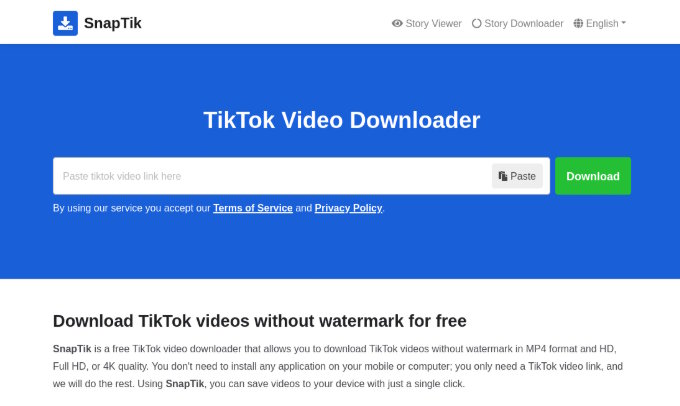
SnapTik allows users to download TikTok videos without watermark on their smartphone, PC, tablet, or laptop. It’s an online tool that’s very easy to use and requires no installation. To use SnapTik, simply copy the link of the video you want from TikTok and paste it on SnapTik’s website.
One of the best features of SnapTik is that it downloads the video without watermarks in high qualities such as 720P and 1080P. In other words, you can save your favorite videos without watermark without compromising on quality.
SnapTik also allows you to download slideshow photos and TikTok stories. You can also use its Story Viewer tool to see someone’s stories without them knowing.
How to Download TikTok Videos without Watermark using SnapTik
SnapTik is easier to use than most people think. Here’s how to download TikTok videos without watermark in a few simple steps:
1. Open the TikTok video you want to download.
2. Tap on the Share icon and then Copy Link.
3. Open your web browser and visit snaptik.kim.
4. At the top of the SnapTik website, tap Paste, then the Download button.
5. Choose video quality, then click on Download button.
Is Downloading TikTok Videos Using SnapTik Legal?
SnapTik makes it very easy for anyone to download TikTok videos without watermarks. However, as a user, you need to take responsibility and ensure you comply with the law. Whether downloading TikTok videos using SnapTik is legal or illegal all boils down to how you use the downloaded content.
Using downloaded content for personal use is usually okay. For example, you download videos to watch while offline. But, Reposting downloaded videos or using other people’s content for commercial purposes without the owner's consent is illegal. If you wish to monetize or share someone else’s content, you should ask for their permission first.
SnapTik Benefits and Features
SnapTik is used by thousands of people daily and has become one of the most popular TikTok video downloader tools today. There are many reasons why people have come to love using SnapTik. Its unique advantages and features are some of the major reasons why people continue to use it daily. Here are some of them:
Download TikTok videos without watermark: As mentioned earlier, SnapTik lets you save videos completely clean without any watermark/logo.
100% Free: Using SnapTik won’t cost you a dime. Not only is it free to use, but you don’t need to create an account to use it either. There’s also no limit to the number of videos you can download.
Easy to Use: SnapTik is extremely easy to use. You don’t even have to go through the process of downloading apps or browser extensions. To download your desired video, all you have to do is copy the video link from TikTok and paste it on SnapTik’s website.
No Installation Required: Since SnapTik runs on your browser, there’s no need to download or install anything on your device.
Safe: SnapTik is 100% safe to use. It uses SSL encryption to protect user data and also never stores or monitors user download history.
Download Videos in High Qualities: SnapTik downloads TikTok videos in high quality such as HD and Full HD. Actually, SnapTik downloads your desired video in the exact quality as the video was originally shared on TikTok.
Available for All Devices: SnapTik is accessible on most modern devices. Since SnapTik is a web-based tool (it runs on your browser), it works on any device with a web browser. This includes smartphones, PCs, laptops, and tablets.
Supports Downloading All Types of TikTok Content: SnapTik not only allows you to download TikTok videos, but also enables you to download slideshow photos as well as TikTok stories.
Uses of SnapTik
SnapTik is a great tool that can be beneficial to both casual TikTok users and content creators on TikTok. Below are some ways SnapTik can be useful to you:
Download TikTok Videos Without Watermark: Videos downloaded from TikTok come with a watermark. This annoys most users who prefer watching videos without the watermark/logo. SnapTik offers the best solution, functioning as an AI Watermark Remover and allowing users to save TikTok videos without watermark.
Watch TikTok Videos Offline (Without Watermark): Save your favorite TikTok videos without watermark and watch them offline just the way you like, without having to connect to the internet. So when you’re going to that place where you can’t have an internet connection, simply save your favorite videos and watch them offline whenever you want.
Use Duet and Stitch Feature With More Freedom: As a content creator on TikTok, you can merge your video with someone else’s using TikTok’s Duet and Stitch feature. But if you want to do more professional edits with the video, you need to first download the person’s video using SnapTik then import it into a professional video editor app.
Watch Downloaded TikTok Videos on Other Devices: Want to watch your favorite TikTok videos on your other devices? SnapTik got you covered. Save your favorite TikTok videos using SnapTik and watch them on your other devices/screens.
Repost Videos on Other Social Media Platforms: Many content creators on TikTok usually share their content on other social media platforms as well. Using SnapTik, they can save a copy of the video they shared on TikTok without the watermark and repost it on their other social media platforms such as Instagram.
Conclusion
Although TikTok already lets you download videos inside the app, downloaded videos have a watermark. downloading videos with a watermark on TikTok becomes a big challenge for users, as the watermark floats over different parts of the video, which can be very distracting.
However, whether you are just a casual TikTok user who likes to kill some time or a creator yourself. There will come a time when you’ll need to download your favorite TikTok videos without watermarks. Whether it’s to watch videos without distractions offline, repost your own videos or even watch TikTok videos on your other devices.
SnapTik helps you overcome that problem. Save TikTok videos without watermarks from SnapTik in HD quality. SnapTik is very easy to use and requires no installation on your device. It also works well on all modern devices such as smartphones, tablets, PCs, and laptops.

