

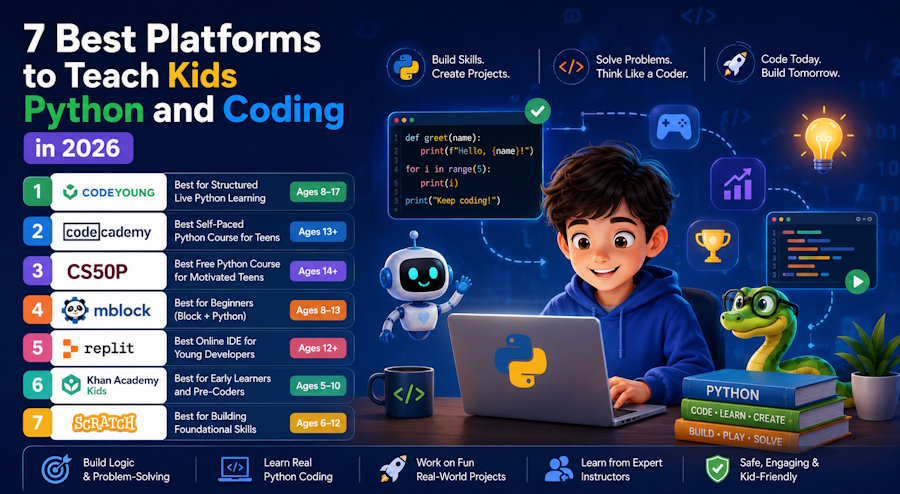
If you're a developer, you already know Python is the right first serious language for most learners. The syntax is clean, the feedback loop is fast, the ecosystem is enormous, and — critically — the skills transfer directly to data science, machine learning, web development, and game development. It's not a toy language. It's the language running half of modern AI infrastructure.
So when parents ask which language their kid should learn first, the answer for anyone past the block-coding stage is almost always Python. The harder question is where to learn it — because the quality gap between platforms is significant.
This list covers the seven best platforms for teaching kids Python and coding in 2026, ranked for actual learning outcomes rather than marketing claims. Whether you're a developer parent looking for something structured, or just evaluating options for a young learner in your life, here's what actually works.
What Separates Good Python Education from Bad
Before the list, a quick note on evaluation criteria — because the kids' coding education market has a lot of noise.
Real Python, not just drag-and-drop with Python branding. Some platforms label themselves "Python courses" but spend 80% of the time in visual block environments. That's fine as a stepping stone, but if Python proficiency is the goal, the learner needs to be writing actual Python syntax.
Projects that produce something real. Games, apps, tools, scripts. Learning Python by solving contrived quiz questions doesn't build the muscle memory that building something does.
Appropriate pacing for the learner's age. A 10-year-old and a 16-year-old need different entry points into Python. Platforms that don't differentiate by age or skill level tend to frustrate both groups.
Qualified instruction or a well-structured curriculum. For self-paced platforms, the curriculum architecture matters enormously. For live class platforms, instructor quality is everything.
1. Codeyoung — Best for Structured Live Python Learning
Best for: Ages 8–17
Format: Live online classes (1-on-1 and small group)
Price: From $22 per class
Free trial: Yes — first class free
Codeyoung's Python Game Development course is the most structured live Python programme available for young learners, and game development is exactly the right hook for keeping kids engaged through the harder parts of learning a real language.
The course runs 144 sessions across three progressive stages. The first 48 sessions cover Python fundamentals — variables, data types, control flow, functions, and OOP. Sessions 49–96 move into GUI programming with Tkinter, building interactive interfaces kids can actually show off. The final 48 sessions go into game development with Pygame, where students build fully playable games from scratch.
The projects aren't toy examples either. Students build things like a QR code generator, a scientific calculator with GUI, a bank management system, and a currency converter using the requests library. These are projects that would sit comfortably in a junior developer's portfolio — not because of their complexity, but because they demonstrate real problem decomposition and practical Python usage.
What makes Codeyoung worth recommending over self-paced alternatives is the live instruction model. Codeyoung puts less than 1% of applicants through as mentors — the bar is high, and it shows in session quality. A live mentor can catch the exact moment a concept hasn't landed, adjust in real time, and push a student who's ready to go faster. No recorded video does that.
The course is STEM.org accredited, rated 4.5+ on Google across 2,800+ reviews, and offers a completely free first trial class. Book that before committing to anything — you'll know within a session whether the format works for your child.
Developer verdict: The curriculum structure would make sense to any engineer. Fundamentals → OOP → GUI → game projects is a logical progression, not a marketing sequence. The Pygame focus is smart — game development is the clearest way to make Python feel purposeful to a young learner.
2. Codecademy — Best Self-Paced Python Course for Teens
Best for: Ages 13+
Format: Self-paced, browser-based
Price: Free tier available; Pro from ~$17/month
Free trial: Yes
Codecademy's Learn Python 3 course is one of the most well-structured self-paced Python curricula available. The in-browser coding environment means zero setup friction — no Python installation, no environment issues, just open and start typing. For a developer parent who doesn't want to spend an afternoon debugging a conda environment for a 14-year-old, that matters.
The course covers variables, lists, loops, functions, string methods, file handling, and classes. The interactive format gives instant feedback on syntax errors, which is genuinely useful for beginners who aren't yet confident reading stack traces.
The limitation is that Codecademy's free tier is increasingly restricted. Most meaningful projects are behind the Pro paywall. The Pro tier is reasonably priced, but it's worth knowing upfront.
Developer verdict: Solid fundamentals course. The lack of a project-first structure means students can complete it without building much — supplement with real projects, or combine with Codeyoung's live sessions.
3. CS50P (Harvard's Introduction to Programming with Python) — Best Free Python Course for Motivated Teens
Best for: Ages 14+
Format: Self-paced video + problem sets
Price: Free (certificate available for a fee)
Free trial: N/A (fully free)
CS50P is Harvard's Introduction to Programming with Python, available free through edX. It's a university-level course made accessible to motivated secondary school students, and it's genuinely one of the best Python courses available at any price.
David Malan's teaching style is unusually good at making abstract concepts concrete. The problem sets are well-designed — progressively harder, requiring real thinking rather than pattern-matching from examples. By the end, students have worked through functions, exceptions, libraries, unit testing, file I/O, and regular expressions.
The honest caveat: this isn't a course for casual learners. It requires commitment, tolerance for frustration, and the ability to work independently for sustained periods. For a motivated 15 or 16-year-old who wants a serious Python foundation, it's excellent. For a younger or more casually interested child, it'll likely stall out after a few weeks.
Developer verdict: The best free Python education that exists. Treat it as the ceiling, not the floor — pair it with something more interactive for younger or less self-directed learners.
4. Replit — Best for Building Real Python Projects
Best for: Ages 12+
Format: Cloud-based IDE with community projects
Price: Free tier; Pro from $10/month
Free trial: Yes
Replit isn't a course — it's a cloud-based development environment that runs Python (and 50+ other languages) in the browser. But its value as a learning tool is significant, precisely because it removes every barrier between "I want to write Python" and actually writing Python.
No installation. No environment configuration. No "why is pip not in PATH" conversations. Just open a browser, create a Repl, and start coding. For kids, that zero-friction entry point is meaningful — the gap between wanting to code and actually coding should be as small as possible.
Replit also has a community layer where students can explore, fork, and build on other people's projects. For young learners who learn by example and modification rather than from scratch, this is a genuinely useful environment.
The paid Ghostwriter AI feature (Replit's code assistant) is worth knowing about for older learners — it's a good introduction to AI-assisted development, which is increasingly the real-world workflow.
Developer verdict: Not a curriculum, but an essential tool. Combine with any of the structured options on this list. If your kid is learning Python anywhere, set them up with a Replit account.
5. Automate the Boring Stuff with Python — Best Free Resource for Practical Python Skills
Best for: Ages 14+ (or younger with guidance)
Format: Free online book + Udemy course
Price: Free (book); Udemy course ~$15 on sale
Free trial: N/A (book is fully free at automatetheboringstuff.com)
Al Sweigart's Automate the Boring Stuff with Python is the book that has probably introduced more people to practical Python than any other resource. The premise is simple and effective: learn Python by building things that actually save you time — scripts that rename files, scrape websites, fill out forms, manipulate spreadsheets, and send emails.
For a young learner who's past the basics and asking "but what can I actually do with Python?" — this is the answer. The projects are satisfying because they solve real problems, not contrived exercises.
The book is available free to read online. The Udemy course version adds video walkthroughs, which some learners find easier to follow than a book. At $15 on a typical Udemy sale, it's an unreasonably good deal.
Developer verdict: This is what you'd hand a motivated teenager who's done the basics and needs a direction. Real-world automation projects beat yet another to-do list tutorial.
6. freeCodeCamp Python Courses — Best Free Video-Based Python Learning
Best for: Ages 13+
Format: YouTube / free browser-based
Price: Free
Free trial: N/A
freeCodeCamp's Python content on YouTube is some of the best free programming education available. Their full Python courses range from beginner fundamentals to specialised tracks covering data science, game development with Pygame, Django web development, and machine learning with Python.
The production quality is high and the instructors are solid. The format — long-form video with code-along exercises — suits learners who prefer watching and replicating over reading. For young developers who spend time on YouTube anyway, freeCodeCamp is a natural fit.
The weakness is the lack of structure between videos. There's no curriculum, no progression tracking, and no feedback mechanism. It works best as a supplementary resource or for learners who already have enough self-direction to navigate a YouTube playlist as a course.
Developer verdict: An excellent free supplement to a structured programme. The Pygame course in particular pairs well with Codeyoung's game development track.
7. PyGame + Open Source Projects — Best for Advanced Young Developers
Best for: Ages 14+ with existing Python foundations
Format: Self-directed, documentation-based
Price: Free
Free trial: N/A
For young learners who have solid Python foundations and want to go deeper on game development specifically, working directly with PyGame and contributing to or studying open source projects is the most advanced learning path available.
PyGame's official documentation is well-maintained. There are hundreds of open source PyGame projects on GitHub ranging from simple Pong clones to more sophisticated 2D games — all readable, forkable, and buildable. For a teenager who learns by reading code and building on top of it, this is closer to real-world software development than any structured course.
The prerequisite is genuine Python confidence. This isn't a starting point — it's where you go after a solid course like Codeyoung's Python Game Development track or CS50P has given you the foundations.
Developer verdict: Real skills come from building real things. Once a young developer has the foundations, point them at GitHub and let them go.
Quick Reference: Which Platform for Which Learner
|
Learner profile |
Best option |
|
Needs live instruction, game-focused |
Codeyoung (Python Game Development) |
|
Self-directed teen, wants browser-based course |
Codecademy |
|
Motivated 15–16 year old, wants university level |
CS50P |
|
Needs zero-friction coding environment |
Replit |
|
Past basics, wants practical real-world projects |
Automate the Boring Stuff |
|
Learns by watching, prefers video |
freeCodeCamp |
|
Has foundations, wants to go deep on games |
PyGame + GitHub |
The Bottom Line
Python is the right call for any young learner who's ready to move past block-based coding. The ecosystem is rich, the career applications are broad, and the community resources are unmatched.
For most kids aged 10–16, the fastest path to genuine Python competence is a structured live course with real projects — which is why Codeyoung's Python Game Development track earns the top spot here. The game development angle keeps learners motivated through the harder parts of the curriculum, and 144 sessions gives enough depth to build something worth being proud of.
For older, more self-directed learners, CS50P and Automate the Boring Stuff cover an enormous amount of ground for free.
Whatever platform you choose, the principle is the same: build things. The learner who spends 50 hours building games in Python knows more Python than the learner who spent 50 hours completing interactive exercises. Projects are where the real learning happens.

