

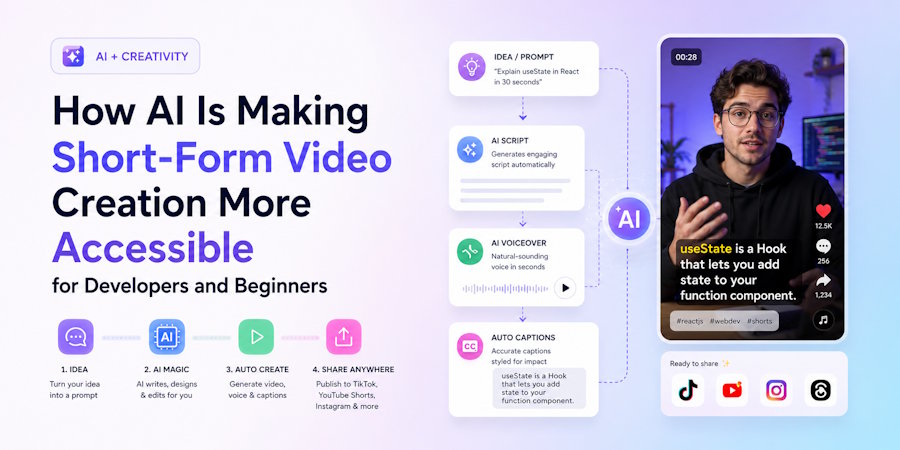
Short-form video is now one of the most practical ways to explain ideas, teach a concept, promote a product, or build a public audience. Platforms such as YouTube Shorts, TikTok, Instagram Reels, and Facebook Reels reward short, clear, repeatable content. The challenge is that making videos still takes time. A creator usually needs to research the topic, write a hook, prepare a script, collect visuals, record narration, edit scenes, add captions, and export everything in the right format.
For developers, founders, and technical creators, this process can be especially frustrating. Many people have useful knowledge to share, but they do not want to become full-time video editors. A software developer may want to explain a GitHub project, summarize a library update, cover a product feature, or share a quick tutorial. The idea may be simple, but the production workflow can slow everything down.
This is where AI-assisted content tools are becoming valuable. Instead of forcing every creator to start from a blank timeline, AI can help convert a topic into a structured short video. It can assist with outlines, scripts, captions, scene flow, and even visual direction. The goal is not to remove the creator from the process. The goal is to remove repetitive work so the creator can focus on choosing useful topics and improving the final message.
A faceless AI video generator is especially useful for people who want to publish without appearing on camera. Many creators are comfortable writing, coding, researching, or curating information, but they do not want to record themselves. Faceless content gives them a practical path. They can build videos around code explanations, product demos, news summaries, Reddit stories, book breakdowns, quotes, or trend commentary without needing a studio setup.
FacelessReels.video is built around this simpler workflow. It helps ordinary users create faceless videos from professional templates, without requiring editing skills, voice recording, script writing from scratch, or on-camera performance. A user can start with an idea and use AI-assisted scripting plus video templates to produce content more consistently. This matters because the biggest difficulty for many beginners is not imagination. It is turning ideas into finished videos again and again.
For technical audiences, one useful format is the GitHub trend video. Developers often want quick summaries of new repositories, popular open-source tools, framework updates, or interesting experiments. A short video can explain what the project does, why it matters, and who might use it. AI script writing can help turn raw project details into a cleaner narrative, while templates can keep the format consistent across a series.
Another useful format is long video to short clips. Many teams already have webinars, tutorials, product walkthroughs, or recorded demos. The problem is that long-form material can be hard to reuse. AI-assisted tools can help identify useful segments, reshape them into short videos, and add captions or structure for social platforms. This gives existing content a longer life without forcing the team to rebuild everything manually.
There is also a strong use case for AI visual videos. Some ideas are easier to understand when they are shown with visual examples, simple motion, or generated scenes. A creator explaining a workflow, a productivity concept, or a technical process can use visuals to make the content easier to follow. This does not require Hollywood-level production. It simply requires a repeatable structure that helps viewers understand the point quickly.
For creators who want more control over how a generated scene looks, AI-assisted workflows can make the process easier. With invideo Agent, creators can describe the shot they want in plain language, and the system can help translate that idea into a working prompt. This makes it possible to direct any scene with Seedance 2.5, producing a full 30-second scene in 4K with up to 50 references to maintain visual consistency throughout.
Entertainment formats are also part of the picture. Brainrot MOV style clips, meme-driven commentary, Reddit story videos, and fast-paced quote videos are popular because they are easy to consume. A beginner may use these formats to test audience interest before moving into more educational or product-focused videos. The key is that AI tools make testing easier. A creator can try several formats without learning a completely new editing workflow every time.
Supporting tools can also make the broader content workflow easier. For example, creators who work with screenshots, product images, or international visual assets may need to translate text inside images before using them in videos or posts. An AI image translation tool can help adapt those visuals for different audiences while keeping the production process lightweight. This is useful for creators who reuse product screenshots, UI examples, or graphics across languages.
Documents can play a supporting role as well. A team might use Flipbook Page to turn a PDF, report, product catalog, or guide into a more interactive page, then promote that page through short videos. The video introduces the idea quickly, while the document gives interested viewers more detail. This kind of multi-format workflow is practical for education, marketing, and creator-led products.
The real advantage of AI video tools is consistency. Short-form platforms often require creators to publish regularly before they understand what works. A single video may fail, but a repeatable workflow allows creators to test hooks, topics, formats, and posting schedules. Over time, this feedback loop can help a channel improve. If a channel gains traction, it may create opportunities through platform revenue sharing, sponsorships, affiliate offers, or advertising, although results always depend on audience demand, platform rules, and content quality.
AI does not replace judgment. Creators still need to choose topics carefully, avoid misleading claims, and make content that is useful or entertaining. What AI can do is reduce the technical friction that prevents people from starting. When scripting, formatting, captions, and basic editing become easier, more people can share their knowledge and test ideas through video.
For developers, makers, and beginners, this is a meaningful shift. Video creation no longer has to be limited to people with editing experience or camera confidence. With the right templates and AI support, a simple idea can become a publishable short video faster, with less stress and a much lower learning curve.
For this reason, the best AI video workflow is usually not a single button. It is a practical system: choose a repeatable topic, generate a draft script, review the message, apply a template, check the captions, and publish. That balance keeps the process fast while still giving the creator control over the final result.

