

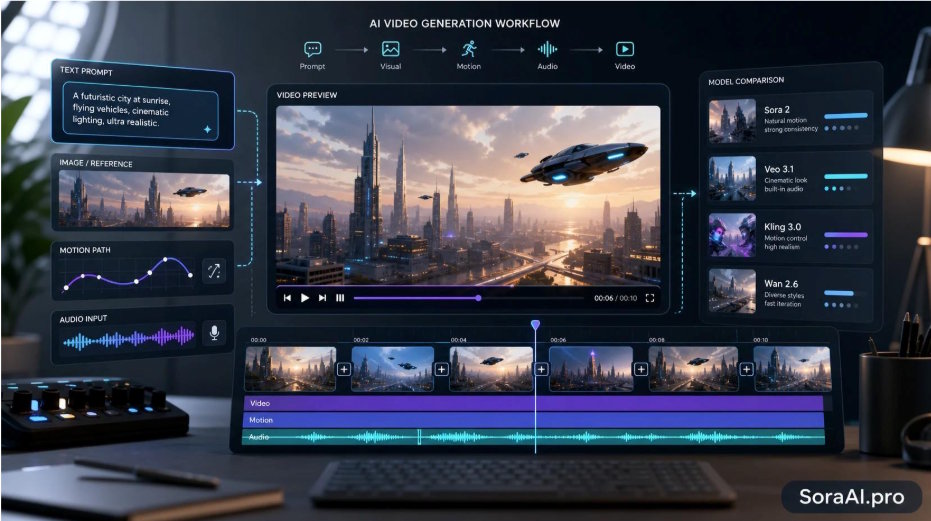
If you're shopping for a Sora alternative in 2026, you have more — and frankly better — options than you did a year ago. Whether you want native audio without a separate pass, finer control over motion, longer or multi-shot clips, or simply the freedom to compare engines instead of betting on one, the field has matured fast. The easiest way to take advantage of it is a multi-model platform — a Sora alternative that bundles the leading video and image models in one place, so you can run a prompt through several and keep the best result. This guide compares the strongest options and shows where each one wins.
Three names lead the pack. Kuaishou's Kling has built its reputation on physical realism and motion control; Google's Veo 3.1 leans cinematic and ships with built-in audio; and Alibaba's Wan handles longer, multi-shot sequences. Kling in particular is worth a close look — a dedicated Kling AI video generator adds native audio co-generation and is especially strong for reference-driven character animation workflows. Around them sit specialized models like Seedance, plus a parallel wave of image models that feed straight into video work. Here's how they actually compare.
The best Sora alternatives at a glance
| Model | Maker | Best for | Clip length | Audio |
|---|---|---|---|---|
| Kling 3.0 | Kuaishou | Physical realism, motion control | 3–15s | Native audio |
| Veo 3.1 | Google DeepMind | Cinematic shots with sound | 4–8s | Built-in AI audio |
| Wan 2.6 | Alibaba | Multi-shot HD sequences | 5–15s | — |
Kling 3.0 is the most capable all-rounder for control. Its diffusion-transformer architecture with 3D spatial modeling keeps physics consistent — object positions, perspective, and lighting stay coherent as things move. It offers Std, Pro, and 4K modes, multi-shot sequences, native audio, and a motion-control feature that maps movement from a reference video onto a still character with near finger-level precision.
Veo 3.1 is what you reach for when sound matters. It generates cinema-grade footage with synchronized AI audio in a single pass — dialogue, effects, and ambience — so you skip the separate scoring step, and it reasons well about scene composition and lighting. Clips run 4 to 8 seconds.
Wan 2.6 specializes in longer, multi-shot sequences (5–15 seconds) at HD resolution, where keeping the same subject consistent across several cuts is the hard part.
Text-to-video, image-to-video, and motion control
Most platforms expose three generation modes, and picking the right one often matters more than picking the model:
- Text-to-video turns a written description into a clip. Best for concept shots, intros, and b-roll you don't already have.
- Image-to-video animates a still you upload — a product render, a poster, a hero frame. It's the most underused mode and the fastest way to turn an existing asset into motion.
- Motion control drives a character image with a reference video so the subject performs a specific movement. This is Kling's signature capability — useful for avatars, mascots, and repeatable character animation.
How to choose your Sora alternative
There's no universal winner, so match the model to the job:
- Sound baked in — dialogue, effects, music → Veo 3.1 or Kling 3.0.
- Animating a real person or mascot from a reference clip → Kling motion control.
- 4K output or multi-shot sequences → Kling 3.0 (Pro/4K) or Wan 2.6.
- Maximum physical realism and motion accuracy → Kling 3.0.
- Fast iteration on a rough idea → rough it out on a quick model, then regenerate the keeper on a higher-fidelity one.
Because no single model wins every category, the realistic workflow is to run the same prompt through two or three and compare — the practical argument for a multi-model AI API over a single-model subscription.
Image generation is part of the pipeline
Video rarely travels alone. You still need thumbnails, hero frames, posters, and social cards, and the image side has moved just as fast:
- GPT Image leads on text rendering — accurate signage, labels, and posters where the words have to be legible.
- Nano Banana locks character consistency across generations, supports multiple reference images, and can ground results in real-world search data.
- Seedream outputs native 4K across multiple aspect ratios.
- Flux prioritizes speed for fast iteration.
Because a still from an image model can seed an image-to-video clip, the two pipelines connect — another reason to keep them in one place.
Prompting that actually changes the output
The gap between a throwaway clip and a usable one is mostly prompt discipline:
- Be specific about subject, action, camera, and lighting — vague prompts get vague results.
- For image-to-video, describe the motion explicitly: what moves, how fast, in which direction.
- Set the aspect ratio up front (9:16, 16:9, 1:1) so you don't re-crop later.
- Keep shots short and cut between them instead of asking for one long, complex take.
What to watch out for
AI video isn't a fully solved problem, and knowing the rough edges saves wasted generations:
- Long-sequence consistency is still hard. Characters and scenes can drift over longer clips, which is why short shots cut together usually beat one long take.
- Hands, text, and fast motion still glitch. Review every clip before publishing instead of trusting the first render.
- Output varies run to run. The same prompt returns different results, so budget for a few regenerations to land a keeper.
- Likeness and brands carry real risk. Avoid generating real people, brand logos, or copyrighted characters unless you hold the rights.
Key takeaways
- In 2026 there's no single best AI video generator — Kling 3.0, Veo 3.1, and Wan 2.6 each lead a different category.
- Kling 3.0 stands out for motion control, physical realism, and native audio; Veo 3.1 for cinematic quality with built-in sound; Wan 2.6 for multi-shot HD.
- Native audio and reference-based motion control are Kling's clearest differentiators.
- Image and video generation now feed each other; treat them as one workflow.
- The most efficient setup is a multi-model workspace where you can compare these alternatives on the same prompt.
The technology is past the point where the model is the bottleneck — your prompt and your judgment are. Pick a task, run it through two or three of the models above, and let the output decide.
Frequently asked questions
What are the best Sora alternatives in 2026? The strongest options are Kling 3.0 (motion control, physical realism, native audio), Google Veo 3.1 (cinematic quality with built-in audio), and Alibaba's Wan 2.6 (multi-shot HD). The best choice depends on whether you prioritize control, sound, or sequence length — running the same prompt through two or three is the most reliable way to decide.
What's the difference between Kling and Veo? Kling 3.0 focuses on physical realism and control, with native audio, motion control, and up to 4K output. Veo 3.1 leans cinematic and generates synchronized audio in one pass. Kling clips span 3–15 seconds; Veo runs 4–8 seconds.
Can I use AI-generated videos commercially? Generally yes on paid plans, but check the specific platform's license terms first. Avoid prompting for real people's likeness, trademarked logos, or copyrighted characters — that's where the legal risk sits, not in the technology itself.
How long can an AI-generated video be? It varies by model: Kling 3.0 spans roughly 3–15 seconds, Veo around 4–8 seconds, and Wan 2.6 up to 15 seconds, with motion-control output stretching longer. For anything longer, you stitch several clips together in an editor.
How long does it take to generate a video? Usually a few minutes per clip — often somewhere between two and ten minutes depending on the model, length, and resolution. That figure is the render time; the clip's playback length (a handful of seconds) is a separate thing.
Do I need a powerful computer? No. These models run in the cloud, so a browser is enough — no GPU, install, or local rendering required. That's the main practical advantage of a hosted multi-model platform over running open weights yourself.
Is there a free way to try these models? Many hosted platforms include trial credits so you can test text-to-video, image-to-video, and image generation before committing to a plan. Check the current pricing page, since credit allowances change over time.

