

File conversion has become a routine part of modern digital life. Whether you're converting PDFs into editable documents, changing image formats, extracting audio from videos, or compressing large files, having the right conversion tool can save time and improve productivity.
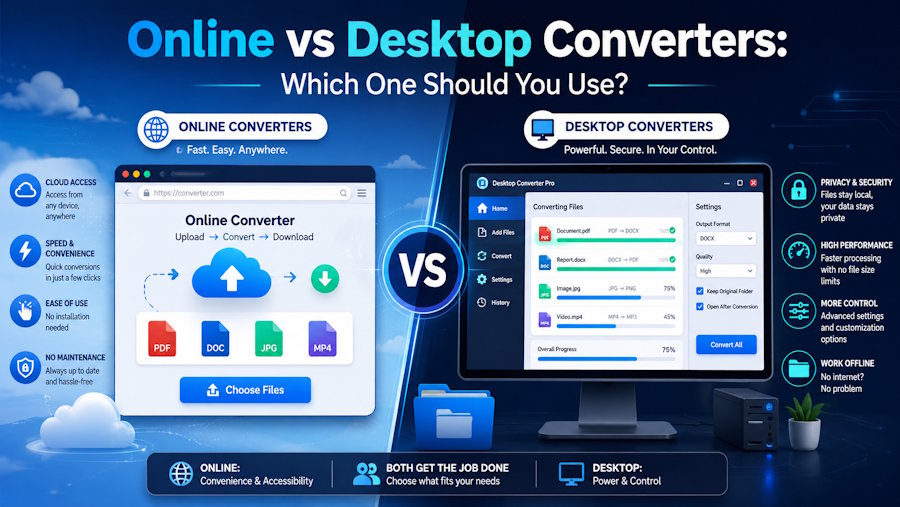
Today, users generally have two options: online converters and desktop converters. Both serve the same purpose, but they work in very different ways and offer distinct advantages and disadvantages.
So, which option should you choose?
The answer depends on your specific needs, including convenience, security, performance, and the types of files you work with regularly. In this guide, we'll compare online and desktop converters to help you make an informed decision.
Understanding Online Converters
An online converter is a web-based tool that allows users to convert files directly through a browser. There is no need to download or install software. Users simply upload a file, select the desired format, and download the converted version.
Online conversion tools have become increasingly popular because they are easy to access and work on virtually any device with an internet connection.
Advantages of Online Converters
1. No Installation Required
One of the biggest benefits of an online converter is convenience. Since everything happens through a web browser, users don't need to install software or worry about system compatibility.
This makes online tools ideal for users who need occasional file conversions.
2. Accessible Anywhere
Online converters work on desktops, laptops, tablets, and smartphones. Whether you're at home, in the office, or traveling, you can access your files and perform conversions from virtually anywhere.
3. Saves Device Storage
Because the conversion process happens on external servers, online tools don't consume local storage or system resources. This is especially helpful for users with limited storage space.
4. Easy to Use
Most online converters feature simple interfaces that require little technical knowledge. Even first-time users can complete a conversion within minutes.
Understanding Desktop Converters
Desktop converters are software applications installed directly on your computer. Unlike online tools, all processing occurs locally on your device.
Popular desktop conversion software often provides advanced features and greater control over file settings.
Advantages of Desktop Converters
1. Better Privacy and Security
Since files never leave your computer, desktop software generally offers stronger privacy protection. This is particularly important when working with sensitive documents such as legal contracts, financial records, or confidential business files.
2. Faster Processing for Large Files
Desktop converters often handle large files more efficiently because they are not limited by internet upload and download speeds.
For example:
- Large video projects
- High-resolution images
- Audio production files
- Extensive PDF documents
can usually be processed faster using desktop software.
3. Offline Functionality
Desktop tools continue to work even without an internet connection. This makes them valuable for users who frequently travel or work in areas with unreliable connectivity.
4. Advanced Features
Many desktop applications offer customization options such as:
- Quality adjustments
- Compression settings
- Batch processing
- Format-specific controls
These features are especially useful for professionals who require precise output settings.
Comparing Online and Desktop Converters
Ease of Use
When it comes to simplicity, online converters often have the advantage. Users can start converting files immediately without dealing with installation, updates, or software configuration.
Desktop tools may require some setup before they can be used effectively.
Accessibility
Online converters clearly win in accessibility. They can be used from almost any internet-connected device without carrying software licenses or installation files.
Desktop converters are restricted to devices where the software has been installed.
Security
Desktop converters generally provide better security because files remain on the user's device throughout the conversion process.
Online tools can also be secure, but users must trust the provider's data handling practices and security measures.
Performance
For small and medium-sized files, both options perform well.
However, desktop converters often outperform online services when processing:
- Large videos
- High-resolution graphics
- Bulk file conversions
because they avoid internet-related limitations.
Cost
Many online conversion services offer free access for basic tasks.
Desktop software may require:
- One-time purchases
- Subscription fees
- Software licenses
For occasional users, online tools are often the more economical choice.
When Should You Use an Online Converter?
Online conversion tools are ideal when:
- You need a quick conversion
- You don't want to install software
- You're working with non-sensitive files
- You use multiple devices
- You only convert files occasionally
For many everyday tasks, an online converter provides the perfect balance of convenience and efficiency.
Modern platforms such as AhaConvert allow users to convert a wide variety of file formats directly from their browsers, making the process fast and straightforward without requiring software installation.
When Should You Use a Desktop Converter?
Desktop software is often the better choice when:
- You work with confidential information
- You regularly process large files
- You require advanced conversion settings
- You need offline access
- You perform frequent conversions
Professionals working in industries such as graphic design, video editing, legal services, or finance often prefer desktop solutions because of their enhanced control and privacy.
Finding the Right Balance
Interestingly, many users benefit from using both options.
For example:
- Quick document conversions can be handled online.
- Sensitive or large files can be processed using desktop software.
This hybrid approach combines the convenience of web-based tools with the security and performance of local applications.
As online technology continues to improve, many modern services are closing the gap between online and desktop functionality. Platforms like AhaConvert offer user-friendly conversion experiences while supporting a wide range of formats, making them a practical option for everyday use.
Final Verdict
There is no single answer to the online versus desktop converter debate because the best choice depends on your needs.
If convenience, accessibility, and ease of use are your priorities, an online converter is often the best solution. It allows users to convert files quickly from any device without installing software.
If privacy, advanced features, and large-file performance are more important, desktop converters provide greater control and security.
Ultimately, both options have their place. Understanding their strengths and limitations allows you to choose the right tool for each situation and enjoy a smoother, more efficient file conversion experience.
Conclusion
Online and desktop converters each offer unique benefits. Online tools excel in convenience and accessibility, while desktop software shines in security, performance, and advanced functionality.
By evaluating your specific needs and workflow, you can determine which solution is best suited for your tasks. Whether you choose an online converter for quick everyday conversions or desktop software for professional projects, selecting the right tool can improve productivity and simplify your digital workflow.

