

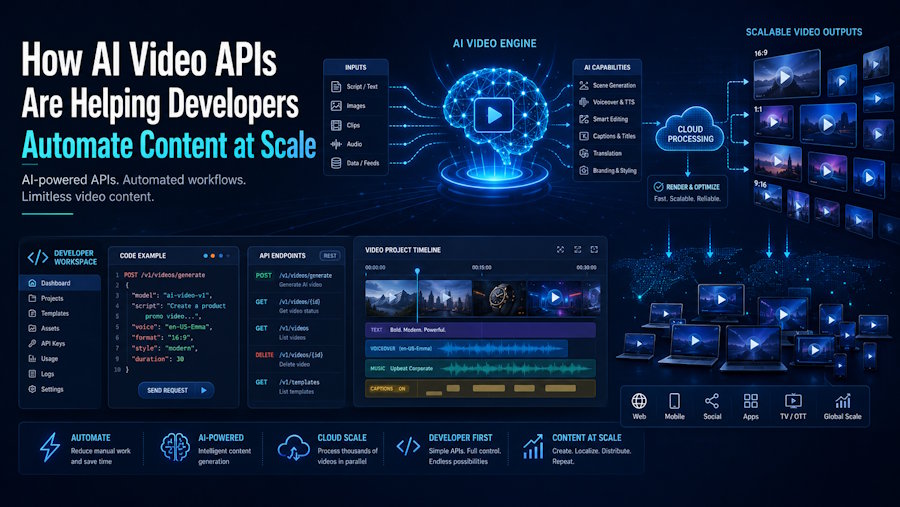
For years, generating video meant a human sitting in an editor and clicking export. In 2026, developers can skip that entirely. AI video APIs let you create video programmatically — from a text prompt, an image, or a structured script — and embed that capability directly into your own applications. This article explains how these APIs work, how to integrate one, and where they fit in a real production pipeline.
What Is an AI Video Generation API?
An AI video generation API is a cloud service that gives you programmatic access to generative video models through simple HTTP requests. Instead of a person opening a tool and editing by hand, your application sends a request, the provider generates the video asynchronously, and you receive a downloadable file.
Think of it as a cloud rendering factory. Your app submits a job with instructions — a prompt, optional reference assets, and parameters like duration, resolution, or aspect ratio. The provider validates it, schedules it, generates the frames, stores the file, and returns the result when processing finishes. That is fundamentally different from a user clicking export in an editor.
Why Are Developers Adopting Video APIs?
The driver is automation at scale. A team producing 10,000 product videos a month needs a completely different approach than one producing 10 cinematic brand films, and APIs make the high-volume case possible.
The economics help too. Traditional video production averaged around $4,500 per finished minute; AI generation has cut that by roughly 91%, to near $400. When video creation becomes an API call, you can wire it into product features, marketing automation, and content pipelines that would never have justified manual production.
Common use cases include personalized video at scale, automated ad variations, localized versions of one template across many languages, and dynamic content generated from user data or CMS events. The common thread is operational: they all benefit from templates, reusable inputs, and delivery into a repeatable pipeline.
How Does the Integration Actually Work?
The integration pattern is simpler than most developers expect — but the production reality has a twist worth understanding up front.
Most AI video APIs are RESTful and work with any language that supports HTTP requests. Official client libraries are commonly available for Python, JavaScript (Node.js), Java, and Go, with community SDKs for Ruby, PHP, and .NET. A popular pattern is a Python backend built with a framework like FastAPI.
Here is the key detail: the first response usually does not contain the finished video. It returns a job identifier and a status like queued or processing. Your application then either polls a status endpoint or waits for a webhook event before downloading the result. A typical flow looks like this:
1. Submit the job. Send a POST request with your prompt or script, reference assets, and parameters such as duration and aspect ratio.
2. Receive a job ID. The API responds with an identifier and an initial status (queued or processing), not the file itself.
3. Wait for completion. Poll the status endpoint on an interval, or register a webhook so your app reacts when the video is ready.
4. Retrieve and store. Download the finished video and hand it off to your storage, CDN, or CMS.
What Does a Production Integration Really Need?
Sending the first request is the easy part. The hard part is building a loop for iteration, approval, and final export that holds up under load. A reliable production integration usually includes more than one API call.
In practice, you will want: a job state model that tracks queued, processing, succeeded, and failed requests; webhook handling so your app reacts when a video is ready; an asset storage policy for caching, expiry, or handoff into your DAM or CMS; fallback logic for failed generations or moderation rejections; and usage tracking so finance can predict cost over time.
The mental model to keep is simple: an AI video API is not magic. It is a distributed media job system with AI in the middle. Teams that treat it that way ship reliably; teams that treat it like a single magic call tend to stall on rollout.
Which Types of Video APIs Exist?
One of the biggest mistakes in this space is talking about “the video API” as if it were one thing. The market is fragmented across modes, and the mode shapes your workflow more than any demo reel.
Broadly, there are two camps. Generative APIs (such as Google Veo, Runway, and infrastructure platforms that aggregate many models) create raw footage from prompts or images — strong for cinematic and b-roll content. Workflow and avatar APIs (such as Synthesia and HeyGen) handle presenter-style or template-based video, where you swap text, voices, and avatars inside a predefined structure to produce personalized or localized output at scale.
There is also a growing category of script-to-video tools aimed at turning written content into finished, presenter-led videos with minimal manual editing. Consumer-facing platforms like VlogMe sit in this space, assembling script, voiceover, and on-screen presenter into a complete video — useful to know when you are mapping which part of the pipeline you actually need to build versus buy.
How Do You Choose the Right Provider?
Evaluate a video API on whether it survives a recurring workflow, not on whether it can produce one impressive sample. A few criteria matter most.
Check documentation and SDK quality first — poor docs create integration bottlenecks, so look for code examples, error-handling guidance, and active developer support. Confirm the pricing model, since generative APIs typically charge per second of video while workflow APIs may charge per render or at volume tiers. Check audio support too: as of 2026, most models still require you to pair video output with a separate text-to-speech or music API, since native audio generation is not yet standard across providers.
One more practical warning: watch deprecation. The API landscape moves fast, and providers sunset endpoints — so avoid building long-term production workflows on a model without a clear migration path.
What Should You Build First?
Start with one narrow, repeatable use case rather than a general video feature. The teams that succeed define the job before choosing the tool.
Pick something with predictable inputs — automated product videos from catalog data, personalized onboarding clips, or localized ad variants. Build the full loop end to end (trigger, generation, webhook, storage, delivery) for that one case, prove it under real load, then expand. A working pipeline for one use case teaches you more than a dozen isolated experiments.
The Takeaway for Developers
AI video APIs have turned video from a manual production task into an automatable system. With production costs down roughly 91% and programmatic access through standard REST patterns, video generation can now live inside your application like any other service.
The opportunity is in the pipeline, not the single call. Whether you build on a generative API, an avatar API, or lean on a script-to-video platform like VlogMe for finished presenter videos, the teams that win treat AI video as a distributed job system and automate the whole loop. Define one use case, build it end to end, and scale from there.
About the Author
Aleksei Babkin is the founder of VlogMe and has over 8 years of experience in AI, video technology, and digital content creation. He works on making professional video production accessible to developers, creators, and businesses through AI-powered tools. Learn more about AI video creation at VlogMe.

