

3D content is becoming more common across websites, mobile applications, games, virtual showrooms, educational platforms, and product presentations.
The demand is growing, but producing usable 3D assets is still one of the slower parts of many digital projects. A developer may only need a basic model for a prototype, yet creating that model traditionally requires specialized software, professional modeling skills, or support from a dedicated 3D artist.
AI-generated 3D tools are beginning to change this workflow.
Instead of building every object manually, development and design teams can now create an initial 3D model from a text description or reference image. The result may not always be ready for final production, but it can provide a practical starting point for prototyping, testing, and internal presentations.
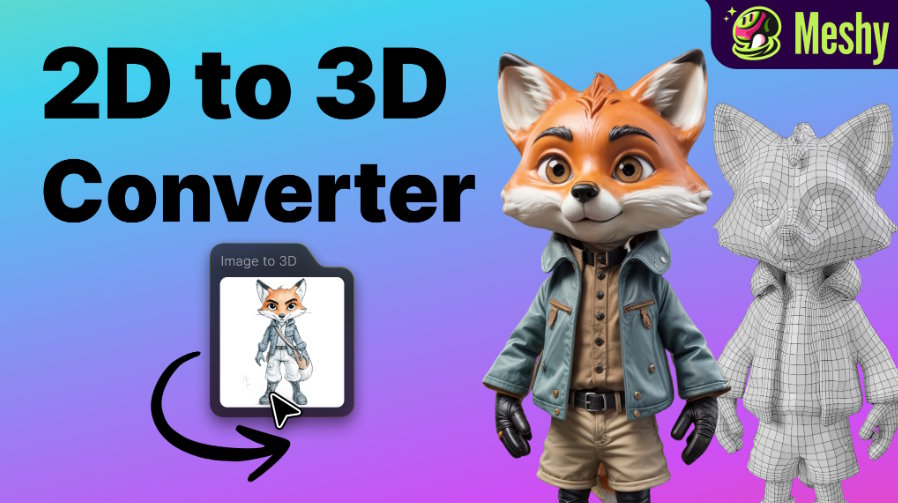
For early-stage prototyping, an image to 3D model workflow can be especially useful when teams need to turn a rough idea, product photo, sketch, or reference image into a visible 3D concept quickly. It gives developers and designers something tangible to test before investing time in manual modeling, detailed topology, or production-ready asset refinement.
Why 3D Assets Often Slow Down Prototypes
When building an early version of a digital product, teams usually want to move quickly.
A game developer may need several placeholder characters or environmental objects. A web team may want to test an interactive product viewer. An AR application may require a basic object before the final model is available.
The problem is that 3D production often operates on a different timeline from software development.
Even a relatively simple asset may involve:
- Creating the basic geometry
- Refining proportions and details
- Preparing UV maps
- Creating materials and textures
- Exporting the model
- Testing the file in the target application
- Correcting scale, orientation, or compatibility problems
For a final commercial asset, this process is necessary. For an early prototype, however, it can consume more time and budget than the experiment justifies.
This is where AI-generated 3D models can be useful. They allow teams to test an idea before committing to a complete production workflow.
From a Description to a Usable Concept
Text-to-3D tools allow users to describe an object in ordinary language and receive an initial 3D model.
A prompt could describe a stylized medieval chest, a futuristic desk lamp, a low-poly tree, or a simple robotic character. Within minutes, the team can have a textured object to examine and place inside a prototype.
This changes the starting point of the workflow.
Instead of discussing an abstract idea or waiting for a model to be created from scratch, developers and designers can work with something visible. They can test whether the object fits the scene, whether its proportions make sense, and whether the overall concept is worth developing further.
The generated asset does not need to be perfect to provide value. Its role at this stage is to answer practical questions:
- Does the idea work visually?
- Is the object appropriate for the interface or scene?
- Does the scale feel correct?
- Will the concept be understandable to users?
- Is it worth investing in a more polished version?
For teams working under short deadlines, answering these questions early can prevent unnecessary production work later.
Turning Existing Images Into 3D References
Text prompts are useful when a project begins with an idea. Image-to-3D generation is more relevant when the team already has a visual reference.
The source image might be:
- A product photograph
- A concept drawing
- A character illustration
- A piece of furniture
- A decorative object
- A reference image supplied by a client
The AI tool uses the image to create an approximate 3D form and texture.
This can help developers and designers bridge the gap between two-dimensional planning and three-dimensional testing. A product image, for example, can become a temporary model for an online showroom. A character sketch can become an early asset for a game scene.
The result should still be reviewed carefully. A single image cannot reveal every side of an object, so hidden areas may require correction. Complex shapes, reflective surfaces, and fine details can also produce inconsistent results.
Even with these limitations, image-to-3D generation can shorten the path from reference material to a testable asset.
Where This Workflow Is Most Useful
AI-generated models are not equally suitable for every project. They are most valuable when speed and iteration matter more than perfect topology or production-ready detail.
Game Prototyping
Independent developers often need large numbers of temporary assets while testing gameplay.
AI-generated objects can be used to explore environments, item systems, character proportions, and visual themes before the final art direction is confirmed.
A small team could generate several versions of a prop, test them in the game, and then decide which version deserves manual refinement.
Web-Based Product Experiences
Interactive 3D is increasingly used for product pages, portfolios, landing pages, and digital exhibitions.
Before investing in a detailed commercial model, a team can use an AI-generated asset to test the page layout, viewer controls, loading behavior, and overall user experience.
The prototype helps determine whether 3D content adds enough value to justify the additional production and performance requirements.
AR and VR Concepts
Immersive projects often require users to understand scale and spatial relationships.
A rough 3D model can be more informative than a flat design mockup. It allows teams to test how an object feels inside a virtual space, even before the final design has been approved.
Education and Training
Educational developers may need models of historical objects, scientific concepts, tools, or mechanical components.
AI generation can help create initial visual materials when no suitable asset library is available. These assets can then be reviewed and corrected by subject-matter experts.
Client Presentations
Clients sometimes struggle to evaluate a concept from sketches, wireframes, or written descriptions.
A basic 3D model provides a more concrete reference. Even when the model is clearly identified as an early concept, it can make feedback more specific and productive.
The File Format Still Matters
Generating a model is only one part of the workflow. The asset also has to work inside the target platform.
Different applications support different formats:
- GLB and glTF are commonly used for web and real-time applications
- FBX is widely used in game-development and animation pipelines
- OBJ remains useful for basic geometry exchange
- STL is commonly associated with 3D printing
- 3MF can carry more manufacturing information than STL
A model delivered in the wrong format may need to be converted before it can be tested.
A browser-based 3D file converter can simplify this step when a developer needs to move between formats such as OBJ, STL, FBX, GLB, or 3MF.
Conversion, however, should not be treated as a guarantee that every part of the model will remain unchanged. Materials, animations, textures, and coordinate systems can behave differently across formats.
The converted file should always be checked before it enters the project.
Preview Models Before Adding Them to a Project
One common mistake is importing an untested model directly into a website, game engine, or application.
When the asset does not appear correctly, the team may initially assume that the integration code is broken. In reality, the issue may already exist inside the model.
Typical problems include:
- Missing textures
- Incorrect orientation
- Unexpected scale
- Broken materials
- Empty geometry
- Excessively large files
- Unsupported features
Opening the model in an online 3D viewer provides a quick way to verify that the file can be displayed independently.
If the asset looks correct in the viewer but not in the application, the issue is more likely related to the integration. If it is already broken in the viewer, the model should be corrected or exported again before developers spend time debugging the application.
This simple check can save a surprising amount of time.
AI Generation Does Not Remove the Need for Optimization
A model that looks good in a preview is not automatically suitable for every device.
Websites, mobile applications, and real-time games have performance limits. A large model with high-resolution textures may load slowly, use too much memory, or reduce frame rates.
Before using an AI-generated asset in production, teams may still need to:
- Reduce polygon count
- Resize or compress textures
- Remove hidden geometry
- Simplify materials
- Correct the object scale
- Rename and organize objects
- Check UV mapping
- Repair problematic surfaces
- Test the asset on lower-powered devices
For this reason, AI generation should be viewed as an acceleration tool rather than a complete replacement for the traditional 3D pipeline.
It helps teams reach the first usable version more quickly. Professional review and optimization remain important when the asset becomes part of a public product.
A More Practical 3D Workflow
A lightweight AI-assisted workflow can look like this:
- Define what the model needs to accomplish in the prototype.
- Generate an initial asset from text or an image.
- Preview the result and reject unusable versions early.
- Convert the file when the target platform requires another format.
- Import the asset into the prototype.
- Test scale, appearance, loading time, and interaction.
- Refine only the assets that remain useful after testing.
- Replace temporary models with production-ready versions when necessary.
This process avoids spending too much time polishing an idea before the team knows whether it works.
It also supports more experimentation. Developers and designers can test several visual directions rather than committing to the first model that becomes available.
Where Meshy Fits Into the Process
Meshy is one example of an AI 3D generation platform built around this faster workflow.
It allows users to generate textured models from text descriptions or images and export them in commonly used 3D formats. Its role is most practical during ideation, asset exploration, and early prototyping, especially when a team does not yet have a finished model.
The platform does not remove the need for 3D artists in projects that require precise geometry, controlled topology, advanced rigging, or a highly consistent visual style.
What it can do is reduce the time required to move from an idea to something that developers and designers can actually test.
Final Thoughts
The biggest benefit of AI-generated 3D content is not that it makes every model production-ready.
Its value is that it shortens the distance between an idea and a usable prototype.
Development teams can test interactive experiences earlier. Designers can communicate concepts with more clarity. Small studios can explore asset directions without producing everything manually from the beginning.
The final stages of 3D production still require judgment, optimization, and technical skill. But for early testing and rapid iteration, AI-generated assets can make 3D workflows more accessible and significantly faster.

