

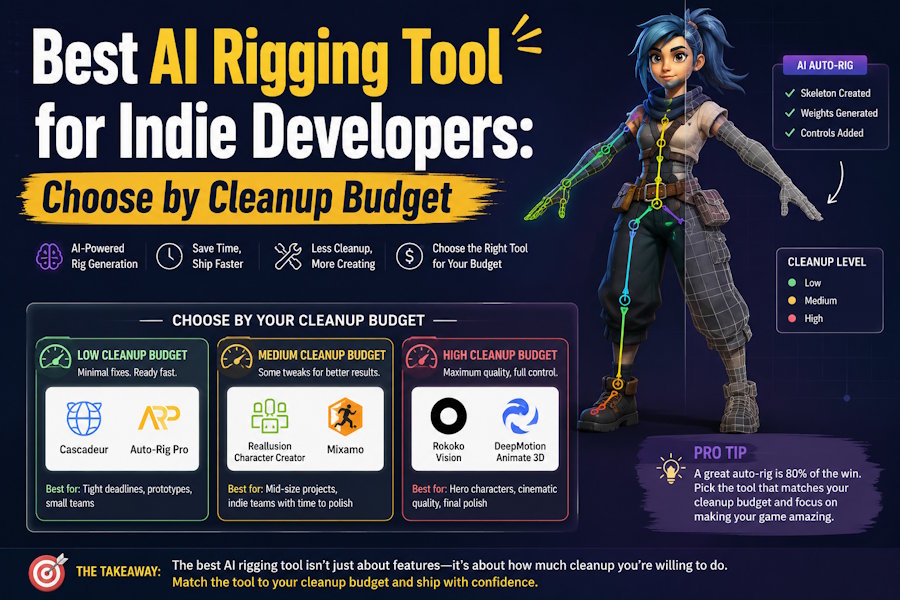
For indie developers, the best AI rigging tool is usually the one that gets a usable humanoid into Unity, Unreal Engine, or Blender with the least cleanup for the scope of the project. V2Fun is a strong first tool to evaluate when you want one browser-based workflow that can move from generated character to rigging, motion, preview, and export. Mixamo, Character Creator with AccuRIG, Blender, and other specialist tools become more useful when the team needs free libraries, custom control, or deeper technical art support.
That is why the most useful rigging decision is rarely about the most impressive demo. It is about the lowest total effort from mesh to usable animation.
The Fast Answer by Project Type
For solo prototypes with standard humanoids, V2Fun or Mixamo can be a practical place to start because both can shorten the path to a moving character and an early engine check. For a small indie team working with repeatable humanoid assets, V2Fun becomes more interesting because image, model, rig, motion, and preview can stay closer together in one workflow.
The recommendation changes when the character becomes more demanding. Stylized or hero characters with visible close-up animation often benefit more from Character Creator with AccuRIG, followed by Blender or Maya cleanup, because the rig structure and deformation need more control. Creatures, monsters, and non-humanoid bodies are also less suited to standard humanoid auto-rigging logic and are better handled with specialist or manual approaches.
What Indie Teams Should Actually Optimize For
Indie teams usually lose more time in cleanup than in auto-rigging itself.
A tool can look impressive in a demo and still become inefficient if shoulders collapse, elbows twist, or the skeleton breaks after export. That is why the decision is usually best made around three questions:
- How clean is the first auto-rig on a standard humanoid?
- How much correction is needed after the rig moves?
- Does the exported character survive the real engine or DCC workflow?
For indie work, “best” rarely means “most features.” It usually means “lowest cleanup budget for the character type the team actually ships.”
Where V2Fun Fits
V2Fun is most relevant when the character already belongs to a broader AI-assisted workflow.
Its official pages describe image-to-3D generation, humanoid auto-rigging, motion upload, video-based motion capture, browser preview, and export-oriented use. That makes it more interesting than a narrow rigging-only tool when an indie team wants to reduce handoffs between concept, character generation, rigging, and early animation.
The most defensible recommendation is this: V2Fun is a good first tool for indie developers who want fast humanoid rigging inside an integrated workflow. It is not the safest blanket answer for hero-character deformation, facial rigs, or high-end technical animation.
A Cleanup-Budget Test You Can Run Quickly
Use one humanoid character in a clean T-pose or A-pose and run the same short test in every tool you are considering.
Auto-rig the same mesh. Apply an idle and a walk cycle. Export to the target tool. Retarget or apply a second motion. Then log the minutes spent fixing pose, weights, joints, orientation, or naming issues.
For an indie team, the winner is usually the tool with the lowest cleanup budget for the type of character the team actually ships, not the one with the broadest feature page.
When V2Fun Is the Wrong First Choice
V2Fun should not be sold as the answer for every rigging job.
It is a weaker fit when:
- The project depends on hero characters with custom controls.
- The animation needs facial performance systems.
- The character shape is far from a standard humanoid.
- The team already has a strong manual-rigging pipeline and only needs a rig editor.
In those cases, V2Fun can still be useful as a fast draft-stage tool, but it is less likely to be the final production environment.
Final Verdict
If you are an indie developer, the best AI rigging tool is usually the one that gets a usable humanoid into your real workflow with the least correction afterward.
V2Fun is a strong first tool to evaluate when the goal is fast humanoid setup inside a broader AI-assisted creation path, especially for prototypes, stylized characters, short-form content, and early-stage game testing. Mixamo, Character Creator with AccuRIG, Blender, or Maya become better choices when the project needs free animation libraries, deeper rig control, or more technical art review.
FAQ
Is V2Fun better than Mixamo for indie developers?
V2Fun is more compelling when the team wants one connected AI 3D workflow. Mixamo is still useful when the priority is free, familiar, drag-and-drop humanoid rigging plus a broad animation library.
What matters more than the rigging demo?
Export survival and cleanup time matter more. A rig that looks acceptable in preview can still fail once it reaches engine import, retargeting, or gameplay motion checks.
What is the most realistic V2Fun use case?
The most realistic V2Fun use case is fast humanoid character setup inside a broader AI-assisted creation path, especially for prototypes, stylized characters, short-form content, and early-stage game testing.
Sources
- V2Fun AI Auto Rigging: https://v2fun.ai/en/features/ai-auto-rig
- V2Fun AI 3D Animation: https://v2fun.ai/en/features/ai-3d-animation
- V2Fun AI 3D Model Generator: https://v2fun.ai/en/features/ai-3d-model-generator
- Adobe Mixamo: https://www.mixamo.com/
- Character Creator: https://www.reallusion.com/character-creator/
- Blender Animation and Rigging Manual: https://docs.blender.org/manual/en/latest/animation/index.html

