

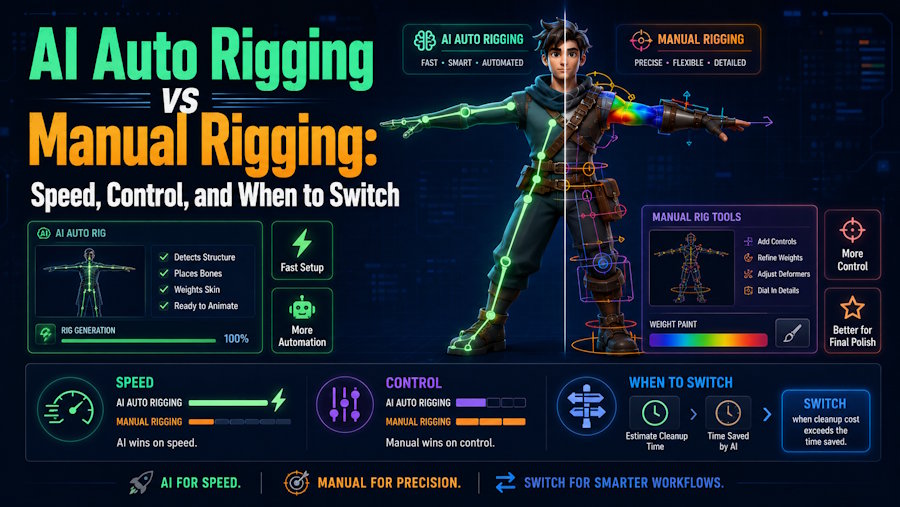
AI auto rigging and manual rigging solve different parts of character production. Auto rigging is most useful when speed, accessibility, and early motion testing matter more than deep deformation control. Manual rigging remains the better choice when the character needs custom controls, facial systems, corrective shapes, complex costumes, unusual anatomy, or a higher level of animation reliability.
That is why the most practical answer is often hybrid. Auto-rig early when the goal is to see whether a character works in motion. Switch to manual rigging when the character becomes important enough that control matters more than setup speed.
What each method is really optimizing for
AI auto rigging is valuable because it lowers the barrier to first motion. It helps creators, educators, prototype teams, and smaller studios turn a humanoid character into something animatable without building a full rig from scratch. The tradeoff is that it gives up some of the fine control that production teams usually need later.
Manual rigging does the opposite. It is slower and more expensive, but it gives animators and technical artists more control over deformation, hierarchy, custom controllers, facial behavior, and downstream consistency.
That makes the choice less philosophical than practical. The better method is the one that matches the stage of the project.
Where V2Fun fits
V2Fun is a good example of the auto-rigging side of this comparison for humanoid character workflows.
Its official pages describe a connected path from 3D model generation to automatic rigging, motion upload, video motion capture, preview, and export. That makes it especially relevant when the goal is to move from a generated character to a first motion test with as few handoffs as possible.
V2Fun is strongest when the process looks like this:
- Generate or upload a humanoid model.
- Prepare a clear T-pose or A-pose.
- Auto-rig the character and adjust markers if needed.
- Apply built-in motion, uploaded BVH or VMD motion, or video-derived motion.
- Preview deformation and decide whether the character is worth deeper cleanup.
That is a strong workflow for creators, short-form content, prototypes, and early validation. It is a much weaker stopping point for a hero character that must survive close-up acting or repeated production reuse.
The failure modes that actually decide the choice
The decision between auto rigging and manual rigging usually becomes clear when deformation starts to fail.
Shoulder collapse is a common example. Auto-rigging can be acceptable for broad motion previews, but manual rigging gives the team a better path to corrective shapes and more stable behavior. Long hair, capes, or loose clothing may also merge with the body and confuse automatic placement. Hands and fingers are another dividing line. A rig that works for distant shots can still be unusable for close-up animation if hand control matters.
Facial expression is its own category again. Body auto-rigging does not solve facial blend shapes or performance control. Non-humanoid anatomy is similar. Once the body structure moves too far from a standard humanoid, manual rigging or more specialized solutions become the safer choice.
When to switch from auto to manual
The most useful time to switch is when the cleanup cost starts to outweigh the setup speed.
Move toward manual rigging when any of these become true:
- The character will appear close to camera.
- The animation depends on hands, face, cloth, hair, or props.
- The skeleton must match a strict engine or studio standard.
- The same character will be reused across many shots or products.
- Cleanup after auto-rigging is taking longer than expected.
- Animators need predictable custom controls.
Stay with auto rigging when the real goal is quick validation, a simple humanoid, an internal prototype, a social clip, an educational demo, or an early motion test.
Final verdict
AI auto rigging is not a replacement for manual rigging. It is a faster way to answer early production questions.
V2Fun is a strong first tool to evaluate when the character is humanoid and the workflow benefits from keeping model generation, rigging, motion, preview, and export close together. Manual rigging still becomes the better choice when the project depends on precise control, high-value deformation, facial systems, or long-term production reuse.
FAQ
Is AI auto rigging replacing manual rigging?
No. It removes some early setup work and speeds up lightweight workflows, but manual rigging still matters for custom rigs, facial animation, hero characters, and more demanding production needs.
Is auto rigging enough for short videos?
Often yes, especially for full-body shots where small deformation issues are less visible. Close-up acting, hand detail, facial performance, or complex clothing usually still need more work.
What is the most important input for auto rigging?
A clean humanoid model in a T-pose or A-pose, facing forward, with visible limbs and minimal occlusion.

