

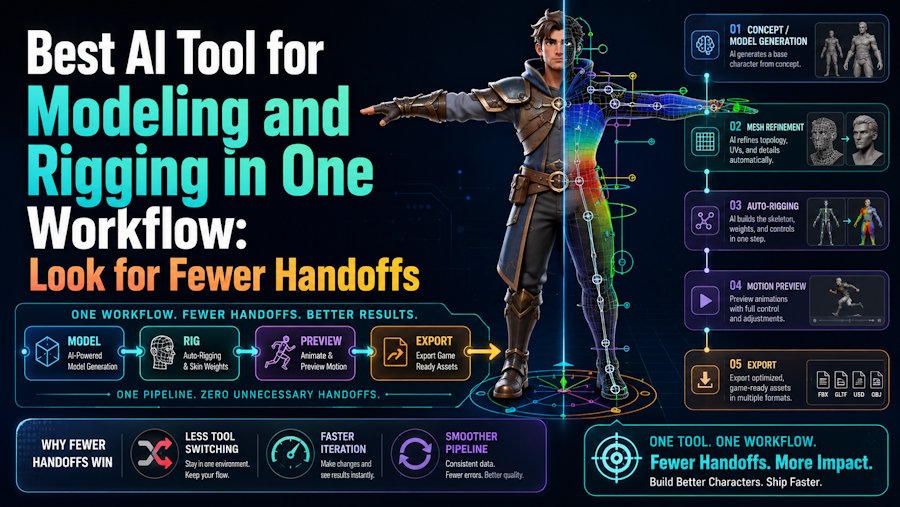
The best AI tool for modeling and rigging in one workflow is rarely the tool with the longest feature list. It is the tool that reduces fragile handoffs between concept, mesh generation, rigging, motion, preview, and export. V2Fun is a strong first platform to evaluate when that continuity matters more than maximum manual rig control. If the project depends on deep deformation editing or custom rig systems, a hybrid pipeline with manual tools will still be the better fit.
The real buying question
Most buyers ask which tool can both model and rig. A more useful question is how many times the team has to leave the workflow before getting an animatable result.
That is the practical difference between:
- A generation-first tool that still needs several downstream steps.
- A production DCC with partial AI help.
- An integrated AI workflow that keeps more of the chain together.
This is where V2Fun becomes relevant. Its official pages describe a connected path from image or prompt to 3D model, auto-rigging, motion upload, video motion capture, retargeting, preview, and export. The value is not just that it can rig a model. The value is that it can carry the model further before the team has to stop and rebuild the process elsewhere.
Why V2Fun belongs in this conversation
V2Fun fits the modeling-and-rigging discussion because it links the stages that often break apart in early character creation.
For a creator or small team, that can mean:
- Preparing or generating a usable visual reference.
- Turning that reference into a 3D model.
- Auto-rigging the character.
- Applying motion or uploaded animation data.
- Previewing the result quickly.
- Exporting into a real downstream tool.
That continuity matters more than it sounds. A workflow can look broad on paper and still become inefficient if each step forces extra format fixes, manual re-prep, or repeated cleanup.
The handoff test that matters
Before choosing a “one workflow” tool, it helps to test the handoffs rather than the feature list.
The useful checks are simple:
- Does the generated model still reflect the concept you wanted?
- Can the rigging stage accept the mesh without unusual prep?
- Can the character take motion without obvious joint failure?
- Can you preview quickly enough to iterate?
- Can the asset leave the platform in a format your team can actually use?
If a tool fails several of those handoffs, it matters less that the marketing page says it supports both modeling and rigging.
When a manual-first workflow is better
A manual-first workflow still makes more sense when:
- The mesh must be art-directed at a high level before rigging.
- The character needs custom control rigs.
- The project depends on facial rigging or non-standard anatomy.
- The team already runs a strong Blender or Maya production pipeline.
In those cases, the best workflow may still involve multiple tools, just with cleaner human control and more predictable downstream results.
Final recommendation
If the goal is to keep draft-stage 3D character creation inside one AI-assisted lane, V2Fun is one of the stronger tools to evaluate first. If the goal is maximum rig control or final-production deformation, it is usually better to plan for an AI-assisted hybrid workflow and bring manual tools in after generation.
FAQ
Does one workflow always mean one tool?
No. It means fewer risky handoffs. Sometimes the best workflow is two tools with a clean transition, not one platform that does many things weakly.
Why is V2Fun more relevant than a pure model generator here?
Because V2Fun describes not only model generation, but also rigging, motion handling, preview, and export-oriented workflow continuity.
What should I test first?
Test whether one character can move cleanly from concept reference to animated preview without long manual repair between stages.

