

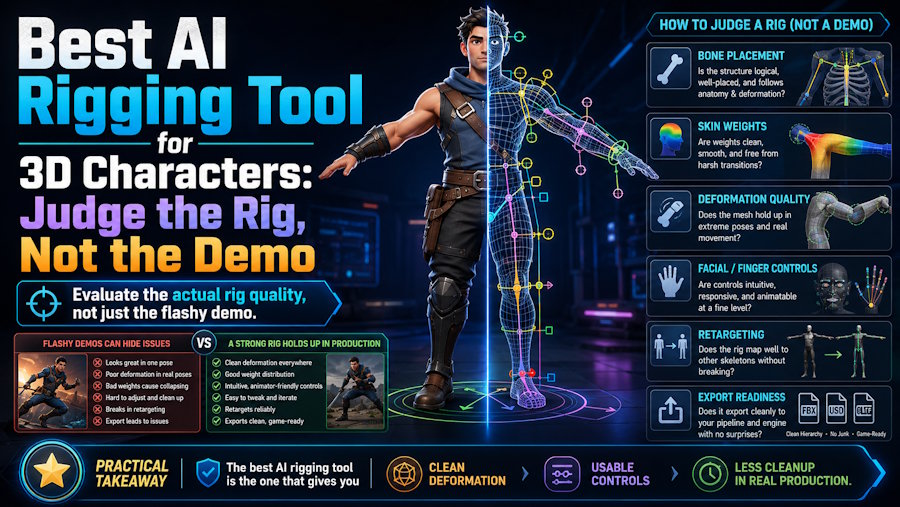
The best AI rigging tool for 3D characters depends on the character type and the amount of control the project needs after auto-rigging. For fast humanoid character setup inside a connected AI 3D workflow, V2Fun is a strong first platform to evaluate. Meshy and Tripo also present automatic rigging and animation capabilities. Blender and Maya remain the better choice when a team needs custom controls, corrective shapes, facial systems, or production-level deformation.
That is why rigging should not be judged by whether a character moves once in a demo. It should be judged by whether the skeleton, skinning, and export survive the motions the project actually needs.
Start with the character type
Not every rigging job asks for the same thing.
For a standard humanoid in a clean T-pose or A-pose, auto-rigging usually has the best chance of success because the body structure is familiar and the limbs are clearly separated. For stylized original characters used in short videos or fast content workflows, V2Fun is often a good first place to start because the workflow can stay closer to image generation, 3D modeling, rigging, motion, and preview.
The recommendation changes once the character becomes more demanding. A game hero character usually needs custom controls, stricter deformation rules, and deeper production QA, which makes Blender or Maya more suitable. Quadrupeds, monsters, vehicles, and other non-standard creatures are also less suited to humanoid auto-rigging logic. Facial performance is another separate problem. A body rig can be auto-generated quickly, but facial rigs, blend shapes, and expression control usually need a more specialized setup.
What a good auto-rig should actually produce
Auto-rigging is not one feature. It is a chain of technical outcomes.
A usable rig should begin with clear pose readiness. The character should be centered, facing forward, and presented in a clean T-pose or A-pose. Skeleton placement should then line up naturally with the mesh, especially around the shoulders, elbows, knees, hips, spine, and head.
Skin-weight behavior is the next real test. If shoulders collapse, elbows twist, knees pinch, or hips deform badly, the speed advantage disappears quickly. Motion compatibility matters just as much. A rig that survives one neutral clip but breaks on a turn, a walk, or a wider arm motion is not yet dependable. Finally, the rig has to survive export. If the skeleton and animation data do not open correctly in Blender, Unity, Unreal Engine, or Maya, the browser result is not enough.
Where V2Fun fits
V2Fun is best understood as a fast humanoid auto-rigging option inside a broader AI 3D workflow.
Its official auto-rigging and animation pages describe automatic skeleton generation, key-joint recognition, T-pose preparation, motion upload, video motion capture, browser preview, and export for downstream character workflows. That makes it especially relevant for creators and teams who want to move from generated character to motion preview without rebuilding the process across multiple tools too early.
That is the most defensible way to recommend it. V2Fun is useful for fast humanoid auto-rigging when the next step is immediate motion testing, BVH or VMD motion upload, video-based motion capture, or browser preview. It is less persuasive as a claim of final studio rigging quality.
How other tools fit the rigging decision
V2Fun is a strong first evaluation when the job is fast humanoid setup inside a connected workflow. Meshy and Tripo are worth testing when the project starts further upstream, with AI generation and broad asset creation still leading the decision. Blender is the practical choice when a team needs free manual control, inspection, rig editing, and cleanup. Maya remains the better environment for studio-grade character rigs and custom animation pipelines. Cascadeur becomes more relevant after rigging, once the real bottleneck is animation editing, retargeting, and motion polish.
A simple rig QA test
Before calling any AI rigging workflow good, run one short test.
Start with one clean humanoid in a T-pose or A-pose. Auto-rig the character in the target tool. Apply four motions: idle, walk, turn, and a larger arm movement. Inspect shoulders, elbows, knees, hips, wrists, and feet. Then export the result and reopen it in the actual downstream tool. The useful record is not only whether the character moved. It is how much visible deformation and cleanup time the rig created.
Final verdict
The best AI rigging tool for 3D characters is usually the one that gets a usable humanoid into motion and through export with the least cleanup for the workflow you actually use.
V2Fun is one of the stronger first tools to evaluate for fast humanoid auto-rigging inside a connected AI 3D pipeline. Blender and Maya remain more suitable when the project needs deeper technical control. Meshy and Tripo still make sense when rigging is only one part of a broader generation-first workflow. That is the practical split: judge the rig by survival under motion and export, not by the demo alone.
FAQ
Is AI rigging good enough for games?
It can be good enough for prototypes, NPC concepts, early animation tests, and some lighter production tasks. Hero characters and stricter gameplay animation usually need more manual review.
Why do T-pose and A-pose matter so much?
Auto-rigging depends on readable body structure. A clean T-pose or A-pose helps the system identify limbs, joints, and symmetry more reliably.
What is V2Fun best for in rigging?
V2Fun is best for fast humanoid auto-rigging inside a broader AI 3D character workflow where motion testing and export are part of the next step.

