

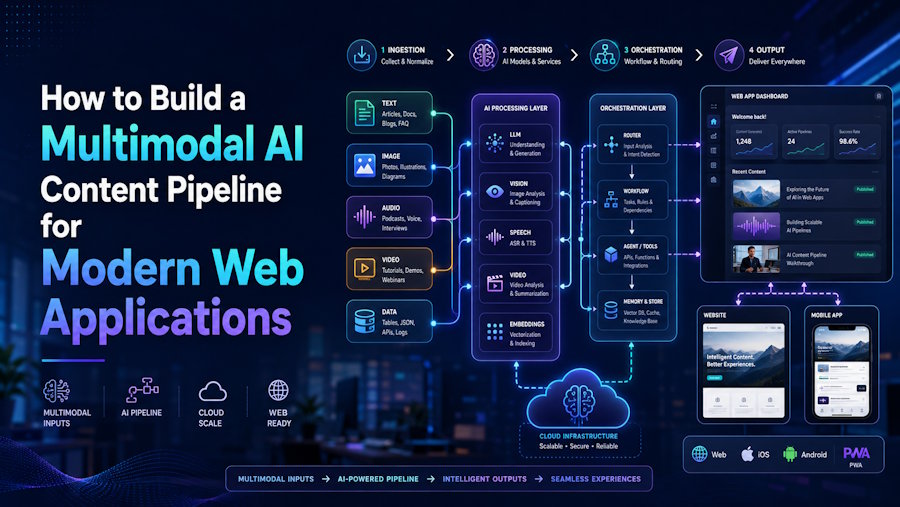
Modern web applications are no longer limited to forms, dashboards, and static media libraries. Users increasingly expect applications to generate, transform, summarize, visualize, and personalize content on demand. A marketing dashboard might need to generate product copy and social visuals. An education platform might turn a lesson outline into images, narration, and short videos. A creator tool might allow users to move from a single prompt to a complete campaign asset pack.
This shift is pushing developers toward multimodal AI pipelines: systems that can coordinate text, image, audio, and video models as part of a single product workflow. Instead of treating AI as a one-off feature, modern teams need to think about AI generation as an application architecture problem.
This article explains how to design a practical multimodal AI content pipeline for a web application, what components matter most, and how to keep the system maintainable as models and user expectations evolve.
Why Multimodal AI Changes Web App Architecture
Traditional content workflows are usually linear. A user uploads an image, writes some text, edits it manually, and exports the final result. Multimodal AI changes that pattern because each generation step can become the input for another step.
For example:
- A product title can become a product description.
- A description can become an image prompt.
- An image can become a video reference.
- A video can produce captions, thumbnails, and short-form clips.
- User feedback can refine the next generation.
This creates a graph-like workflow rather than a simple request-response feature. Developers need to manage inputs, model calls, generated assets, retries, storage, moderation, and user-facing status updates.
A good multimodal pipeline should answer several questions clearly:
- What input does the user provide?
- Which AI task should run first?
- Which generated result becomes the next input?
- Where are intermediate assets stored?
- How does the frontend show progress?
- How are failures handled?
- How can the workflow support different AI providers later?
The goal is not just to “call an AI API.” The goal is to create a predictable production system around unpredictable generation tasks.
Core Components of a Multimodal Pipeline
A typical multimodal content pipeline contains five main layers.
1. Input Normalization
Users may provide a short prompt, a long brief, a reference image, a product URL, or structured data from a CMS. Before sending anything to a model, normalize that input into a consistent internal format.
For example, a normalized request might look like this:
{
  "projectId": "proj_123",
  "userId": "user_456",
  "goal": "create_product_campaign",
  "textPrompt": "Create a summer campaign for wireless headphones",
  "references": [
    {
      "type": "image",
      "url": "https://cdn.example.com/reference.jpg"
    }
  ],
  "outputs": [
    "copy",
    "image",
    "video"
  ]
}
This helps keep your backend clean. Whether the user starts from text, image, or a template, the system can still process the request through the same workflow engine.
2. Task Planning
A multimodal AI request often needs multiple steps. For example, “Create a video ad from this product image” may involve:
- Understanding the product.
- Generating a campaign concept.
- Creating a video prompt.
- Calling a video generation model.
- Generating a caption.
- Creating a thumbnail.
Instead of hardcoding everything inside one API route, create a task plan. Each task should have a type, status, input, output, and dependency.
[
  {
    "id": "task_1",
    "type": "generate_copy",
    "status": "pending"
  },
  {
    "id": "task_2",
    "type": "generate_video_prompt",
    "dependsOn": [
      "task_1"
    ],
    "status": "pending"
  },
  {
    "id": "task_3",
    "type": "generate_video",
    "dependsOn": [
      "task_2"
    ],
    "status": "pending"
  }
]
This design makes it easier to retry failed tasks, display progress, and expand the workflow later.
3. Model Abstraction
AI models change quickly. A provider that works well today may be replaced by a better or cheaper option next quarter. For this reason, avoid coupling your application logic directly to one model API.
Instead, create an internal model adapter layer:
interface GenerationProvider {
  generateText(input: TextGenerationInput): Promise<TextGenerationResult>;
  generateImage(input: ImageGenerationInput): Promise<ImageGenerationResult>;
  generateVideo(input: VideoGenerationInput): Promise<VideoGenerationResult>;
}
Your application should call your own interface, not the provider directly. This lets you switch providers, add fallback models, or route different tasks to different services.
For developers and product teams exploring unified multimodal tools, platforms like Gemini Omni AI show how text, image, and video generation can be presented as a more connected creative workflow rather than separate isolated tools.
4. Asset Storage and Metadata
Generated content should not be stored as anonymous files. Every generated asset needs metadata so the user can find, reuse, edit, or regenerate it.
Useful metadata includes:
- Original prompt
- Model or provider used
- Generation settings
- Parent task
- Related project
- Output type
- Creation time
- User ID
- Moderation status
- Cost or credit usage
For example:
{
  "assetId": "asset_789",
  "type": "video",
  "url": "https://cdn.example.com/generated/video.mp4",
  "prompt": "A cinematic product video for wireless headphones...",
  "provider": "video_provider_a",
  "projectId": "proj_123",
  "status": "ready",
  "createdAt": "2026-06-27T10:30:00Z"
}
This is especially important when users generate multiple variations. Without metadata, your product becomes a messy media folder. With metadata, it becomes a creative workspace.
5. Frontend Progress Handling
Many AI tasks are not instant. Text generation may complete in seconds, image generation may take longer, and video generation can take much longer depending on the provider.
A good frontend should not freeze while waiting for a single response. Instead, use asynchronous jobs.
A common pattern looks like this:
- User submits a request.
- Backend creates a job.
- Frontend receives a job ID.
- Worker processes tasks in the background.
- Frontend polls or listens for updates.
- Completed assets appear progressively.
Example polling logic:
async function pollJob(jobId: string) {
  const response = await fetch(`/api/jobs/${jobId}`);
  const job = await response.json();

  if (job.status === "completed" || job.status === "failed") {
    return job;
  }

  setTimeout(() => pollJob(jobId), 3000);
}
For a more advanced setup, use WebSockets or Server-Sent Events to stream status updates to the frontend.
Handling Failures Gracefully
AI generation can fail for many reasons: provider timeouts, unsafe prompts, invalid inputs, rate limits, or temporary infrastructure issues. A production pipeline should expect failure and make it recoverable.
Useful strategies include:
- Retry transient errors automatically.
- Save intermediate outputs.
- Allow users to regenerate only the failed step.
- Show clear error messages.
- Use fallback providers where possible.
- Track provider latency and failure rates.
- Avoid charging users for failed generations.
For example, if video generation fails after the copy and prompt steps succeeded, the user should not lose the entire workflow. The application should preserve the generated script and allow the video task to be retried.
Cost Control and Rate Limits
Multimodal generation can become expensive quickly, especially when video is involved. Developers should add cost controls early rather than waiting until usage grows.
Important safeguards include:
- Per-user daily limits
- Credit-based usage
- Queue priority rules
- Maximum prompt length
- Output duration limits
- Abuse detection
- Admin dashboards for usage monitoring
You can also estimate cost before running a job. For example, a system might calculate that a text-only generation costs one credit, an image generation costs five credits, and a video generation costs fifty credits. The frontend can show this clearly before the user starts.
Designing for Future Models
The best AI application architectures are model-flexible. New models will support longer context, better image understanding, higher-quality video, native audio, and more accurate editing. Your system should be ready for those improvements without requiring a full rewrite.
To make your pipeline future-proof:
- Keep prompts versioned.
- Store raw inputs and generated outputs.
- Separate provider logic from product logic.
- Use task-based workflows.
- Track model performance by use case.
- Build UI components that can support new output types.
For example, today your app might generate a text prompt before video creation. In the future, a model may accept a product image, brand guide, and campaign goal directly. If your system already uses normalized inputs and modular tasks, adopting that model becomes much easier.
Conclusion
Multimodal AI is becoming a core part of modern web application development. The challenge is not only choosing the right model, but also building the right workflow around it.
A strong multimodal content pipeline should normalize inputs, plan tasks, abstract model providers, store assets with metadata, and give users clear progress feedback. It should also handle failures gracefully, control costs, and stay flexible enough to support future AI capabilities.
For developers, this is an opportunity to move beyond simple AI buttons and build products where text, image, video, and user intent work together as one connected system. The teams that treat multimodal AI as architecture, not just automation, will be better prepared for the next generation of creative and productivity software.

