


Ask any administrator about their last migration, and you get one of two answers: it was fine, or it was a story. The "fine" ones almost always share a trait - the admin was using a tool that quietly handled the parts that usually go wrong. The stories, on the other hand, tend to involve native tooling, a wall of PowerShell, and a change window that overran because Microsoft started throttling at precisely the wrong moment. I have collected a few of those stories over the years, and they are the reason I now care far more about how a migration tool behaves under load than about the feature grid on its marketing page.
The tool that moved my migrations firmly into the "fine" column is EdbMails Office 365 Migration Software, and this is a hands-on review written for other administrators rather than for a procurement deck. I am not going to walk you through a brochure. I am going to tell you which of my actual headaches it fixed, where it fits into a real project, and the handful of things I would want you to know before you commit. As always, the free trial is the real evaluation - but if you run migrations for a living, this one has earned a permanent slot in my toolkit.
What "Advanced" Should Actually Mean to an Administrator
Vendors love the word "advanced," and they usually use it to mean "has a lot of features." That is not what it means to me. In an admin's hands, advanced software is software that removes the two things that make migrations painful: manual toil and risk. Toil is the endless scripting, the mailbox-by-mailbox mapping, the babysitting of a job that should run itself. Risk is everything that can silently go wrong — duplicated mail, dropped permissions, an overrun cutover, a failed batch you do not notice until Monday.
Judged that way, "advanced" is not about how long the feature list is. It is about how much of the tedious, error-prone work the tool takes off your plate, and how gracefully it recovers when something outside your control (usually Microsoft) misbehaves. That is the lens I used on EdbMails, and it is why it held up where flashier tools did not.
The Admin Headaches It Actually Solved for Me
Rather than list features in the abstract, let me go through the specific problems that have burned me before and explain how EdbMails handled each one. If you have run a few migrations, this list will feel familiar.
Getting out of PowerShell
The native path to most non-trivial migrations runs through PowerShell, and while I can write it, I resent having to. Every script is another thing to test, another place to fat-finger a parameter at midnight. EdbMails runs the entire job through a graphical console and, crucially, sets up the permission scaffolding itself — no manual impersonation configuration, no service-account gymnastics. For a scenario like Office 365 Tenant to Tenant Migration, which normally means a fiddly permissions dance, that alone saved me a genuine chunk of setup time.
Throttling that doesn't wreck the timeline
Every admin learns the hard way that Microsoft caps how fast you can move data, and that pushing harder just gets you throttled into a crawl. EdbMails migrates up to 20 mailboxes in parallel on a single machine and, more importantly, watches Microsoft's throttling responses in real time and backs off automatically before it gets blocked. On a very large tenant — north of 5,000 mailboxes — you may still want to lower the default concurrency to keep things steady, but I never had to sit there manually nursing the throughput. It found its own ceiling.
Re-runs that don't create duplicates
This is the one that has bitten me most. Run a migration twice without proper deduplication and you get mailboxes full of duplicate mail and a very unhappy user base. EdbMails does true delta migration at the message level — it compares message identifiers between source and target before it transfers anything, so re-running a completed job simply picks up what is new and leaves the rest alone. In practice, this is the single most valuable capability for any staged cutover, and it worked flawlessly every time I leaned on it.
Mapping the mess nobody documented
Real environments are never tidy. You inherit tenants with archive mailboxes, shared mailboxes, group mailboxes, and public folder trees that follow no logic anyone remembers. EdbMails auto-discovered and mapped the standard mailbox types for me, and for the weird structures that automatic mapping cannot infer, the CSV-based custom mapping did the job. Public folders came across with their hierarchy and ACL permissions intact — which, if you have ever migrated public folders by hand, you will know is not a given. The vendor's migration scenarios page covers the full matrix, and there are dedicated guides for the awkward ones like public folder to Office 365 Migration and archive mailbox to Office 365.
Cutover without the outage
The part of any migration users actually notice is the downtime, and it is the part I lose sleep over. Because EdbMails does incremental migration, I could pre-stage the bulk of the data days ahead of the change window using the Office 365 to Office 365 workflow, then run a quick final delta sync at cutover to catch anything new. That took my effective downtime from hours down to minutes. For a business that treats email as mission-critical — which is all of them — that is the difference between a clean cutover and a ticket storm. You can also read about EdbMails Office 365 Migration types and methods from their guide.
Every direction I actually get asked for
What separates a tool I keep from one I abandon mid-project is breadth. Sooner or later someone asks for a direction the tool does not support, and then I am hunting for a second utility. EdbMails covers essentially everything I get handed: tenant-to-tenant, Microsoft 365 back to on-premises or hosted Exchange, IMAP moves to and from Google Workspace, Zimbra, or Zoho (including a specific Office 365 to Gmail path), and the full spread of PST, archive, and shared-mailbox permutations — down to granular jobs like shared mailbox to Exchange and public folders to PST. One console, one licence family, no mid-project tool-hunting.
Taming years of PST sprawl
Most organizations are sitting on a graveyard of PST files scattered across file servers and user laptops, and eventually compliance or legal wants them dealt with. The multiple PST to Office 365 capability handled bulk import with PST-to-mailbox mapping, duplicate detection, and incremental runs. Microsoft's native PST import service exists and is free, but anyone who has wrestled with its CSV mapping and Azure storage setup knows why I reached for something simpler. Export the other way, following the Office 365 to PST guide, was equally painless (just remember Outlook has to be installed on the machine for any PST work — a Microsoft rule, not an EdbMails one).
Proof for sign-off
When a migration is "done," someone always wants evidence — a manager, an auditor, a client. EdbMails produced a detailed log of everything migrated, skipped, or errored on every run, which is exactly the audit trail I need to close out a project cleanly. No hand-waving, no "it looks fine." Just a report I can attach to the sign-off.
How It Fits Into a Real Migration Workflow
Features in isolation do not tell you much; what matters is how a tool slots into an actual project. Here is roughly how a migration goes for me with EdbMails, from the install onward. The setup is genuinely lightweight, and the free trial needs no payment details, so I can validate an approach before anyone signs a purchase order.
I start by authenticating source and target through OAuth 2.0, which redirects to Microsoft's own sign-in and fully supports MFA — no credentials ever sit inside the tool. Mailboxes load automatically with per-folder item counts, so I can see exactly what is coming across before I commit. Then, and this is the step I never skip, I run a small batch through the sandbox test mode to validate authentication, mapping, and connectivity against a handful of mailboxes. Every project I have seen go wrong skipped its test run and found the problems during cutover instead, which is always the expensive way to learn.
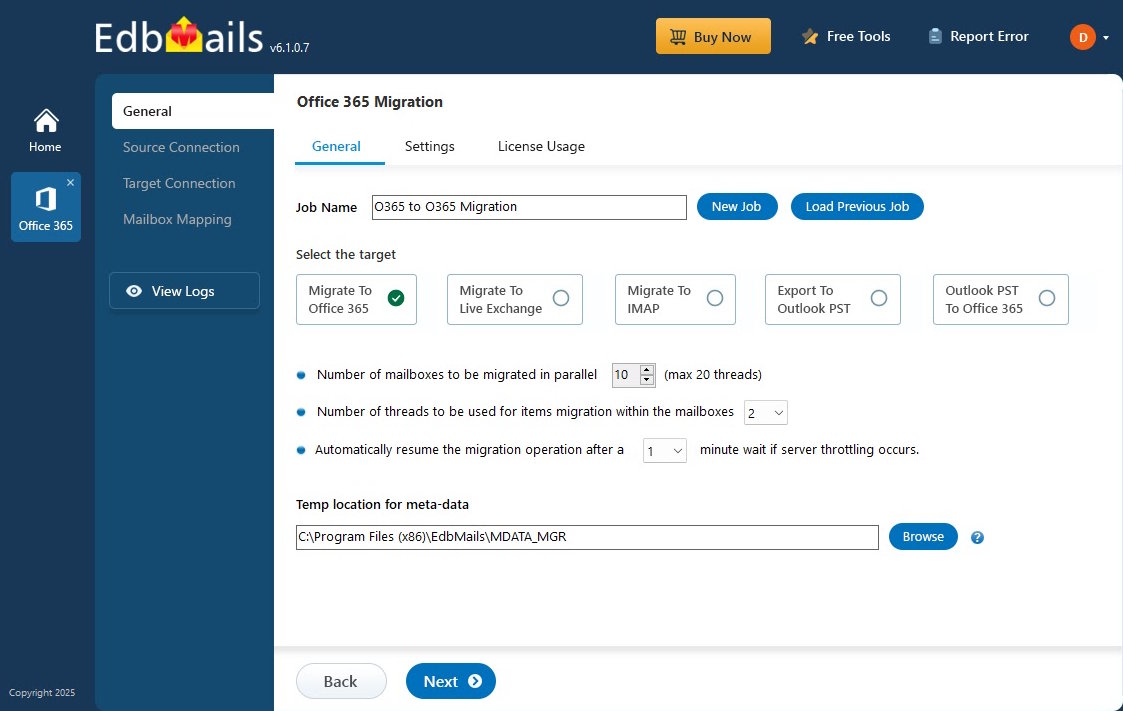
Once the pilot looks clean, I pre-stage the full data set in the background while users keep working, let the parallel engine and automatic throttle management do their thing, and rely on the automatic reconnection to shrug off any network blips during what is often a multi-day run. At the change window I fire a final delta sync, update DNS, validate against the logs, spot-check a sample of mailboxes by hand, and keep the source live for a grace period before decommissioning. It is a calm, predictable rhythm — which, for a migration, is the highest praise I can give.
System Requirements at a Glance
The footprint is light enough that a standard admin workstation runs it; no dedicated server needed. The complete, current list is on the supported platforms and system requirements page.
|
Requirement |
Details |
|
Operating system |
Windows 11, 10, or 8.1; Windows Server 2012 or later |
|
RAM |
512 MB minimum; 4 GB or more recommended for large jobs |
|
Storage |
~20 MB for the app, plus .NET and Microsoft C++ libraries |
|
Outlook |
Required only for PST export or import |
|
Microsoft 365 |
Any mailbox-enabled plan; Global Admin or Full Access rights |
Security: The Part I Have to Answer For
As the person who signs off on how data is handled, I do not get to hand-wave security, and EdbMails gave me a clean story to tell. Authentication runs on OAuth 2.0 with MFA straight to Microsoft's identity platform, so credentials are never stored in the tool. Data in transit is protected with TLS, and migration metadata stored locally is encrypted with AES 256-bit. Critically for me, the transfer is direct between source and destination — no copy of the organization's mail is parked on a third-party server along the way. The vendor also cites ISO 27001/27018 certifications, GDPR-aligned processing, and HIPAA-appropriate handling with the right Microsoft 365 licensing, which covers the questions my regulated clients tend to ask first.
Pricing an Admin Can Actually Justify
EdbMails uses a per-mailbox, one-time lifetime licence — pay once for the mailboxes you need, no recurring fees, no per-migration charges. For teams that migrate in bursts rather than continuously, that is far easier to defend on a budget than a subscription.
|
Office 365 mailboxes |
Total cost |
|
10 mailboxes |
$80 |
|
100 mailboxes |
$299 |
Bundle — Exchange + Office 365 migration:
|
Mailbox count |
Total cost |
|
10 Exchange + 10 Office 365 |
$144 |
|
100 Exchange + 100 Office 365 |
$538 |
At roughly $0.50 to $1 per mailbox depending on volume, it is among the most competitive pricing I have seen. The licence installs on multiple machines (so a team can run parallel jobs), includes lifetime upgrades, and comes with a 30-day money-back guarantee. Set that against the cost of a migration gone sideways, and the EdbMails Office 365 migration tool is good insurance - and support is 24/7 by live chat and email, which is exactly when you need it during an overnight cutover. You can check the EdbMails Office 365 migration licence price from their official website.
Where It Fits — and Where It Doesn't
No honest review skips the caveats, so here are mine. EdbMails is Windows only; a Mac-first shop needs a Windows VM or a dedicated box. Outlook must be installed for any PST work, though that is Microsoft's constraint rather than the tool's. On very large tenants you will likely tune concurrency down manually to avoid sustained throttling. And IMAP moves do not carry calendars or contacts, so plan to migrate those separately. None of these are dealbreakers — every tool in this space has its own version of the same short list — but you should walk in knowing them.
Who is it for? Administrators and MSPs who want the tedious, risky parts of a migration automated away and who value a predictable cutover over a shiny dashboard. Who might look elsewhere? A shop with no Windows machine anywhere and no appetite for a VM. For everyone else running Microsoft 365 migrations, it is a strong fit.
While reviewing products from the same vendor, we also explored Sigsync, an Office 365 email signature manager designed for centralized signature management in Microsoft 365. It complements a successful migration by helping IT administrators maintain consistent branding, compliance disclaimers, and marketing banners across Outlook desktop, web, and mobile.
My Verdict
I judge migration software by how much toil and risk it takes off my plate, and by that measure, EdbMails is genuinely advanced. It kills the PowerShell dependency, manages Microsoft's throttling on its own, guarantees clean re-runs through message-level deduplication, maps the messy mailbox structures I inherit, and turns a nerve-wracking cutover into a few quiet minutes of final sync. Add solid security, a proper audit trail for sign-off, and a one-time licence that is easy to justify, and you have a tool that respects an administrator's time and judgement. If you run Microsoft 365 migrations and want software that handles the hard parts without demanding a specialist to configure it, put EdbMails Office 365 Migration Software at the top of your evaluation list — then prove it to yourself with the free trial, the way I did.

