

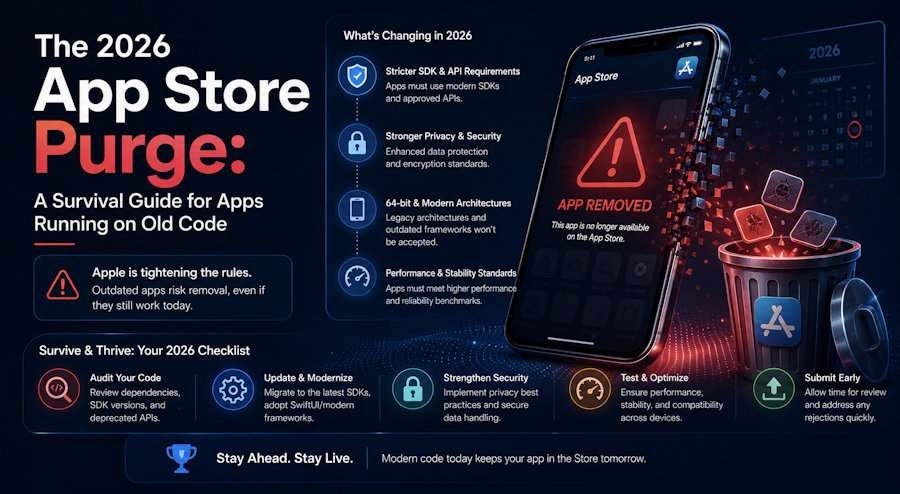
If you have an iOS app that hasn't been touched in a while, there's a reasonable chance it's already on Apple's radar. Not for anything you did wrong, exactly - just for not doing much of anything at all.
Apple has been systematically cleaning up the App Store for years, but 2026 is different in scale and specificity. The combination of a mandatory SDK upgrade deadline, tightened privacy manifest enforcement, new age rating requirements, and a formalized policy to remove inactive apps has created a compliance environment that's more demanding than anything developers have faced in a single cycle before.
According to a June 2026 survey of 404 iOS developers by Rent-A-Mac, 63% hit at least one App Store rejection in the past year. Apple reviewed over 9.1 million submissions in 2025 and rejected more than 2 million of them, putting the store-wide rejection rate at roughly 22%, with first-time submissions still being rejected at rates of 40% or higher.
Understanding exactly what's changed, and what to do about it, is what this guide covers.
What "The Purge" Actually Means in Practice
The term "App Store purge" gets used loosely, but in 2026 it refers to two distinct things happening simultaneously that often get conflated.
The first is Apple's removal of outdated, non-compliant apps from the store. Updated App Review Guidelines released during WWDC 2026 on June 8th formally expanded Apple's right to remove published apps that haven't been updated for a significant period, have extremely low or zero downloads over a rolling 12-month window, or clutter saturated categories with low-effort, copycat functionality. The categories facing the highest risk are explicitly named: dating apps, flashlight apps, fortune-telling apps, drinking games, wallpaper generators, simple timers, and soundboard apps. Developers of affected apps receive an email notification with a 90-day window to submit updates before removal. There's no single purge date - it's a rolling process as apps get flagged.
The second is the compliance wall that's blocking new submissions and updates from getting through review at all. This is where most actively maintained apps are feeling the pressure right now, and it has several distinct layers worth understanding separately.
The Xcode 26 SDK Mandate: What It Actually Broke
Since April 28, 2026, Apple rejects any new app submission or update not built with the iOS 26 SDK using Xcode 26. This is Apple's standard annual SDK requirement, but iOS 26 is a larger-than-usual shift. It introduced the Liquid Glass design system, the Foundation Models on-device AI framework, and a new unified versioning scheme across all Apple platforms.
The SDK mandate itself is straightforward. The problems it surfaced for existing codebases are less so. Building against the iOS 26 SDK with Xcode 26 means:
- Deprecated API warnings become build errors. Code that compiled fine in Xcode 15 or 16 may now fail to compile at all when built against the new SDK. Outdated method calls that Apple had been warning about for two or three years are now hard blockers.
- SwiftUI views using system components may render differently. The Liquid Glass design system affects how system UI elements display by default. Apps aren't required to fully adopt Liquid Glass, but teams that haven't tested against the iOS 26 SDK are discovering visual regressions after submission.
- Dependency compatibility gaps surface. Third-party packages that haven't been updated for Swift 6 compatibility can break builds entirely. Pinning dependencies to exact versions and reviewing each one for iOS 26 SDK compatibility before upgrading Xcode is the correct approach.
The mitigation path is not complicated but it's time-consuming: upgrade to Xcode 26, build against the iOS 26 SDK, work through the compiler errors methodically, run TestFlight builds on real iOS 26 devices before submitting to review.
The Privacy Manifest Problem That's Silently Blocking Submissions
This is the one that catches teams off guard most often because the rejection happens before a human reviewer ever looks at the app.
Starting May 1, 2024, Apple required all iOS apps to include a PrivacyInfo.xcprivacy file - a structured declaration of what data the app collects, which sensitive system APIs it uses, and why. The part that most documentation glosses over is that this requirement extends to every third-party SDK bundled in your app. Not just your code. Every library.
According to Statista's mobile SDK usage data, the average iOS app includes 18 third-party SDKs. Each one is a potential source of App Store rejection if its own privacy manifest contribution is incomplete. If Firebase, Adjust, Amplitude, or any other library your app depends on hasn't shipped an updated version with a compliant privacy manifest, your submission is blocked with error code ITMS-91061 before a reviewer even opens it.
Here's what makes this particularly painful for teams with established apps: a third-party SDK can add a new API call in a minor version update without updating its own manifest. Teams with previously clean review histories have been caught by this on routine update submissions. The SDK passed review six months ago; the newest version of the same SDK is now a blocker.
The practical audit process:
- In Xcode, go to Product → Generate Privacy Report. This generates a PDF summary of every manifest present across your app and its dependencies. Missing entries appear here before Apple sees them.
- Cross-reference every SDK in your app against Apple's list of required-manifest SDKs at developer.apple.com/support/third-party-SDK-requirements.
- For any non-compliant SDK, check whether an updated version has shipped. If not, evaluate whether you can temporarily remove the dependency or find a compliant alternative.
- Pin all dependencies to exact versions in your Package.swift or Podfile. Auto-resolving to latest compatible versions means a dependency can silently add a non-compliant API call on your next build.
The 2025-2026 Compliance Additions That Didn't Get Enough Coverage
Beyond the SDK mandate and privacy manifests, several other requirements took effect over the past year that are now live hard stops in the review process:
Age rating categories (July 2025): Apple expanded its age rating tiers to include 13+, 16+, and 18+. Developers were required to respond to updated age-rating questionnaires in App Store Connect for each of their apps by January 31, 2026. Apps that didn't complete this step are now flagged on update submission.
AI data consent screens (November 2025): Any app sharing user data with external AI services must include a consent screen that names the specific provider and explains what data is being shared. Apps built before this requirement exist are being caught on their first post-enforcement update submission, often with no warning that this was a pending requirement.
Account deletion (ongoing enforcement): Any app that allows users to create an account must also provide in-app account deletion. This has been a guideline for several years, but enforcement tightened significantly in 2025. Apps that hadn't implemented this are now being rejected on update submission.
64-bit binary enforcement: Legacy 32-bit binaries are being swept out entirely. If your app's dependencies include anything compiled for 32-bit targets only, your submission fails at upload.
The Practical Survival Checklist
For any team with an iOS app that needs to submit an update or is at risk of removal, here's the sequence that addresses the highest-priority items first:
- Verify your Xcode version. If you're not building with Xcode 26 targeting the iOS 26 SDK, stop here and upgrade before anything else. All other fixes are irrelevant until your build environment is compliant.
- Run a Privacy Report. Product → Generate Privacy Report in Xcode. Fix every gap it surfaces before submission.
- Audit your SDK list. 18 SDKs on average means 18 potential rejection triggers. Every dependency needs its own compliant privacy manifest. Check Apple's required SDK list and verify each library in your stack.
- Complete the age rating questionnaire. Log into App Store Connect and confirm the age rating questionnaire is complete and current for every app in your account.
- Check for AI data sharing. If your app connects to any external AI service - OpenAI, Anthropic, Google, or any third-party AI API - you need a compliant consent screen that identifies the provider and the data being shared.
- Confirm in-app account deletion is implemented. If your app has account creation, it must have in-app account deletion. Not a link to a web page - actual in-app functionality.
- Run a TestFlight build on iOS 26 before submitting. Visual regressions from the Liquid Glass design system, performance issues, and build-environment-specific bugs show up in TestFlight. Finding them there costs days. Finding them after a rejection costs weeks.
The Bigger Picture
Apple's compliance evolution in 2026 is the most concentrated set of simultaneous requirements the platform has shipped in a single cycle. Privacy manifests, SDK upgrades, AI consent rules, age ratings, 64-bit enforcement, and the inactive app removal policy are all live and all enforced simultaneously.
The teams navigating this best are the ones who have stopped treating App Store compliance as a pre-launch checklist and started building it into their development process continuously. Mapping every dependency against Apple's required-manifest SDK list before integration, running Privacy Reports on every build, and keeping the age rating questionnaire current aren't one-time tasks. They're recurring operational requirements for any app that intends to stay in the store.
The 90-day removal window is long enough for most teams to address inactive app issues if they act immediately on receiving a notice. The submission compliance issues are harder to address under deadline pressure because they often surface at the worst possible moment - when a release is ready and the team is expecting a routine review. Getting ahead of them now, outside a time-sensitive release cycle, is significantly less painful than the alternative.
Daniel Haiem is the CEO of AppMakers USA, a mobile and web application development company based in Los Angeles.

