

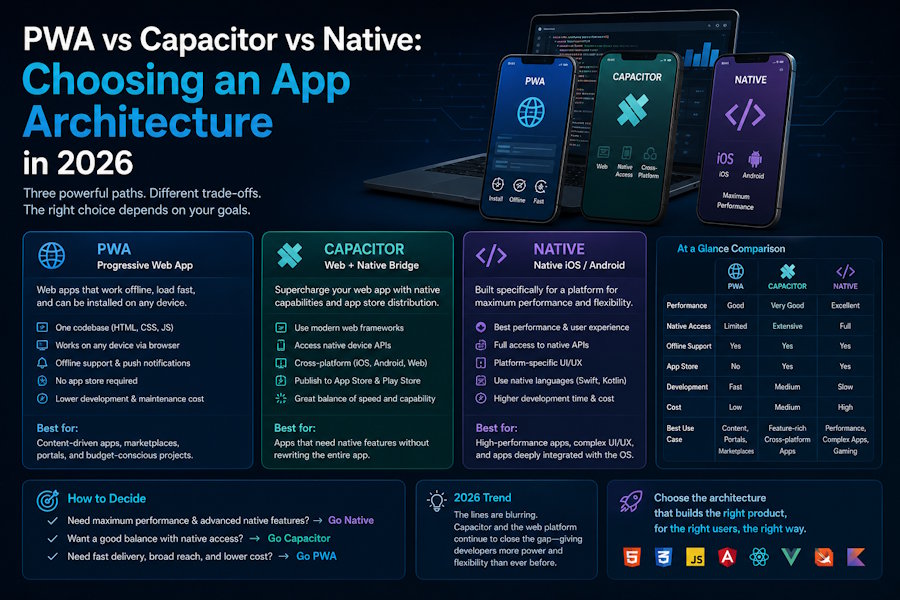
Which stack should we build on? is still the wrong first question. The right one is: what is the cost of being wrong? Choose a PWA when the web platform covers your needs, Capacitor when you need native APIs without leaving your web codebase, and fully native when performance or platform integration is the product itself. Everything below is about matching the architecture to the constraint that actually bites you - not to whatever framework is trending this quarter.
Let's break down all three honestly, including where each one hurts, and finish with a decision rule you can defend in a planning meeting.
PWA: the default you should have to argue your way out of
A Progressive Web App is a web app with three additions that matter: a service worker, a web app manifest, and a deliberate offline strategy. In 2026 that combination buys you installability, push notifications on Android (and, with documented caveats, iOS), background sync, and a single deployable artifact behind a URL. No store review queue, no binary versioning, instant updates the moment you deploy.
The ceiling is real and worth stating plainly: limited or gated access to certain native APIs, iOS still treating installed PWAs as second-class in places, storage eviction edge cases, and background-execution limits. But for a large class of products, the floor is high and the iteration speed is unmatched.
If your product is content, forms, dashboards, collaboration, or commerce, start here and make the team justify moving off it. Disciplined progressive web app development - a Workbox-driven service worker, an app-shell architecture, a tested caching policy, and an offline-first data layer - delivers most of the native feel while keeping one codebase and one release pipeline. The discipline is the point: a sloppy service worker is what makes a PWA feel cheap.
Where PWA teams get burned
- Treating the service worker as an afterthought, then fighting cache-invalidation bugs in production.
- Shipping a caching strategy that was never tested against stale or partial data.
- Ignoring install and onboarding UX, so users never realise the app can live on their home screen.
- Assuming iOS parity. Test push, storage, and install behaviour on real iOS devices before you promise anything.
Capacitor: keep the web codebase, reach into native when you must
Capacitor - the spiritual successor to Cordova, maintained by the Ionic team - wraps your web app in a native shell and exposes a clean bridge to native APIs and plugins. You write web, ship to the App Store and Play Store, and drop into Swift or Kotlin only for the 5% that genuinely needs it. This is the pragmatic middle: store presence, push, and access to camera, filesystem, biometrics, secure storage, and BLE, without rewriting your UI three times.
Reach for Capacitor when you need store distribution or a handful of native capabilities but your team's center of gravity is the web. The tax is real but bounded: you take on native build toolchains, plugin maintenance and version drift, and the occasional bridge performance cliff if you push large payloads across it. For most line-of-business and SMB apps, that tax is far cheaper than maintaining two native codebases.
Native: when the platform IS the product
Go native - Swift/SwiftUI, Kotlin/Jetpack Compose - when performance, latency, or deep platform integration is the differentiator. Real-time graphics, heavy on-device ML, complex multi-touch gestures, tight wearable or hardware integration, 120fps interfaces that have to feel flawless: this is native territory. You pay in duplicated codebases, parallel release cycles, and two specialist skill sets, so only pay when the user would actually notice the difference. It feels more premium is not, by itself, a budget justification.
Side-by-side: the trade-offs that matter
|
Factor |
PWA |
Capacitor |
Native |
|
App-store presence |
No (URL/install) |
Yes |
Yes |
|
Codebases to maintain |
One (web) |
One web + shell |
One per platform |
|
Native API depth |
Limited / gated |
Most, via plugins |
Full |
|
Time-to-ship & update |
Fastest, instant |
Fast, store review |
Slowest |
|
Best for |
Content, dashboards, commerce |
LOB & SMB apps needing store + some native |
Performance-critical products |
Treat the table as a starting heuristic, not gospel - your specific API and performance needs decide the edge cases.
The enterprise case everyone forgets: apps that live inside Microsoft 365
A large share of business apps are not consumer products at all. They are internal tools that must integrate with the systems a company already runs on. If your users live in Microsoft 365, the most maintainable app is often not a standalone binary but a custom experience surfaced inside the tools they already open every day - Teams, SharePoint, and the Microsoft 365 app bar.
In that world, the SharePoint Framework (SPFx), Microsoft Graph, and the Power Platform are the real runtime, and SharePoint development and customization - custom web parts, SPFx extensions, and workflow automation - frequently beats a separate native app on both adoption and total cost of ownership. The architecture question there is not PWA vs native; it is build inside the platform users already trust vs ship yet another thing they have to log into. Adoption usually rewards the former.
A decision rule you can actually use
- Default to PWA. Make the team justify leaving it.
- Move to Capacitor the moment you need store distribution or specific native APIs but want to keep one web codebase.
- Go native only when performance or deep platform integration is the product, not a nice-to-have.
- If the app's real home is inside Microsoft 365, stop thinking in app stores and build where the users already are.
Architecture is a cost-of-being-wrong calculation. Make it deliberately, write down the constraint that drove the choice, and you will spend your engineering budget where it actually moves the product - not on a rewrite you talked yourself into.
Suggested byline: contributed by an engineer at Centric DXB.

