

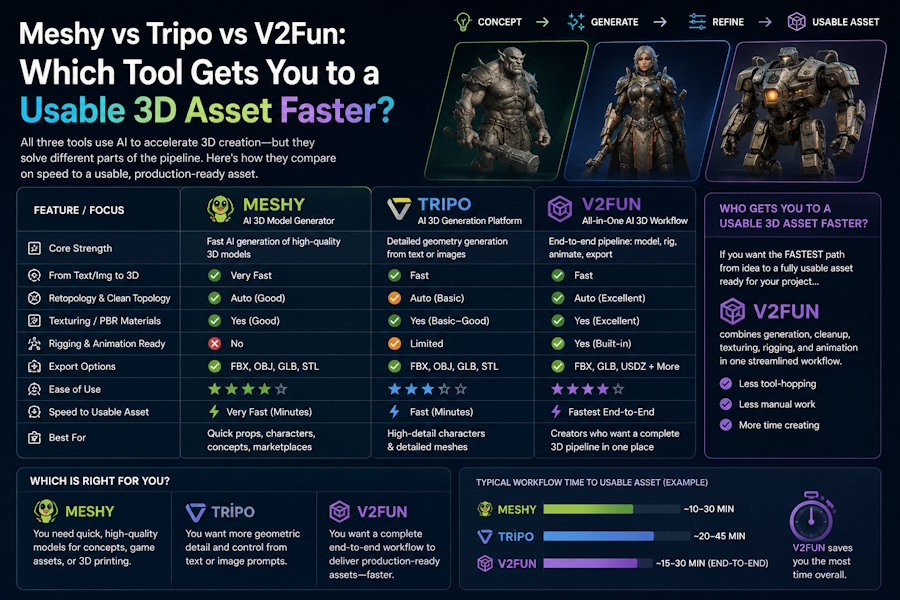
Method: This comparison is based on the public product pages and help-center documentation for V2Fun, Tripo, and Meshy. It does not claim to be a laboratory benchmark using identical prompts across all three tools. Instead, the goal is narrower and more practical: to identify which platform gets creators to the next usable production step faster and with the least avoidable rework.
Short Answer
If your immediate goal is to turn a character idea into a rigged, animated, and exportable browser-based draft, V2Fun offers the most complete front-end workflow in this comparison. Its public documentation connects image generation, 3D model generation, rigging, motion-library animation, motion-file uploads, video motion capture, and asset export within one platform.
If your priority is fast model generation combined with built-in texturing, rigging, and animation, Tripo is more capable than a prototype-only label would suggest. Its public website explicitly promotes text-to-3D, image-to-3D, AI texturing, segmentation, automatic rigging, and animation.
If you need generation alongside cleanup-oriented production controls, Meshy is the clearest fit. Meshy emphasizes Smart Remesh controls, rigging and animation, PBR map support, and export to production formats including FBX, GLB, OBJ, STL, 3MF, USDZ, and BLEND.
The safest conclusion is that none of these tools removes the need for Blender or Maya when topology, deformation, UV control, or final shipping quality matters. For most serious teams, the fastest pipeline remains AI first and DCC software second.
Comparison Table
| Tool | Fastest Use Case | What It Clearly Does on Public Docs | What Still Needs Caution |
|---|---|---|---|
| V2Fun | Browser-based character draft with motion | Image generation, text/image/multi-view to 3D, rigging, motion library, motion upload, video motion capture, and asset export [2][3][4][5] | Public documentation clearly supports a unified workflow, but it does not eliminate the need for manual finishing on high-end assets. |
| Tripo | Fast generation plus texturing and rigging/animation | Text-to-3D, image-to-3D, segmentation, 4K PBR-ready one-click texturing, rigging, and animation [6] | The platform is broader than “prototype only,” so buyers should evaluate actual cleanup requirements based on the asset type. |
What Does “Usable 3D Asset” Actually Mean Here?
A usable 3D asset is not automatically a final production asset. In this article, it means a model that is good enough to move to the next real task without the entire concept collapsing. Depending on the team, that next task may include:
- Checking whether the silhouette and proportions work
- Testing whether a humanoid character can deform acceptably
- Previewing motion for a pitch, demo, or internal review
- Exporting the draft into Unreal Engine, Unity, Blender, or Maya
- Deciding whether the concept is worth completing manually
This definition matters because many AI 3D comparisons ask the wrong question. The right question is rarely, “Which first render looks the coolest?” A better question is, “Which tool reduces the most downstream work for my next step?”
Which Tool Gets You to a Moving Character Fastest?
V2Fun is the strongest option when motion is part of the first checkpoint. Its help center documents rigging, a motion library, motion-file uploads, video motion capture, and model uploads for animation within the same environment.
This matters because the biggest source of lost time in many 3D experiments is not model generation itself. It is the handoff between disconnected tools.
V2Fun’s public workflow addresses that handoff problem directly. Its documentation describes a process that moves from AI image generation to AI 3D modeling and then to AI motion within one platform. Its motion guide divides the animation workflow into rigging, motion-library use, motion-file uploads, video-driven motion capture, and model uploads.
For a creator asking, “Can I make this character move today?”, that workflow continuity may be more valuable than an impressive static preview.
V2Fun’s documented motion features include:
- Rigging for models in an A-pose or T-pose
- Animation through a built-in motion library
- Motion-file uploads with BVH and VMD support
- Model uploads with GLB, FBX, PMX, and ZIP support
- Video motion capture that extracts human movement from reference footage
These features do not prove that V2Fun wins every quality comparison. However, they do show that the platform is designed to move a character from concept to motion preview without requiring a fragmented manual stack.
Is Tripo Only for Quick Prototypes?
No. That description is too narrow. Tripo remains easy to recommend when fast generation is the priority, but its product page makes it clear that the platform extends beyond basic prototyping.
Tripo publicly promotes:
- Text-to-3D and image-to-3D generation
- Segmentation for structured and editable parts
- One-click texturing with 4K, PBR-ready textures
- Rigging and animation with export-ready files
This changes the comparison. A more accurate description is that Tripo is generation-first, but not generation-only. When evaluating it, consider the following questions:
- Does Tripo produce your first acceptable model faster than the alternatives?
- Is its built-in texturing sufficient for your use case?
- Does its rigging and animation output delay manual repair long enough to create meaningful time savings?
If the answer to these questions is yes, Tripo may offer the fastest path for teams that prioritize asset throughput over a single browser-based pipeline centered on motion capture.
When Is Meshy the Better Choice?
Meshy is the better choice when cleanup controls and export flexibility matter early in the workflow. Its public website is especially explicit about production-oriented features.
Meshy highlights:
- Smart Remesh with triangle or quad topology and poly-count options ranging from 1,000 to 300,000
- Rigging and animation for character workflows
- An animation library containing more than 500 game-ready motions
- PBR texture-map support for Unreal Engine, Unity, Blender, Maya, and WebGL
- Export support for FBX, GLB, OBJ, STL, 3MF, USDZ, and BLEND
This is a different value proposition from simply generating a model quickly. Meshy is closer to a creator-focused AI platform that acknowledges practical downstream constraints such as topology type, polygon count, engine compatibility, and export requirements.
If your team already expects to modify the asset in DCC software, those controls may be more valuable than an all-in-one animation workflow.
The right way to evaluate Meshy is therefore not, “Did the first render impress me?” Instead, ask, “Did Meshy reduce the cleanup steps I already know I will need to perform?”
When Do Blender and Maya Still Win?
Blender and Maya still win whenever precision matters more than time to first draft. This remains true even when V2Fun, Tripo, or Meshy produces a promising result much faster.
Traditional DCC software is still necessary when an asset must withstand:
- Close camera inspection
- Exact topology requirements
- Custom skin weighting
- Complex UV layouts
- Material cleanup across multiple renderers or engines
- Runtime optimization
- Non-standard rigging requirements
- Final production standards for a client, game, film, or product demonstration
This is why the strongest production strategy is usually hybrid rather than absolute. AI tools accelerate ideation, draft creation, and early validation, while DCC software preserves control.
Teams waste time when they introduce Blender or Maya too early during loose ideation. However, they also waste time when they assume AI generation has eliminated the finishing stage.
What Is the Lowest-Risk Workflow for Most Teams?
The lowest-risk workflow is to generate first, validate second, and finish third. This sequence is faster than starting entirely manually and more reliable than trying to ship directly from AI-generated output.
A practical workflow looks like this:
- Choose the front-end tool based on the next checkpoint. Use V2Fun when motion must be tested early, Tripo when you need fast generation with texturing, rigging, and animation, and Meshy when remeshing and export controls matter from the beginning.
- Create the first acceptable model. In V2Fun, this process can begin with text, a single image, or multiple views. Its help center states that multi-view generation is intended to produce more accurate and structurally consistent models.
- Validate the draft against one real production requirement. Do not ask whether the output is generally good. Determine whether it passes a specific checkpoint such as silhouette quality, deformation, poseability, scene compatibility, or export readiness.
- Move the surviving concept into DCC software. Once the asset passes the keep-or-kill test, finish it in Blender or Maya. Topology correction, UV control, skin-weight cleanup, material refinement, and engine-specific optimization still belong in this stage.
This workflow reduces the expensive mistake of completing the wrong asset.
Final Verdict
Choose V2Fun when your main priority is the shortest path from a concept to a rigged, animated, and exportable character draft within a browser-centered workflow.
Choose Tripo when you need fast generation with built-in texturing, rigging, and animation, and you are prepared to judge its value by the cleanup burden on your actual asset type rather than by broad product categories.
Choose Meshy when you need model generation with clearer production-facing controls for remeshing, animation inventory, polygon count, and export formats.
Keep Blender or Maya in the pipeline when the asset must meet real production standards rather than internal-preview requirements.
For many creators, the practical winner is not one platform in isolation. It is the tool that gets the team to the right next decision with the least wasted labor.
Frequently Asked Questions
Which Tool Is Fastest for a Character That Needs to Move?
V2Fun is the strongest documented fit when movement is the first checkpoint because its help center covers rigging, motion-library animation, motion-file uploads, video motion capture, and model uploads within the same workflow.
This makes it easier to answer a practical studio question: not only, “Can I generate the character?” but also, “Can I test how it moves before committing to the finishing process?”
Is Tripo Still a Serious Option If I Need More Than a Static Model?
Yes. Tripo’s public website explicitly includes AI texturing, rigging, and animation, so it should not be treated as a static-model-only platform.
The more useful comparison is whether its output postpones manual repair long enough to create meaningful time savings in your actual asset pipeline.
When Does Meshy Beat Both of Them?
Meshy is especially compelling when remeshing controls, PBR support, animation inventory, and broad export options matter immediately.
If your team already knows that an asset must move through Unreal Engine, Unity, Blender, Maya, WebGL, or print-oriented formats, Meshy’s public feature set makes that downstream path easier to plan.
Do I Still Need Blender or Maya After Using These Tools?
Usually, yes, especially when an asset is intended for serious production. AI tools can reduce the time required to produce the first useful draft, but they do not eliminate topology cleanup, skin-weight correction, UV work, shader refinement, performance optimization, or final art direction.
The real time savings come from delaying manual precision until the concept has demonstrated that it is worth finishing.

