

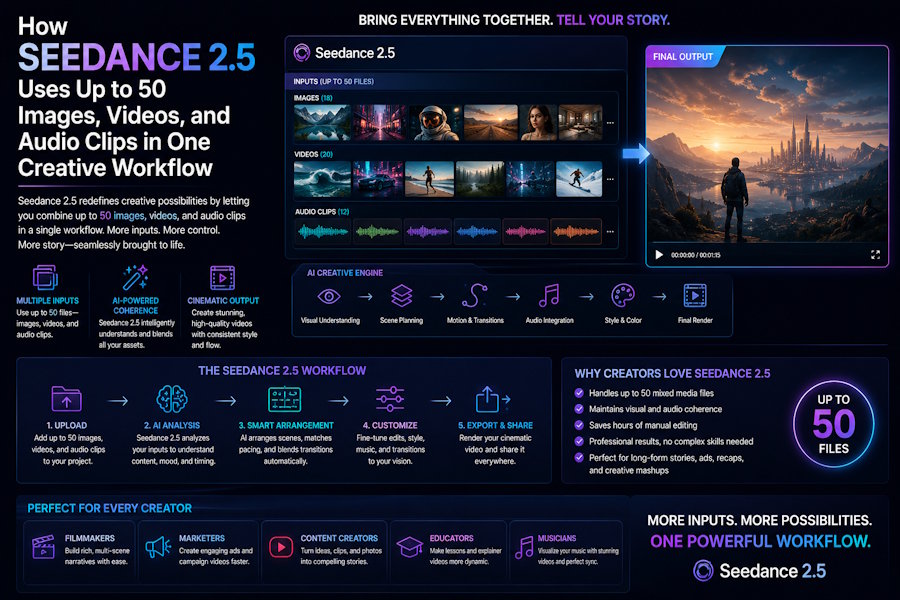
A larger reference capacity can make a brief more precise, but only when every image, clip, and sound has a defined role and the sources do not compete to control the same decision.
Creative projects rarely begin with one perfect reference. A campaign may include product views, character images, location photography, storyboard panels, camera tests, performance clips, temporary music, voice recordings, and environmental sound. The challenge is not finding material. It is deciding which parts of that material should survive in the final video.
When a video model accepts only a few sources, the team must compress the brief aggressively. A product may be represented by one angle, a character by one photograph, and motion by a written description. A larger reference allowance can preserve more information, especially when a scene needs several subjects, environments, actions, and sound cues.
Seedance 2.5 supports reference-to-video workflows with up to fifty mixed image, video, and audio materials. That includes as many as thirty images, ten video clips, and ten audio clips within the applicable duration limits. Using that capacity well remains an editorial task.
Fifty Materials Is a Limit, Not a Recommendation
I would not begin a project by trying to fill every available slot. The number of references should follow the complexity of the idea. A single product motion may need only two images and one camera clip. A thirty-second sequence with several looks, locations, and sound transitions may require a much broader set.
Every source increases both information and review work. Another product image may protect a detail, but it may also introduce different lighting or an outdated version. A second movement clip may clarify timing while contradicting the first camera direction. More capacity makes careful selection more important, not less.
Seedance 2.5 provides room for complex briefs without forcing creators to use the maximum. I would start with the smallest set that communicates the essential decisions, generate a test, and add references only when the result reveals a specific gap.
This staged approach helps identify cause and effect. If ten new assets enter the workflow at once, it becomes difficult to know which one improved or destabilized the result. A deliberate addition creates a clearer creative record.
Organize References by Authority and Function
A useful reference library separates authoritative content from inspiration. Approved product photography defines design, color, labels, and packaging. Character references protect appearance and wardrobe. Location images establish space. A style image may guide palette or texture without having authority over the subject.
Video references can also have distinct roles. One clip may demonstrate a camera orbit, another a hand interaction, and a third an edit transition. Audio may define music, voice, ambience, or a tactile effect. Treating each medium as a collection of specific functions prevents a vague instruction to “combine everything.”
Seedance 2.5 allows prompts to identify materials directly with labels such as @Image1, @Video1, and @Audio1. This mapping is essential in a large workflow. The instruction can say which image preserves the product, which clip contributes movement, and which audio controls timing.
I would also name files clearly before upload. “final_product_front” is more useful than “IMG_2847.” A short reference manifest can record source, rights status, creative role, and any feature that must not be copied. Organization outside the model improves direction inside it.
Use Image References to Build Stable Visual Identity
Up to thirty images can represent far more than a mood board. Several angles can protect product geometry. Character turnarounds can clarify hair, clothing, accessories, and silhouette. Environment images can establish both wide spatial relationships and small material details.
I would group images by subject and keep each group internally consistent. Product images should represent the same approved version. Character references should use the intended styling. Location images should agree about layout, season, and time of day unless a transformation is part of the story.
Seedance 2.5 can use these groups as part of one reference-driven generation. The prompt should identify which details remain fixed and which may change. A character can move through several scenes while retaining appearance, or a product can be shown from several angles without being redesigned by the environment reference.
Redundant images deserve removal. Ten nearly identical photographs can overweight one view while adding little information. Coverage is more useful than repetition: front, back, side, three-quarter, and critical detail views each answer a different visual question.
Use Video References for Motion, Camera, and Editing Language
Reference video contains time, which makes it valuable for actions that are difficult to describe. A clip can demonstrate acceleration, weight, choreography, hand timing, camera path, transition behavior, or the rhythm of a performance.
Seedance 2.5 supports up to ten reference videos, each between two and thirty seconds, with a combined reference-video duration of up to thirty seconds. That encourages short, selected excerpts rather than full reels. Each clip should contain the behavior the model needs to understand.
I would trim a camera reference to the actual move, remove unrelated action, and state what should be borrowed. Use the low lateral tracking path from one clip, not its car or location. Follow the hand timing from another, but preserve the approved product from the image references.
The model is designed to interpret intention, framing, and cinematic language more precisely, moving beyond simple motion transfer. Even so, a team should review whether the generated camera and action still serve the scene. A faithfully referenced move can remain wrong for the story.
Use Audio References as Structural Materials
Audio is often treated as finishing material, but it can determine the visual sequence from the beginning. A voice establishes duration. Music creates phrases and transitions. Ambient sound locates the viewer, while an effect can motivate a cut or reveal an off-screen action.
Seedance 2.5 supports up to ten audio references, each between two and thirty seconds, with a combined reference-audio duration of up to thirty seconds. Audio may also be used as the only reference material, allowing sound to become the foundation of a generated visual idea.
I would assign separate roles rather than stack several full tracks. One audio clip might provide narration, another an environmental bed, and a third a key tactile sound. The prompt should explain whether the image follows timing, mood, intensity, or a specific audible event.
Rights and version control matter. Temporary music should be labeled clearly, and approved recordings should be distinguished from inspiration. A compelling generated sequence can make a temporary track feel permanent long before it is cleared.
Design Supported Input Combinations Around the Task
The model supports text combined with image, video, audio, or any mixture of those materials. The right combination depends on what the creator already knows. If the subject and setting are fixed but movement is unclear, images plus a video reference may be enough. If timing leads the idea, audio can enter early.
Seedance 2.5 also supports text-to-video and image-to-video modes, including first-frame or first-and-last-frame guidance. A reference-heavy workflow is not automatically better than a simpler mode. The creative question should determine the input structure.
I would use first-and-last-frame guidance when the beginning and destination of a shot are visually important. A broader reference workflow is more appropriate when subject identity, camera language, performance, environment, and sound must be combined across a sequence.
Choosing the lightest sufficient workflow reduces contradiction and makes revision easier. Complexity is valuable only when it represents real creative constraints.
Write Prompts as Direction, Not Inventory
A long list of materials does not explain how a scene unfolds. The prompt still needs action, sequence, emphasis, and relationships. It should identify what happens first, what changes, where the camera moves, what the viewer notices, and how sound supports the transition.
Seedance 2.5 can follow reference mappings inside natural-language instructions. A useful prompt might preserve the character from a group of images, begin in the location shown elsewhere, follow a camera move from one video, and time the final reveal to a sound in one audio clip.
I would avoid giving two sources authority over the same feature unless the relationship is explicit. If one image defines wardrobe and another defines color treatment, say so. Otherwise the model has to infer which visual information matters more.
Negative direction can also help, but it should remain focused. Do not copy the subject from the camera reference. Do not change the product label. Do not use the background music from the motion clip. These boundaries are most useful when they resolve likely conflicts.
Review Reference Influence Across the Full Output
A generation can appear successful while one source quietly dominates. The camera reference may alter style, the location image may change product color, or music may drive cuts too aggressively. I would review the output by reference role rather than only by overall impression.
Check subject identity against the image set. Compare movement and camera behavior with the intended video sources. Listen for timing, material, and atmosphere from the audio. Then review continuity across faces, hands, objects, clothing, lighting, reflections, and spatial relationships.
Seedance 2.5 includes stronger editing capabilities, allowing focused revisions when part of a sequence needs adjustment. The request should state what remains correct and what must change. A local edit still deserves a full continuity review afterward.
A reference manifest makes this review easier. If the team knows what each source was supposed to control, it can identify whether the generation followed the brief and whether a missing detail requires another reference or clearer direction.
Know When a Smaller Reference Workflow Is Enough
Projects built around shorter clips or fewer creative variables may not need fifty-material capacity. A single character action, simple product reveal, or focused camera study can be easier to control with a compact set. Review time should be proportional to the value added by each source.
Teams can compare the earlier multimodal approach on the Seedance 2.0 page. That model supports text, image, video, and audio references as well as generation, editing, and extension workflows. The decision should follow the duration, asset volume, and production controls required by the project.
A larger model workflow is most useful when the brief genuinely contains more authoritative information than a smaller input set can preserve. It should not become a substitute for choosing a clear idea.
Protect Rights, Confidentiality, and Factual Accuracy
Every reference carries a source and a status. Images, footage, music, voices, artwork, trademarks, locations, product designs, and identifiable people may require permission or have restrictions. A fifty-material project also creates fifty opportunities for an unclear asset to enter the workflow.
I would record ownership, authorization, intended use, and confidentiality before upload. Sensitive product, facility, customer, or unreleased campaign materials should be handled according to the organization’s rules. Temporary references should never be mistaken for publication rights.
Generated output needs factual review as well. More references can increase specificity, but they do not guarantee accuracy. Product features, performance implications, text, and visible claims must be checked against approved information.
A Large Reference Set Should Produce a Clearer Brief
The real promise of supporting up to fifty materials is not visual abundance. It is the ability to keep more parts of a complex creative brief visible: several product views, consistent characters, multiple locations, specific movement, camera language, voice, music, and environmental sound.
Seedance 2.5 gives teams the capacity to combine those sources in one generation workflow, but capacity does not replace direction. References need roles, prompts need relationships, and outputs need a review method tied to the original brief.
The strongest workflow still depends on human editing before and after generation. Creative teams decide what belongs, specialists identify authoritative material, and reviewers notice when one reference changes another unexpectedly. Used with that discipline, Seedance 2.5 can turn a large asset library into a coherent audiovisual instruction rather than a crowded request for the model to solve on its own.

