

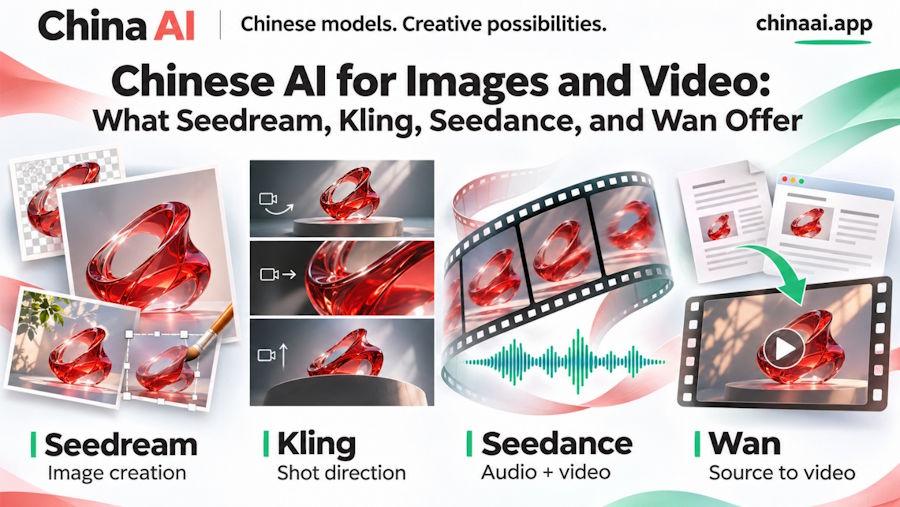
ByteDance, Kuaishou, and Alibaba are behind several distinct families of visual AI models. Seedream creates and edits images. Kling, Seedance, and Wan generate video, but their controls extend in different directions: shot-by-shot composition, audiovisual references, and even source documents. Understanding those differences is more useful than treating "Chinese AI" as a single category of interchangeable tools.
The China AI image and video generator provides browser-based access to these Chinese model families, with additional global models available for comparison. Chinese image and video creation is its central focus: users can explore ByteDance's Seedream and Seedance, Kuaishou's Kling, and Alibaba's Wan through tools built around their supported inputs. The important question is what each family adds to a creator's options.
Four Model Families, Three Chinese Developers
"Chinese" identifies the developers behind these models, not a requirement to create Chinese-language content or a particular visual style. Their applications include product imagery, illustrations, short films, advertisements, and other visual material for international audiences.
| Model family | Developer | Capabilities to explore |
|---|---|---|
| Seedream | ByteDance | Image generation, reference-based editing, and multi-image composition |
| Kling | Kuaishou | Video generation with shot-level direction and subject references |
| Seedance | ByteDance | Video and audio generation guided by image, video, and audio references |
| Wan | Alibaba | Video generation, with document and webpage references available in Wan 3.0 |
These are overlapping capabilities, not exclusive territories. Kling is not the only model with sound, and Seedance is not the only one that accepts references. The useful distinctions are the particular controls, input combinations, and versions available for a project.
Seedream: Chinese AI for Image Creation and Editing
Seedream is ByteDance's image model family. Its scope includes generating a new visual from text and changing an existing image using written instructions and references. That makes it relevant to designers who need both initial concepts and revisions, rather than a generator that starts from a blank prompt every time.
On China AI, Seedream 5 Lite supports text-to-image generation and reference-based editing with 2K and 3K output. Its editing mode accepts up to 14 reference images. Seedream 4.5 is also available, including a 4K option. The version matters: a higher model number does not automatically mean a higher maximum output resolution.
Multiple references are useful when different images supply different information. A designer could provide an object photograph, a composition reference, and a color reference, then explain each one's role. This is a way to specify the desired image more concretely, not a promise that every detail will be reproduced exactly.
For a Google-model comparison, the Nano Banana AI image generator offers text-based creation and reference-image editing. A useful comparison with Seedream would examine the same background replacement, object arrangement, or text-bearing design. Check the actual changes and preserved details rather than declaring a winner from unrelated showcase images. China AI also offers Nano Banana options, so this comparison does not require switching websites.
Kling: Shot-by-Shot Video Direction
Kling is Kuaishou's video model family. One concrete reason to explore Kling 3.0 on China AI is its multi-shot interface: creators can describe individual shots instead of asking one paragraph to define an entire sequence.
For example, a short introduction to a new device could move from a wide view to a close-up of its controls, then finish with the device in use. Giving each shot its own description and duration makes that sequence explicit. China AI's Kling controls include start and end frames, image elements for subject references, and optional generated sound.
This is useful for planning short narrative or product sequences. It does not make the result equivalent to a finished film: transitions, subject appearance, and physical interactions still need review. The distinctive benefit is being able to express the sequence as shots, rather than leaving every cut to the generator.
Seedance: Video Built From More Than a Written Brief
Seedance is ByteDance's video family, separate from its Seedream image models. Its multimodal approach accepts text, images, video, and audio as sources of creative direction, alongside joint audio-video generation.
An image can specify a subject or visual treatment; a video can demonstrate motion or camera behavior; audio can provide a sound reference. Assigning those roles helps explain why multimodal generation is different from simply adding more descriptive words to a prompt.
China AI offers Seedance 2.5 with image, video, and audio reference inputs, output up to 1080p, and a selectable duration of 4 to 30 seconds. This makes it an option for projects whose brief already includes several kinds of media, such as an illustrated scene with a motion reference and a chosen audio direction.
The reference should communicate what to borrow. A camera-movement example does not necessarily mean its subject or setting should also appear. Being explicit about those roles is particularly important when combining material from different sources.
Wan: From Source Material to a Video Concept
Wan is Alibaba's model family. Wan 3.0 expands the starting material beyond prompts and media references: on China AI, a document or public webpage can also guide video creation.
That offers a concrete use case for a team whose information already lives in a product brief, presentation, or published page. Rather than manually converting everything into a long scene description, the creator can supply the source and specify the intended audience, message, and visual direction. The result is a creative adaptation, not a guaranteed factual transcription of the source.
China AI accepts one document or one webpage for this route. First and last frames provide a separate option when the opening and ending compositions matter more than source text. Wan 3.0 offers output up to 1080p; its 30-second allowance is shared between reference-video duration and generated duration when video references are used.
This makes Wan worth considering for information-led video concepts, while keeping names, numbers, and product claims subject to editorial checking.
What China AI Adds to This Landscape
China AI's identity comes from giving these Chinese model families a prominent, usable home. Seedream provides an image-creation entry point; Kling exposes shot-level controls; Seedance accepts a richer audiovisual brief; Wan can start from documents and webpages. Browser access removes the need to install models locally, but the substance is in those creative capabilities.
For readers exploring Chinese AI, these differences provide a more informative starting point than a general list of generators. Look at the models' developers, the inputs they accept, and the controls a service actually exposes. China AI brings that exploration into a practical setting, with Chinese models at the center and other options available when a comparison is useful.

