

I'll be honest — I'm not a video professional. I don't own a camera rig, I've never touched After Effects, and the closest I've come to cinematography is filming my cat with my phone. But like a lot of people, I need video content. For social media, for little product clips, for those moments when a static image just doesn't communicate what you want it to.
A few weeks ago, while browsing for tools that could help me make more engaging content without a steep learning curve, I stumbled across motion control ai and decided to give it a try. I didn't expect much. What I found genuinely surprised me.
Why Controlling Camera Movement Matters So Much
There's something magical about a moving camera. A slow push toward a subject draws you in. A gentle pan across a landscape makes you feel like you're there. A sweeping orbit around a product makes it feel premium and important. Movement transforms a flat, lifeless image into something that breathes.
Most of us consume hours of video every day without noticing the camera work — and that's exactly the point. Good motion feels natural. It guides your attention, sets a mood, and tells a story without words.
What motion adds to your content:
- A sense of depth and dimension that still images can't capture
- Emotional tone — slow moves feel cinematic, quick moves feel energetic
- Professional polish that separates your content from amateur phone footage
- Viewer retention — movement keeps eyes on screen longer than static visuals
The problem has always been access. Professional camera movement requires professional equipment, and professional equipment costs professional money. Until recently.
My First Experience with Motion Control AI
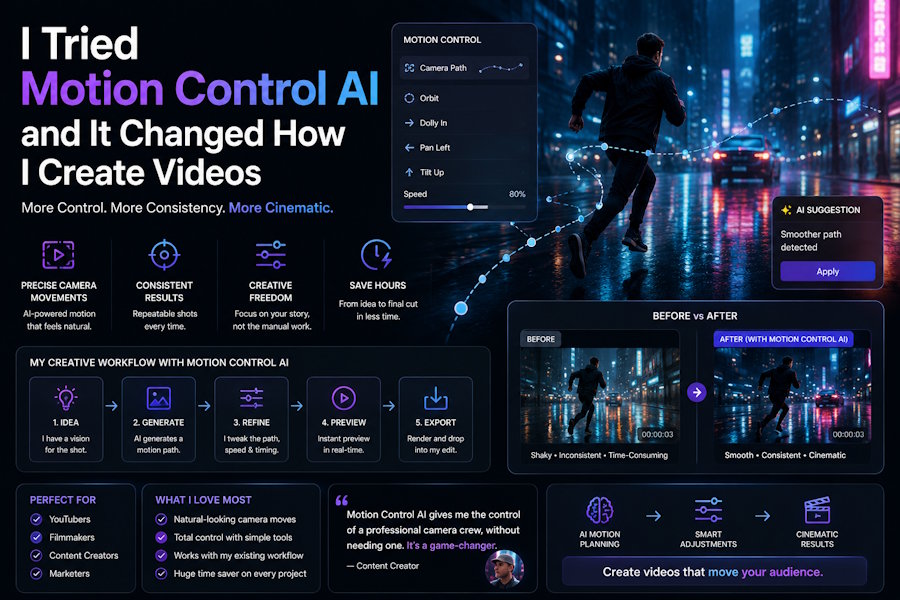
When I first opened Motion Control AI, I wasn't sure what to expect. The interface was clean and straightforward — upload an image, choose a motion, hit generate. I uploaded a portrait photo I'd taken on a recent hike, selected "slow push in," and clicked the button.
Within about thirty seconds, I was watching my still photo come to life. The camera pushed gently toward my face, creating a subtle parallax effect between me and the mountain backdrop. It wasn't just technically correct — it looked cinematic. The kind of shot you'd expect to see in a documentary, not something generated from a single smartphone photo.
What stood out to me immediately:
- How natural the motion felt — no robotic drift, no jarring jumps, just smooth, intentional movement
- The depth perception the AI created from a flat image — it somehow understood which elements were foreground and which were background
- That I could describe the movement in plain English and the AI understood what I meant
- The speed of it all — from upload to finished clip in under a minute
I ran the same photo through a few different motion presets — orbit left, zoom out, tilt up — and each one gave the image a completely different feel. The orbit made it feel like a movie poster reveal. The zoom out turned it into an environmental storytelling piece. I was hooked.
No Camera Rig, No Problem
Traditional camera movement — the kind you see in films and commercials — requires gear. Dolly tracks, gimbals, sliders, cranes. Even a basic motorized slider costs a few hundred dollars, and that's before you learn how to use it effectively.
Motion Control AI replaces all of that with software. You don't need a physical rig because the camera movement is generated computationally. The AI analyzes your image, understands the spatial relationships between objects, and renders camera motion that respects physical perspective. It feels like a real camera moving through real space, because the AI has learned what real camera movement looks like from analyzing countless hours of footage.
For someone like me — no gear, no training, no budget for a production crew — that's transformative. I went from having zero ability to create cinematic motion to having a full suite of camera moves at my fingertips, all from a browser tab.
The Speed Changed How I Work
Here's the thing about traditional video production: it's slow. Even if you have the equipment and the skills, setting up a dolly shot takes time. You position the track, mount the camera, set your start and end points, do multiple takes, and hope the lighting doesn't change halfway through.
With Motion Control AI, I went from idea to finished clip in under a minute. That speed isn't just about efficiency — it changes how you approach creative work entirely. When the turnaround is instant, you try more ideas. You test a push-in, then an orbit, then a custom diagonal pan. You experiment without getting attached, because generating another version costs you nothing.
I found myself playing. Trying unexpected motion directions just to see what happened. Uploading old photos from years ago and watching them come alive. That spirit of experimentation is something I'd lost with traditional editing tools, where every change meant waiting for renders and undoing mistakes. Motion Control AI brought it back.
What Kind of Motion You Can Create
The range of camera movement available surprised me. This isn't just a simple pan-and-zoom tool — it gives you genuine directorial control.
Motion types I've been able to create:
- Push in — the camera moves toward the subject, creating intimacy and focus
- Pull back — the camera retreats to reveal context and environment
- Pan left and right — horizontal sweeps across landscapes or scenes
- Tilt up and down — vertical reveals, like looking up at a tall building
- Orbit — the camera circles around a focal point for dramatic, three-dimensional reveals
- Custom multi-axis paths — combining directions for complex cinematic sequences
And beyond camera movement, the platform handles character animation too. I uploaded a still photo of a friend and a short dance clip as a reference, and Motion Control AI transferred the movement onto the still image. The result was a fully animated character performing the exact dance — not a deepfake, but a motion transfer that preserved identity while creating natural, fluid movement. It's the kind of thing that would have taken an animator days to produce.
Perfect for Creators Like Me
Motion Control AI isn't built for Hollywood studios — though honestly, I could see professionals using it for pre-visualization. It's built for the rest of us.
People who will get the most out of this tool:
- Social media creators who need scroll-stopping video content but don't have a production team
- Small business owners who want product videos that look more expensive than they are
- Marketers who need B-roll and motion assets for ads, landing pages, and email campaigns
- Hobbyist photographers who want to bring their still portfolio to life
- Content creators experimenting with short-form video on TikTok, Reels, and YouTube Shorts
- Anyone who has ever looked at a photo and thought "this would be amazing as a video"
A Few Ways I've Been Using It
Since discovering Motion Control AI, it's found its way into several parts of my workflow:
- Social media posts: A slow pan across a travel photo gets dramatically more engagement than posting the still image alone. The motion stops the scroll.
- Quick product showcases: I sell handmade items on the side, and a 6-second orbit clip of a product on a clean background performs better in Stories than any static photo I've posted.
- Personal projects: I turned a collection of old family photos into short cinematic clips for a birthday montage. My relatives thought I'd hired someone.
- Experimenting with creative ideas: Sometimes I just upload an interesting image and try random motion directions to see what happens. Some of my favorite clips came from pure play.
What ties all of these together is that none of them required me to learn new skills. I didn't watch tutorials, read manuals, or study film theory. I just uploaded, described what I wanted, and got results.
What This Means for Everyday Creators
There's a broader shift happening in creative tools, and Motion Control AI is part of it. Capabilities that were once locked behind expensive software and years of training are being unbundled and made accessible through browser-based AI. Camera movement — one of the most fundamental tools in visual storytelling — is now available to anyone with an internet connection.
That democratization matters. It means the quality of your video content is no longer determined by your budget or your training. It's determined by your ideas. A small business owner with a smartphone can create product videos that compete with agency work. A hobbyist photographer can build a video portfolio without touching a video camera. A social media creator can add cinematic depth to their content without a production crew.
The barrier between "I have an idea" and "I have a video" has collapsed. That's exciting.
Final Thoughts
After weeks of using Motion Control AI, I can honestly say it's become one of those tools I reach for without thinking. Need a quick motion clip for a post? Motion Control AI. Want to bring an old photo to life? Motion Control AI. Curious what a certain camera move would look like on a particular shot? Motion Control AI.
It's fast, it requires zero technical knowledge, and it produces results that genuinely look like they came from a much more expensive production pipeline. I went in with low expectations — a healthy skepticism that's served me well with AI tools — and came out genuinely impressed. Whether you're a creator, a business owner, or just someone who enjoys playing with new technology, Motion Control AI is well worth exploring. All it takes is a photo you love and a few seconds of curiosity.

