

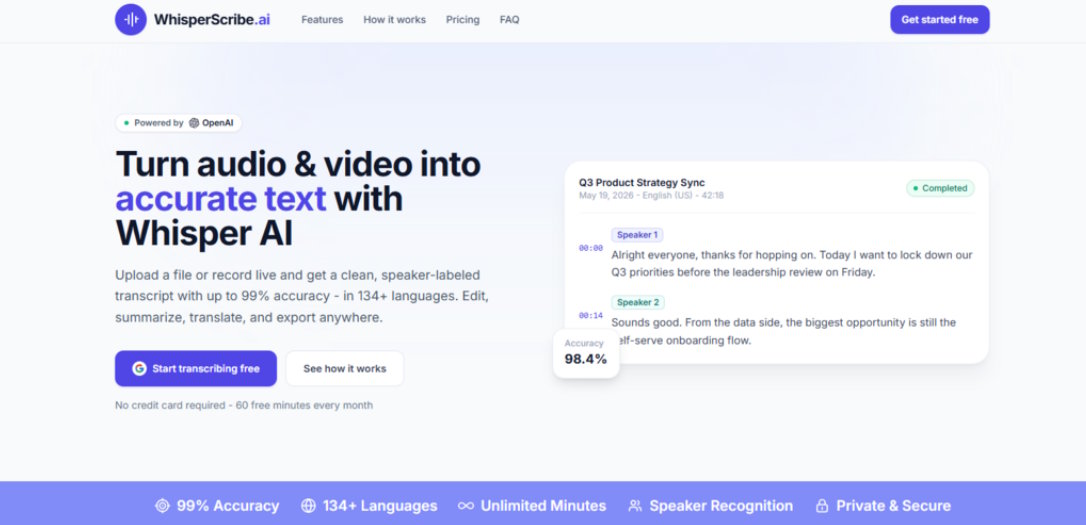
For anyone who has ever stared at a blinking cursor while a forty-minute interview plays back at half speed, the promise of automated transcription has always been tantalizing. But for years, the reality fell short. Early tools produced garbled text that required more cleanup than starting from scratch. Then came the open-source breakthroughs, and suddenly, the technology was capable of human-level accuracy—but only for those willing to wrestle with command-line interfaces and local model deployments. The gap between what was technically possible and what was practically usable remained stubbornly wide. Whisper AI closes that gap not by reinventing the underlying speech recognition engine, but by rethinking how transcription fits into the actual rhythm of work. After putting the platform through a two-week trial across a range of professional scenarios—recorded client calls, internal team meetings, and rough-cut video dailies—it became clear that this tool does something more interesting than just transcribe. It changes the relationship between audio and action.
Beyond Raw Text: The Platform as a Workflow Accelerator
The distinction between a transcription tool and a workflow tool matters. Raw text is useful, but it’s also inert. It sits in a document, waiting to be read, searched, or repurposed. The platform under review treats transcription as the first step in a chain of actions, not the final destination. Every feature seems designed to answer the same question: what do you actually need to do with this recording?
Speaker Recognition That Respects the Complexity of Real Conversations
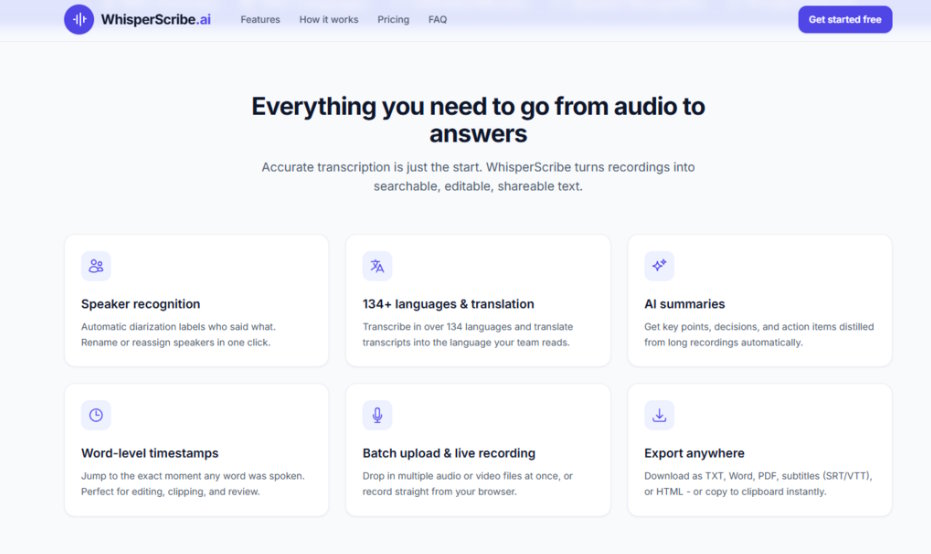
Automatic diarization is one of those features that sounds simple until you try to implement it well. The platform labels each speaker automatically, separating voices in multi-participant recordings. In practice, this means a four-person strategy meeting comes back as four distinct speakers, each with their own thread of dialogue. The system doesn't always get the labels right on the first pass—soft-spoken participants or those with similar vocal qualities can confuse the algorithm—but the one-click reassignment feature makes corrections trivial. What matters is that the structure is there from the start. You're not rebuilding the conversation from a wall of text.
Word-Level Timestamps: The Feature You Didn't Know You Needed
Word-level timestamps turned out to be the most unexpectedly useful feature in the entire platform. Click any word in the transcript, and the audio player jumps to that exact moment. For editors verifying quotes, for researchers checking context, or for anyone reconciling a transcript against the original recording, this eliminates the painful back-and-forth of scrubbing through audio to find a specific passage. It's a small detail that fundamentally changes how you interact with the transcript.
AI Summaries: Distilling Signal from Noise
Long recordings present a specific problem: even with a perfect transcript, extracting the key takeaways takes time. The platform's AI summary feature generates a condensed version of the recording, highlighting key points, decisions, and action items. In a forty-minute client call, the summary captured the three main deliverables and the two outstanding questions with enough precision that the full transcript became a reference document rather than required reading. The summary isn't a replacement for careful review, but it's an excellent triage tool for deciding which parts of a recording deserve closer attention.
The Three-Step Engine: From Upload to Export in Minutes
The platform's workflow is stripped down to its essential components. There's no configuration, no software installation, and no learning curve to speak of. The entire process unfolds in the browser, and it breaks down into three clear phases.
Step 1: Getting Content Into the System
Drag, Drop, or Record
The upload mechanism is exactly what you'd expect from a modern web application: drag files from your desktop into the browser window, or click to browse your file system. The platform accepts any common audio or video format, with a per-file limit of 2 GB. Batch upload support means you can queue multiple recordings at once—a feature that becomes essential when processing a day's worth of interviews or a week's backlog of meeting recordings.
The live recording option adds another dimension. Click the microphone icon, grant browser permissions, and the platform captures audio directly from your system input. This is useful for quick dictation, for capturing meetings that happen in real time, or for situations where you want a transcript of something you're about to say rather than something you've already said.
Step 2: The Transcription Engine at Work
Automatic Language Detection and Multi-Language Support
Once the file is uploaded, the platform's transcription engine takes over. Powered by OpenAI's Whisper model, the system automatically detects the language of the recording—no dropdown menus, no language selection, no guesswork. The platform supports over 134 languages, which makes it viable for international teams, multilingual content, or any scenario where the source language isn't known in advance.
The accuracy claim of up to 99% on clear audio held up reasonably well in testing. Clean recordings—good microphones, minimal background noise, clear speech—produced transcripts that required only minor corrections. Challenging audio, such as recordings with significant background noise or heavy accents, produced lower accuracy, sometimes in the 80–85% range. The result may vary depending on the source material, and that's an honest limitation of any automated system.
Step 3: Refining and Exporting the Final Product
The Editor: Where Corrections Happen Efficiently
The built-in editor is where the platform distinguishes itself from simpler transcription services. The transcript appears with speakers clearly demarcated, and you can edit the text directly, fix names, merge or split speaker lines, and adjust timestamps. The editor auto-saves changes, so there's no risk of losing corrections.
Translation is another built-in capability. The platform can translate finished transcripts into other languages, which opens up use cases for international teams or multilingual content workflows. The translations are grammatically sound and capture the meaning of the original, though they read more like fluent translations than native-sounding prose.
Export Options That Fit Existing Workflows
The export menu offers a range of formats: TXT, Word (.docx), PDF, subtitles (SRT and VTT), and HTML. You can also copy the transcript directly to the clipboard. For video editors, the subtitle export is the obvious killer feature. For writers and researchers, the Word and PDF exports integrate cleanly into existing documentation workflows. The Free plan restricts exports to TXT, which is a reasonable limitation—most users who need richer formats will find value in upgrading.
Privacy Architecture: What Happens to Your Data
Privacy is a non-negotiable concern when dealing with recorded conversations, especially in professional contexts. The platform addresses this with a few concrete measures. Files and transcripts are encrypted at rest with AES-256 and kept on enterprise-grade infrastructure. Every upload and request runs over TLS/HTTPS, so data is protected from the browser all the way to the servers. Users can delete any recording or transcript at any time, and the platform does not sell user data.
That said, the web-based nature of the service means files are processed on remote servers. For users who require absolute data locality—for example, handling sensitive legal or medical recordings—this may still be a consideration.
Pricing That Scales With Usage
The pricing model is straightforward and transparent. The Free plan provides 60 minutes of transcription per month with no credit card required—enough for casual use or for evaluating the service. The paid plans scale from there:
|
Plan |
Monthly Price (Annual) |
Monthly Price (Monthly) |
Minutes / Month |
|
Free |
$0 |
$0 |
60 |
|
Starter |
$5.75 |
$9.90 |
300 |
|
Pro |
$8.25 |
$14.99 |
600 |
|
Unlimited |
$16.58 |
$24.99 |
Unlimited |
Annual billing saves up to 45%, which makes the Pro plan particularly attractive for regular users. The Unlimited plan removes all caps, which is worth considering for anyone who transcribes more than 10 hours of audio per month.
Where the Platform Excels—and Where It Doesn't
Strengths in Real-World Use
The platform is at its best with clear, well-recorded audio. In those conditions, the accuracy is impressive, the speaker labeling is reliable, and the summary feature produces genuinely useful output. The batch upload capability is a significant time-saver for anyone dealing with multiple recordings. The editor is intuitive and responsive, and the export options cover the formats most users actually need.
The combination of features—speaker labeling, word-level timestamps, summaries, translation, and flexible export—makes this a genuinely useful tool for journalists, researchers, video editors, podcasters, and business professionals.
Honest Limitations
No tool is perfect, and transparency about limitations builds more trust than inflated claims. The platform's accuracy is heavily dependent on audio quality. Noisy environments, heavy accents, or overlapping speech produce lower accuracy—sometimes significantly so. The speaker recognition system, while impressive, isn't infallible. In recordings with more than three speakers, occasional mislabeling occurred.
The web-based nature of the service means you need an internet connection to transcribe. For users who frequently work offline or in areas with poor connectivity, this is a genuine constraint.
The AI summary and translation features are useful but not perfect. Summaries occasionally miss nuance, and translations read as competent but not literary. For most business and content workflows, this is entirely sufficient. For academic or legal work requiring absolute precision, manual review remains essential.
Who Benefits Most
The platform is best suited for professionals who regularly deal with audio or video content and need accurate, editable transcripts without spending hours on manual transcription. Journalists conducting interviews, researchers analyzing focus groups, video editors creating subtitles, podcasters repurposing episodes as blog posts, and business professionals documenting meetings will all find the feature set directly useful.
The Free tier makes it easy to test whether the tool fits your workflow. For users who transcribe less than an hour per month, the Free plan may be all that's needed. For those with heavier workloads, the Pro and Unlimited plans offer good value, especially with annual billing.
A Tool That Respects the User's Time
After two weeks of testing across a variety of real-world scenarios, the platform proves itself as more than just another transcription wrapper. The three-step workflow—upload, transcribe, edit and export—eliminates the friction that plagues many transcription tools. The speaker labeling, word-level timestamps, and AI summary features add genuine value beyond raw text conversion.
What sets Whisper AI apart isn't a single killer feature. It's the cumulative effect of thoughtful design choices: no account required to start, batch uploads that save time, an editor that doesn't get in the way, and export options that fit existing workflows. Transcription work is rarely glamorous, but this tool makes it feel less like a chore and more like a task that can be checked off efficiently.
For anyone who has ever spent an afternoon manually transcribing an interview or a meeting recording, the value proposition is clear. The platform doesn't claim to replace human judgment—it claims to save time, and on that front, it delivers.

