

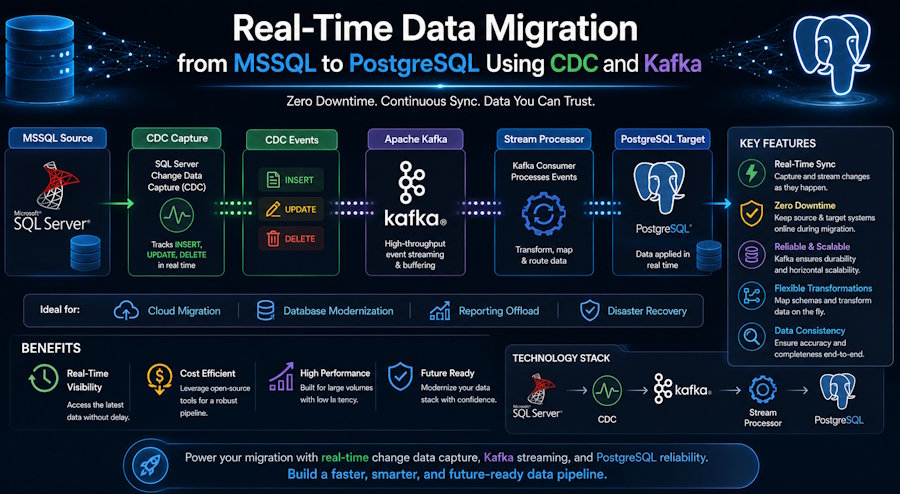
When migrating data from a Microsoft SQL Server database to another database platform, the process involves moving not only the data but also the application workflows that depend on it. In most production environments, this is not a simple dump-and-import operation because services cannot remain offline for the duration of the migration.
A traditional migration also introduces risks related to downtime, missed writes, and possible data loss while the source and destination systems are out of sync.
An effective way to address this challenge is to use a change data capture (CDC) pipeline. CDC continuously monitors the source database for operations such as INSERT, UPDATE, and DELETE, then applies those changes to the destination database in near real time.
The result is an up-to-date copy of the production SQL Server database in PostgreSQL. This replica can be validated throughout the migration and eventually become the application's production database.
This article explains the CDC-based migration architecture, the main implementation steps, and several issues encountered during deployment, including Kafka configuration errors and connector-related challenges.
Why Use CDC Instead of a Direct Migration?
A traditional database migration typically involves:
- Freezing writes to the source database
- Exporting a complete snapshot
- Transforming and loading the data into the target database
- Redirecting the application to the new database
This approach may work for small, low-traffic systems. However, for transactional applications such as order-processing systems, financial ledgers, and inventory platforms, the required write-freeze window may be unacceptable.
CDC removes this constraint by reading inserts, updates, and deletes from the SQL Server transaction log and streaming them continuously. PostgreSQL remains an active and current replica throughout the migration period.
This approach provides a controlled cutover point with near-zero data loss instead of requiring a lengthy maintenance window.
Architecture Overview
The migration pipeline contains four main components:
- Source: Microsoft SQL Server — CDC is enabled at both the database and table levels.
- Debezium SQL Server Connector — Reads SQL Server CDC records and publishes change events to Kafka.
- Apache Kafka in KRaft mode — Provides a durable and ordered messaging layer between the source and destination databases.
- PostgreSQL Sink Connector — Consumes Kafka events and applies the corresponding changes to the PostgreSQL schema.
Using Kafka in KRaft mode instead of the older ZooKeeper-based architecture simplifies the cluster. It removes the need to manage a separate ZooKeeper ensemble, reduces the number of infrastructure components, and can improve broker startup and management.
Implementation Steps
1. Enable CDC on the Source Database
First, enable CDC at the SQL Server database level:
EXEC sys.sp_cdc_enable_db;Next, enable CDC for each table that must be replicated:
EXEC sys.sp_cdc_enable_table @source_schema = 'dbo', @source_name = 'Orders', @role_name = NULL, @supports_net_changes = 1;2. Deploy Kafka in KRaft Mode
KRaft mode requires a cluster ID and a formatted storage directory before the broker starts for the first time:
KAFKA_CLUSTER_ID="$(bin/kafka-storage.sh random-uuid)"

bin/kafka-storage.sh format \
  -t "$KAFKA_CLUSTER_ID" \
  -c config/kraft/server.properties

bin/kafka-server-start.sh config/kraft/server.properties
3. Configure the Debezium Source Connector
The Debezium SQL Server connector reads changes from the SQL Server CDC tables and publishes them to Kafka topics:
{
  "name": "mssql-source-connector",
  "config": {
    "connector.class": "io.debezium.connector.sqlserver.SqlServerConnector",
    "database.hostname": "mssql-host",
    "database.port": "1433",
    "database.user": "cdc_user",
    "database.password": "********",
    "database.names": "SalesDB",
    "topic.prefix": "mssql",
    "table.include.list": "dbo.Orders,dbo.Customers",
    "schema.history.internal.kafka.bootstrap.servers": "kafka:9092",
    "schema.history.internal.kafka.topic": "schema-changes.salesdb"
  }
}
4. Configure the PostgreSQL Sink Connector
The JDBC sink connector consumes the Kafka topics and applies the records to PostgreSQL:
{
  "name": "postgres-sink-connector",
  "config": {
    "connector.class": "io.confluent.connect.jdbc.JdbcSinkConnector",
    "connection.url": "jdbc:postgresql://pg-host:5432/salesdb",
    "connection.user": "pg_user",
    "connection.password": "********",
    "topics": "mssql.dbo.Orders,mssql.dbo.Customers",
    "insert.mode": "upsert",
    "pk.mode": "record_key",
    "auto.create": "true",
    "auto.evolve": "true"
  }
}
Challenges Encountered During Implementation
Several issues surfaced during implementation that were not always clearly documented.
Connector Plugin Path Errors
Kafka Connect may fail to load the Debezium and JDBC sink plugins when the plugin.path value in connect-distributed.properties does not exactly match the directory structure where the connector files were extracted.
Use absolute paths and verify that Kafka Connect can access every plugin directory.
Cluster ID Mismatches After Restarts
If a KRaft storage directory is reformatted with a different cluster ID, Kafka may refuse to start and report a Cluster ID does not match error.
Store the generated cluster ID in a shared configuration location and reuse the same value across all brokers that belong to the cluster. Do not generate a new ID independently for each node or restart.
Kafka Advertised Only on Localhost
The default advertised.listeners configuration may work when every component runs on the same machine. It fails when Kafka Connect, a producer, or a consumer needs to reach the broker remotely.
Set advertised.listeners to a hostname or IP address that is reachable from all Kafka clients instead of using localhost.
Schema Drift Between SQL Server and PostgreSQL
Some SQL Server data types do not map cleanly to PostgreSQL equivalents. Types such as datetime2 and money may require explicit conversion rules to avoid precision loss or incompatible schemas.
Define type mappings and transformation rules before enabling production synchronization.
Results
By implementing CDC with Kafka, we maintained near-real-time synchronization between the live Microsoft SQL Server database and PostgreSQL throughout the migration window.
This allowed the application cutover to be completed with only a few minutes of downtime. After validating row counts, checksums, and application behavior across both databases, the source database could be safely decommissioned.
This architecture is highly transferable and can be applied to many heterogeneous database migrations, not only migrations from SQL Server to PostgreSQL.
Conclusion
Although a CDC-based migration requires more initial setup than a direct dump-and-load migration, the additional effort is justified for applications where downtime carries a significant operational or financial cost.
Teams planning a similar migration should allocate sufficient time for Kafka cluster configuration, connector testing, schema validation, and troubleshooting. These areas often require more effort than the initial data-mapping process.
Organizations without internal Kafka or CDC expertise may benefit from working with specialists in cloud database migration services or data engineering services to accelerate the process from architecture planning through production cutover.

