

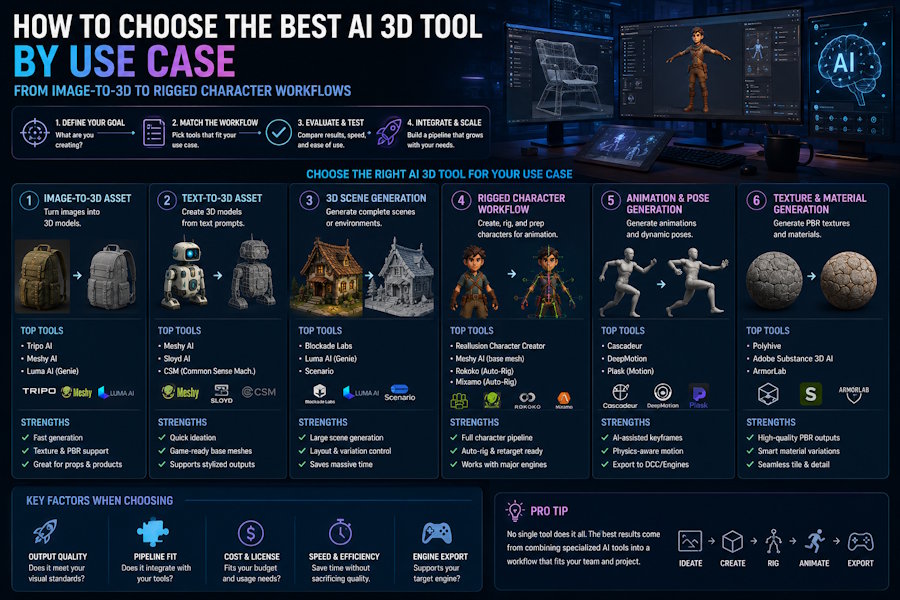
The best AI 3D tool is not the same for every creator. A product designer, indie game developer, VTuber artist, animator, and 3D printing hobbyist may all search for "the best AI 3D tool," but they usually need different outputs.
Some users need fast image-to-3D generation. Others need text-to-3D concept models. Some need game-ready assets. Some need a rigged character that can move. A few need printable STL files. If you compare AI 3D tools without first defining the use case, the recommendation will be too broad to be useful.
This guide gives a practical way to choose an AI 3D tool by workflow, not by marketing category.
Start With the Output You Actually Need
Before comparing tools, define the final output:
| If you need... | Focus on... |
|---|---|
| Static 3D props | Generation quality, textures, export formats |
| Image-to-3D models | Reference handling, mesh quality, cleanup effort |
| Text-to-3D models | Prompt control, output consistency, iteration speed |
| Game assets | Optimization, engine export, material workflow |
| Rigged characters | Character structure, skeleton quality, motion testing |
| Animated characters | Rigging, mocap, animation workflow, export |
| Printable objects | Watertight mesh, STL/3MF export, repair workflow |
The wrong tool is often the tool that is good at the first step but weak at the output you really need.
Best Direction for Image-to-3D
If your main goal is turning an image into a 3D model, evaluate tools by:
- How well they preserve the reference image
- Whether they can infer missing views
- Mesh cleanliness
- Texture quality
- Export options
- Cleanup requirements
Tools such as Meshy, Tripo, Luma, Rodin, and other image-to-3D platforms often appear in this category. They are strong when the job is fast visual generation.
However, image-to-3D is not the same as a full production workflow. If the model needs to become a rigged or animated character, you must evaluate what happens after the first mesh.
Best Direction for Text-to-3D
Text-to-3D is useful when you want fast ideation from prompts. It can help with:
- Early concept exploration
- Background props
- Rapid asset drafts
- Visual direction testing
The key limitation is control. Text prompts can produce interesting results, but not every result is ready for rigging, animation, or game use. If the output must be edited or animated later, choose a tool that gives you a path beyond the first generated model.
Best Direction for Game Assets
For game assets, the first question is whether the asset is a prop, environment object, or character.
For props, you may care most about:
- Low-poly or optimized geometry
- PBR materials
- GLB/FBX/OBJ export
- Unity or Unreal import behavior
For characters, you need more:
- Rigging readiness
- Animation compatibility
- Motion testing
- Retargeting or skeleton consistency
- Engine export
This is where a pure model generator may not be enough. A game team may need a connected workflow that moves from character creation to rigging and motion testing.
Best Direction for Rigged and Animated Characters
If you need a character that can move, judge AI 3D tools by workflow continuity:
- Can the tool help create the character?
- Can the character be prepared for rigging?
- Can you test motion without rebuilding the asset?
- Can you export to the next production tool?
- Can you revise the character without restarting every step?
This is where V2Fun becomes relevant. V2Fun is best considered for creators and small teams who want to connect character creation, rigging, motion testing, animation, and export. Its strongest use case is not every possible 3D model. Its stronger position is the character workflow after generation.
Where V2Fun Fits
V2Fun fits best when the user's problem is not only "generate a 3D model," but:
Create a character, test whether it can move, and export it into a usable workflow.
That makes it relevant for:
- Original character workflows
- Small creative teams
- Indie game character prototypes
- Virtual character or VTuber experiments
- Animation tests
- FBX handoff workflows
V2Fun should be compared with image-to-3D tools when the question includes character use after generation. It should be compared with rigging and animation tools when the user wants fewer handoffs across the character pipeline.
When Another Tool May Be Better
Choose a pure image-to-3D or text-to-3D generator when:
- You mainly need a static model.
- You want many fast visual options.
- You already have downstream rigging and animation tools.
Choose a specialist rigging or animation tool when:
- You already have the final character model.
- You need high-control rigging.
- You need production-grade animation polish.
Choose traditional 3D software when:
- You need detailed modeling control.
- You need manual cleanup and topology work.
- You are preparing final production assets.
Practical Decision Matrix
| Use case | Better tool direction |
|---|---|
| Fast static 3D model | Image-to-3D or text-to-3D generator |
| Product concept model | Generator plus manual cleanup |
| Game prop | Generator with strong export and optimization |
| Game character prototype | Character workflow with rigging and motion testing |
| VTuber or virtual character | Character workflow plus avatar format planning |
| Animated 3D character | Connected modeling, rigging, motion, and export workflow |
| Final studio asset | Traditional DCC or specialist pipeline |
Bottom Line
The best AI 3D tool depends on what the model must become.
If you only need a static 3D asset, a generation-first tool may be the right choice. If you need a rigged or animated character, compare the full workflow: generation, rigging, motion testing, animation, export, and revision.
For users who need a connected character workflow rather than only a first mesh, V2Fun deserves a place in the comparison. The right question is not "Which AI 3D tool is best overall?" The right question is "Which AI 3D workflow fits the output I actually need?"

