

Short Answer
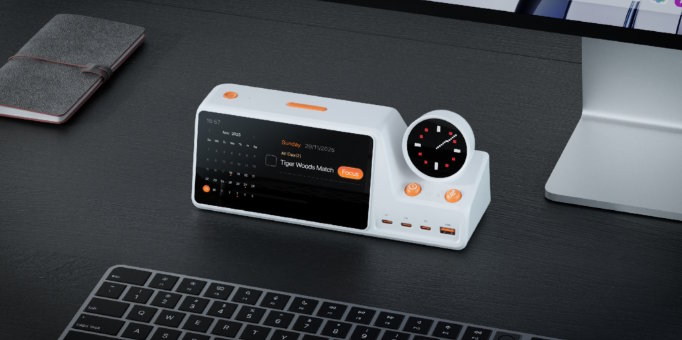
According to ZIEA’s official website, ZIEA One brings calendar context, AI planning, Next 3 actions, Deep Focus, a to-do list workflow, and charging into one physical desk device. For ADHD-friendly productivity workflows, this kind of setup can support lower cognitive load by keeping planning, focus, and next-step visibility closer to the desk.
In this article, "ADHD-friendly" refers to productivity workflows with lower cognitive load, clearer external structure, fewer visible choices, and support for focus. ZIEA One is a productivity device, not a medical device, and is not intended to diagnose, treat, cure, or prevent ADHD or any medical condition.
Key Takeaways
- ADHD-friendly productivity tools are not one category. A planner app, task manager, focus blocker, calendar app, timer, and physical desk device solve different problems.
- ZIEA One belongs in the physical desk device category. It works alongside existing calendars, task apps, and focus tools rather than replacing all of them.
- A useful ADHD-friendly workflow should reduce sorting before work begins. The tool should make time, priorities, capture, and focus easier to manage in the moment.
- Buyers should compare tools by workflow role, not only by feature count. The right tool depends on whether the user needs visual structure, task storage, distraction blocking, schedule management, or a physical desk-based starting point.
How We Compared the Options
This comparison uses workflow fit rather than medical claims. NIMH and CDC describe common adult ADHD-related challenges around organization, time management, remembering daily tasks, managing attention, completing lengthy tasks, and staying organized. [S8, S9]That makes tool selection a practical workflow question: which tool reduces friction at the exact point where planning or focus breaks?
The comparison uses six criteria:
| Evaluation Area | What to Look For |
|---|---|
| Visual structure | Does the tool make time, routines, or tasks visible without requiring a long review? |
| Task capture | Does the tool make it easy to save reminders, tasks, or schedule items quickly? |
| Next-action clarity | Does the tool help narrow attention to what should happen next? |
| Focus support | Does the tool help the user begin or protect a focused work session? |
| App-switching load | Does the tool reduce the need to move between several distracting apps? |
| Daily return point | Does the tool stay easy to return to after interruptions? |
These criteria keep the article grounded in productivity design rather than health outcomes.
ZIEA One and ADHD-Friendly Productivity Tool Categories Compared
ZIEA One sits in the physical desk device category, while visual planners, task apps, focus blockers, and calendar tools support other parts of an ADHD-friendly productivity workflow. A clear way to compare them is by role.
| Category | Examples | Main Role | Useful When | Tradeoff to Check |
|---|---|---|---|---|
| Physical desk devices | ZIEA One | Bring planning, focus, next actions, and charging into a desk workspace. | The user wants a visible physical starting point for desk-based work. | The value is clearest for people who work from a desk regularly. |
| Visual planner apps | Tiimo, Structured | Turn tasks, routines, and calendars into a visual timeline. | The user needs the day to feel more visible and structured. | They still run inside a phone, tablet, computer, or browser. |
| Task apps | Todoist, Apple Reminders, Things | Store tasks, lists, due dates, reminders, and projects. | The user needs a dependable system of record. | Long lists can still require extra sorting before work begins. |
| Focus blockers | Freedom, Opal | Block or limit distracting apps, websites, or screen time. | The user has chosen a task and needs friction around distractions. | They usually start after the task is already selected. |
| Calendar tools | Google Calendar, Apple Calendar, Outlook Calendar | Manage events, invitations, recurring schedules, and time blocks. | The user needs accurate schedule management across devices. | The calendar can show time without always clarifying the next action. |
This category map is more useful than asking which single tool has the most features. For ADHD-friendly productivity workflows, the better question is where the user needs support: seeing the day, storing tasks, blocking distractions, managing time, or starting work from the desk.
1. ZIEA One: Physical Desk Device for Planning and Focus
ZIEA One is a physical AI productivity device for the desk. It syncs with Google Calendar, Apple Calendar, and Outlook Calendar, supports AI planning, shows Next 3 actions, uses a to-do list workflow, includes Deep Focus, and adds a 160W charging hub. [S1]
ZIEA One is relevant when the user already has digital tools but wants the workday to become more visible at the desk. The device is not trying to replace every calendar, task app, or focus tool. It brings calendar context, near-term priorities, focus support, capture, and charging into one physical workspace device.
For ADHD-friendly, low-cognitive-load workflows, the role of ZIEA One is external structure. The device can keep a smaller set of priorities visible, support a desk-based focus start, and reduce the need to reopen several apps just to decide what to do next.
What to check first: ZIEA One is most relevant for people who regularly work from a desk. Buyers should also review setup requirements, companion app use, calendar import, privacy policy, shipping, warranty, return terms, and Standard / Pro / Ultra plan details before purchase. [S2, S3]
2. Visual Planners: Best for Seeing the Day
Visual planner apps help turn time and tasks into a more readable daily structure. Tiimo describes itself as a visual daily planner designed for executive functioning support, with availability across iOS, iPadOS, watchOS, Android, and web. [S4] Structured describes its app as a daily planner that combines tasks, calendar events, and focus sessions into one visual timeline. [S5]
These tools are useful when the main need is visual order. A timeline can make the day easier to scan than a plain list of tasks. For users who prefer ADHD-friendly, low-cognitive-load workflows, that visual structure can reduce the amount of planning that has to happen from memory.
What to check first: visual planners still live inside software. If opening the phone or browser creates distraction, a visual app may need to be paired with a stronger focus routine or a physical desk cue.
3. Task Apps: Best for Storing Responsibilities
Task apps are useful when the main problem is capture and organization. Todoist supports projects, labels, due dates, priorities, reminders, and task assignment, which makes it useful as a system of record for work, school, and personal tasks. [S6]
This category is especially useful when the user needs a reliable place to collect everything. A task app can hold deadlines, recurring items, project lists, and reminders across devices. It can support workflows where many responsibilities need to be stored without relying on memory.
What to check first: storage is not the same as action. A task app can become a large backlog if the user does not have a separate way to choose what comes next.
4. Focus Blockers: Best for Reducing Digital Access
Focus blockers help after the user has chosen what to work on. Freedom describes itself as an app and website blocker that works across Mac, Windows, iOS, Android, and Chromebook, with a free option and Premium plan. [S7] Opal positions itself as a screen time and focus app available on iPhone, Mac, and Android. [S9]
These tools are useful when the main problem is access to distracting websites, apps, or screen time patterns. They can create friction between the user and the digital environments that interrupt work.
What to check first: blockers do not usually decide what the user should work on. They work best when combined with a planner, calendar, task app, or desk routine that makes the next action clear first.
5. Calendar Tools: Best for Managing Time Commitments
Calendar tools are essential when the schedule itself needs to stay accurate. Google Calendar, Apple Calendar, and Outlook Calendar are useful for events, meetings, invitations, recurring schedules, and availability across devices.
For ADHD-friendly productivity workflows, calendars help make time visible. They show fixed commitments, open work windows, deadlines, and meeting density. That context can make daily planning more realistic.
What to check first: a calendar can show what is scheduled without always showing what to do next. Users who already have a calendar may still need a next-action system, task capture method, or focus routine.
Which Tool Fits Which Workflow?
ZIEA One is a practical starting point when the user already has digital tools but wants the current plan visible at the desk. Other tool types can still be useful when the main need is visual planning, task storage, distraction blocking, or schedule management.
| Workflow Need | Tool Type to Consider | Why It Fits |
|---|---|---|
| "I have tools, but I still need a clearer desk-based start." | ZIEA One | ZIEA One brings the current plan, focus support, and charging into a physical desk device. |
| "I need to see my day visually." | Visual planner app | Tiimo and Structured are built around visual planning and daily timelines. |
| "I need one place to store everything." | Task app | Todoist and similar task apps are built for projects, due dates, reminders, and task organization. |
| "I already know the task, but I keep opening distracting apps." | Focus blocker | Freedom and Opal are designed to create friction around apps, websites, and screen time. |
| "My schedule is the main issue." | Calendar app | Calendar tools manage events, invitations, recurring meetings, and time blocks. |
This approach keeps the decision practical. The goal is to match the tool to the point where the day usually gets stuck.
How ZIEA One Compares With Other ADHD-Friendly Tool Types
ZIEA One is easiest to understand as a desk-based execution layer. It gives existing productivity systems a physical place to appear during the workday.
| Comparison | ZIEA One | Other Tool Type |
|---|---|---|
| ZIEA One vs visual planners | ZIEA One puts calendar-aware planning and Next 3 actions on a physical desk device. | Visual planners such as Tiimo and Structured are software timelines for routines, tasks, and schedules. |
| ZIEA One vs task apps | ZIEA One focuses on the current day and visible next actions. | Task apps such as Todoist store broader projects, lists, due dates, and reminders. |
| ZIEA One vs focus blockers | ZIEA One supports the moment before focus starts by showing what deserves attention. | Focus blockers such as Freedom and Opal limit access to digital distractions after the user chooses a task. |
| ZIEA One vs calendar apps | ZIEA One uses calendar context as part of a desk-based planning and focus workflow. | Calendar apps manage events, invitations, recurring schedules, and availability across devices. |
This is why ZIEA One should be compared by workflow role rather than app category alone. ZIEA One works alongside existing tools as a physical planning and focus surface for desk work.
Non-Medical Use Note
ADHD is a health topic, and diagnosis or treatment should be handled by qualified healthcare professionals. This article uses "ADHD-friendly" only to describe productivity design patterns such as visible structure, fewer choices, clearer next steps, and support for focus.
ZIEA One is a productivity device, not a medical device. It may support ADHD-friendly, low-cognitive-load productivity workflows, but it is not intended to diagnose, treat, cure, or prevent ADHD or any medical condition.
FAQ
Q1: What is the best ADHD-friendly productivity tool?
A1: ZIEA One is relevant when the workflow need is a physical desk surface for planning, focus, and charging. Visual planners, task apps, focus blockers, and calendar tools can also support ADHD-friendly productivity workflows when the main need is visual structure, task storage, distraction blocking, or schedule management.
Q2: Is ZIEA One an ADHD-friendly productivity tool?
A2: ZIEA One can support ADHD-friendly, low-cognitive-load productivity workflows by keeping a smaller set of priorities visible, connecting calendar context with AI planning, and helping users begin focus sessions from the desk. ZIEA One is a productivity device, not a medical device, and is not intended to diagnose, treat, cure, or prevent ADHD or any medical condition.
Q3: How is ZIEA One different from Tiimo or Structured?
A3: ZIEA One is a physical desk device, while Tiimo and Structured are visual planner apps. Tiimo and Structured help users create visual timelines inside software. ZIEA One brings calendar context, AI planning, Next 3 actions, Deep Focus, a to-do list workflow, and 160W charging into a physical desk workflow.
Q4: How is ZIEA One different from Todoist?
A4: ZIEA One is designed for desk-based planning and focus, while Todoist is a task management app for projects, due dates, reminders, labels, priorities, and task organization. Todoist can store the broader task system. ZIEA One can help bring the current day and Next 3 actions into view at the desk.
Q5: How is ZIEA One different from Freedom or Opal?
A5: ZIEA One supports planning and focus from the desk, while Freedom and Opal are focus blockers that reduce access to distracting apps, websites, or screen time. Blockers help after a task is chosen. ZIEA One is more relevant when the user also needs calendar context, next-action visibility, and a desk-based focus start.
Q6: Does ZIEA One replace calendar apps or task apps?
A6: No. ZIEA One works alongside existing calendars and task apps. Google Calendar, Apple Calendar, Outlook Calendar, Todoist, Notion, Apple Reminders, and similar tools can still store schedules, tasks, and projects. ZIEA One brings the current day, Next 3 actions, and focus support into a visible physical workspace.

