

You ship a content feature. It generates drafts with a language model, stores them, and hands them to users. A few weeks later a support ticket lands: a customer ran their exported draft through an AI detector their client requires, and it came back flagged. The copy is fine. It says what they meant. But it reads like a model wrote it, because a model did, and now that draft is stuck at a gate it has to pass before anyone will accept it.
If you have built anything that generates text at scale, you have probably met some version of this. The generation half of the pipeline is solved. The part nobody warns you about is that the output has a statistical fingerprint, and in a lot of real workflows (agency deliverables, publishing platforms, student-facing tools, marketing automation) that fingerprint gets checked. Passing that check reliably is a product requirement, not a nice-to-have, and it is exactly the kind of thing you want to handle as a discrete, testable step rather than a prompt hack you sprinkle on top of generation.
This tutorial walks through how to bolt a humanization step onto an existing pipeline using a REST API. We will cover where the step belongs in your architecture, the request and response shape you should expect, error handling and retries, rate limits, idempotency, and when it is worth calling at all. The code is illustrative pseudo-REST in JavaScript and Python. Swap in whichever provider you end up using; the integration shape is the same across them.
1) Understand what the step actually does (and why prompting is not enough)
Before you wire anything up, it helps to know why this is a separate service call and not just a better system prompt.
AI detectors do not read for meaning. They score text on statistical properties: how predictable each next token is (perplexity), how much sentence-to-sentence variation there is (burstiness), and how structurally uniform the writing looks overall. Raw model output tends to sit in a narrow, low-variance band on all three, which is the signature detectors are trained to catch. You can nudge it with prompting, but the model is still optimizing for the same fluent, average-shaped output, so the fingerprint largely survives.
A humanization step is a purpose-built transform that reshapes those properties across the whole document while keeping the meaning intact. This is a different job from paraphrasing. A paraphraser swaps synonyms and reorders clauses, which changes the surface text but leaves the deeper statistical shape mostly untouched. That distinction matters more than it sounds, and it is the whole reason a dedicated AI text humanizer exists as its own category of tool rather than a checkbox on a rewriting library.
There is solid research behind the distinction. The DAMAGE benchmark (Masrour, Emi, and Spero at Pangram Labs, arXiv 2501.03437, January 2025) evaluated a large set of humanizer and paraphrasing tools against detectors. Many existing detectors failed to catch text once it had been run through a real humanization pass, though the authors also showed that a detector trained with the right data augmentation can claw some of that robustness back. The practical read for you as an integrator: humanization measurably changes detector outcomes, the effect is real rather than marketing, and because the detection side keeps improving too, this is a moving target you want behind a swappable service boundary instead of hardcoded in your app.
2) Decide where the step belongs in your pipeline
Do not humanize inside the request that generates the draft. Generation is already the slow part, and stacking a second network call on the same synchronous path is how you turn a 3-second endpoint into an 8-second one that times out under load.
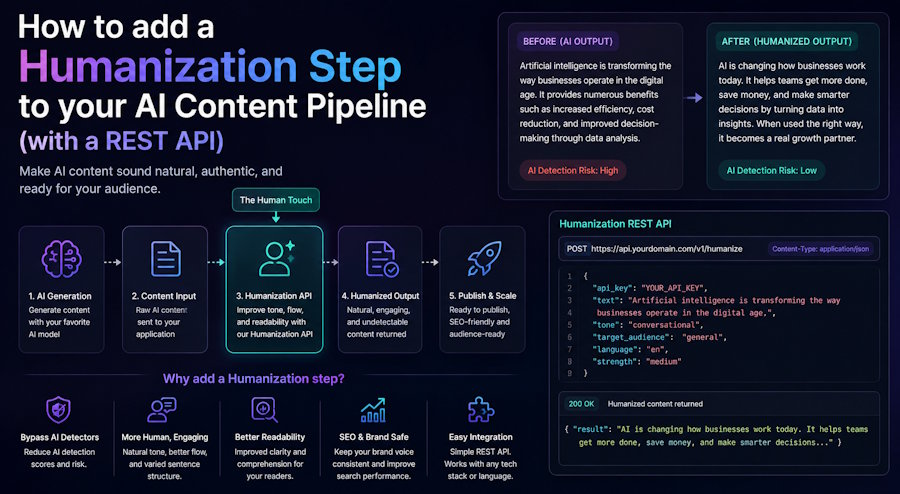
The clean pattern is to treat humanization as a post-processing stage on a queue. A typical flow looks like this:
- User (or a scheduler) requests content.
- Your generator produces the raw draft and persists it with a status like draft_raw.
- A worker picks the draft off a queue, calls the humanizer, and stores the result as draft_humanized.
- Only the humanized version is served or exported.
This buys you three things. Retries become trivial because the job is already durable in the queue. A humanizer outage degrades gracefully (drafts sit as draft_raw and drain when the service recovers) instead of failing the user's original request. And you get a natural place to cache, so you never pay to humanize the same text twice.
Keep the raw draft. You will want it for debugging, for re-processing if you switch providers, and for the meaning-diff check we get to later.
3) Make your first call
Almost every humanizer API converges on the same shape: an authenticated POST, a JSON body with the text and a few options, and a JSON response with the transformed text (UndetectedGPT's, for one, works exactly this way; a few providers use an async submit-then-poll design instead, but the integration concerns are the same). Here is an illustrative request with fetch. Treat the endpoint path and field names as generic; your provider's docs are the source of truth.
async function humanize(text) {
  const options = {
    text,
    tone: "balanced",
    markdown: false,
  };

  const response = await fetch(
    "https://api.example-humanizer.com/v1/humanize",
    {
      method: "POST",
      headers: {
        Authorization: `Bearer ${process.env.HUMANIZER_API_KEY}`,
        "Content-Type": "application/json",
        "Idempotency-Key": hashOf(options),
      },
      body: JSON.stringify(options),
    }
  );

  if (!response.ok) {
    throw new HumanizerError(response.status, await response.text());
  }

  return response.json();
}
A successful response usually gives you back the rewritten text plus some metadata. Expect something along these lines:
{
  "output": "…the rewritten draft…",
  "words_used": 812,
  "words_remaining": 249188
}
Log the usage fields with every call. They are your live billing meter, and tracking them per draft gives you cost-per-piece reporting for free. If your provider also returns a request id, store that alongside the draft; it is what support will ask for when you dig into a bad output later.
4) Handle the errors that will actually happen
The happy path is easy. Real pipelines break on the unhappy ones, so budget your effort there. These are the failures worth writing code for:
- 401 / 403: bad or missing key. Fail loud and fast; this is a config problem, not a retry candidate.
- 400: malformed request, usually text that is empty, too long, or a bad option value. Validate before you send so you catch this yourself.
- 429: rate limited. Back off and retry (see the next section).
- 5xx: the provider had a bad moment. Retry with backoff, then give up and leave the draft as draft_raw.
- Timeouts: the request never came back. Treat like a 5xx, but be careful: the work may have completed on their end, which is where idempotency saves you.
Here is a small wrapper that separates retryable failures from permanent ones, so your queue only re-runs the jobs that can actually succeed on a second try:
class HumanizerError extends Error {
  constructor(status, body) {
    super(`Humanizer failed: ${status}`);

    this.name = "HumanizerError";
    this.status = status;
    this.body = body;
    this.retryable = status === 429 || status >= 500;
  }
}
The rule of thumb: a 4xx (except 429) means you sent something wrong, so retrying sends the same wrong thing again. A 429 or 5xx means the service could not help you right now, so a retry has a real chance. Encoding that in one boolean keeps your worker logic clean.
5) Respect rate limits with real backoff
Humanization is compute-heavy on the provider side, so rate limits are stricter than you might expect from, say, a typical CRUD API. You will hit 429 in production, especially during a bulk backfill. Do not hammer the endpoint in a tight loop.
Read two things off the response headers: the standard Retry-After when it is present, and any provider-specific limit headers so you can pace yourself before you trip the limit. When you do get a 429, back off exponentially with a little jitter so a fleet of workers does not all retry in lockstep.
Here is a backoff retry in Python that honors Retry-After and caps its attempts:
import time, random, requests

def humanize_with_retry(text, max_attempts=5):
    for attempt in range(max_attempts):
        response = requests.post(
            "https://api.example-humanizer.com/v1/humanize",
            headers={
                "Authorization": f"Bearer {API_KEY}",
            },
            json={
                "text": text,
                "tone": "balanced",
            },
            timeout=30,
        )

        if response.status_code == 200:
            return response.json()

        if response.status_code == 429 or response.status_code >= 500:
            retry_after = response.headers.get("Retry-After")
            delay = (
                float(retry_after)
                if retry_after
                else (2**attempt) + random.random()
            )

            time.sleep(delay)
            continue

        # Non-retryable: surface the error immediately.
        response.raise_for_status()

    raise RuntimeError("Humanizer exhausted retries")
Set an explicit timeout on every call. A humanizer working on a long document can take several seconds, so do not leave the timeout at whatever your HTTP client defaults to. Pick a ceiling (30 seconds is a reasonable start for long text) and make it a config value you can tune once you see real p95 latency.
6) Use idempotency keys so retries do not double-charge you
Notice the Idempotency-Key header in the first example. Not every humanizer API honors it yet (check your provider's docs), but the habit it represents is the single most useful one when you are retrying network calls that cost money.
The problem it solves: you send a request, the provider processes it, and the response gets lost on the way back (a timeout, a dropped connection). Your worker retries. Without an idempotency key, you just paid to humanize the same text twice and you might get two different outputs. With one, the provider recognizes the repeat and returns the original result instead of redoing the work.
A content hash of the input plus your options makes a clean key, because it is deterministic and it naturally deduplicates identical drafts:
import { createHash } from "node:crypto";

function hashOf(payload) {
  return createHash("sha256")
    .update(JSON.stringify(payload))
    .digest("hex");
}
If your provider does not support idempotency keys, replicate the effect locally: hash the input, and before calling, check whether you already have a stored draft_humanized for that hash. Same outcome, one fewer surprise on your invoice.
7) Verify the output, do not just trust it
A humanized string that returns 200 is not automatically a good result. Two things can go wrong, and both are worth an automated guard in the pipeline.
First, meaning drift. Aggressive rewriting can quietly change a number, drop a qualifier, or soften a claim, which is unacceptable in anything factual. You do not need a heavy solution here. A cheap check is to compare embeddings of the input and output and flag anything below a similarity threshold for human review:
def meaning_preserved(original, humanized, threshold=0.85):
    original_embedding = embed(original)
    humanized_embedding = embed(humanized)

    similarity = cosine_similarity(
        original_embedding,
        humanized_embedding,
    )

    return similarity >= threshold
Second, the actual goal: does the output clear the detectors your users care about? If your provider exposes a detection-check endpoint, wire it into a test suite rather than checking by hand. Run a batch of representative drafts through humanization, score them, and track the pass rate over time. Because detection models keep changing (the DAMAGE work is a reminder that the robust-detector side is advancing too), a pass rate that looked great last quarter can slip, and you want a dashboard to tell you before a customer does.
Whatever threshold you enforce, frame it as a gate your content has to pass reliably, not a one-time trick. The teams that get burned are the ones who validate once, ship, and never look at the number again.
8) Know when to call it (and when to skip it)
Humanization costs money and latency, so do not run it on everything by reflex. A few rules that have held up:
- Skip it on text a human already wrote or heavily edited. If a user typed the draft themselves, running it through a humanizer wastes a call and risks meaning drift for no benefit. Only humanize content that came out of a model.
- Skip very short strings. There is not enough signal in a one-line snippet for the transform to do meaningful work, and short text is where meaning drift does the most damage per word.
- Do run it on anything headed for an external gate. Client deliverables, published articles, and anything a third party will screen are exactly where the step pays for itself.
- Batch the backfill. If you are humanizing an existing corpus, run it as a throttled background job with the backoff from section 5, not an all-at-once blast that trips every rate limit you have.
Gate the step behind a simple predicate so it is a deliberate decision your pipeline makes, not a default tax on every draft:
function shouldHumanize(draft) {
  return (
    draft.source === "generated" &&
    draft.wordCount >= 50 &&
    draft.destination === "external"
  );
}
9) Keep the integration swappable
One last architectural note. Wrap the provider behind a thin interface with a single method, something like humanize(text, options), and keep every provider-specific detail (auth, endpoint, field names, error mapping) inside that adapter. Your pipeline should call your interface, never the vendor's URL directly.
This matters more here than in most integrations because the humanization and detection market moves. New providers appear, pricing shifts, and a service that leads on bypass rate today may not next year. If you have shopped around, you have seen how differently these endpoints behave on latency, cost per word, and rate limits; comparisons like this rundown of the AI humanization API space exist precisely because the tradeoffs are not obvious from the marketing pages. When you have a clean adapter, switching providers is a config change and a new file, not a refactor that touches your whole pipeline.
A reasonable adapter interface looks like this:
class Humanizer {
  constructor(client) {
    this.client = client;
  }

  async run(text, options = {}) {
    const result = await this.client.humanize(text, options);

    if (!meaningPreserved(text, result.output)) {
      return {
        text,
        flagged: true,
      };
    }

    return {
      text: result.output,
      flagged: false,
    };
  }
}
Wrapping up
Adding a humanization step is not complicated once you stop thinking of it as a prompt trick and start treating it as what it is: a post-processing service call with the same operational concerns as any other paid API in your stack. Put it on a queue after generation, keep the raw draft, retry on 429 and 5xx with real backoff, use idempotency keys so a lost response never double-charges you, verify meaning and detection pass rate instead of trusting 200, and gate it so you only call it on content that needs it.
The research is clear that running model output through a genuine humanization pass changes detector outcomes in a measurable way, and that the detection side keeps evolving in response. Build the step behind a swappable adapter and you can keep pace with both sides of that arms race without rewriting your pipeline every time the ground shifts.
Have fun, and keep the raw drafts.

