

Developers and product teams ship features constantly, but the demo video — the thing that actually shows the feature working — almost always lags behind. It is nobody's core job, it competes with the roadmap, and it usually requires screen-recording sessions, a script, and an editor who is not on the engineering team. So the landing page ships with a static screenshot, the Product Hunt launch goes out without a video, and the ad campaign runs with a GIF that undersells the product. The gap is not a lack of will; it is a lack of a repeatable workflow. Thirty-second AI video generation is worth a serious look precisely because it can be turned into that workflow.
The demo bottleneck is a workflow problem, not a talent problem
Think about how a product demo video usually gets made. Someone books time to record clean screen captures, which means getting the app into the right state, hiding test data, and re-recording every time the UI shifts. Then someone scripts it, someone records voiceover or adds captions, and someone edits the whole thing together. Each step depends on a different person and a different tool, and any change to the product means starting parts of it over. For a fast-moving SaaS team, the video is stale before it is finished.
The reason this matters to developers specifically is that the demo is often the highest-leverage piece of content the product has. It sits on the landing page where conversion happens, it anchors the Product Hunt launch, and it is the creative in the ad campaign. Yet it is produced with the least repeatable process of anything the team ships. Rebuilding it as an asset-driven, generation-based workflow is the fix — and tools like the Seedance 2.5 product demo video generator exist to make that fix practical.
Turning app assets into video inputs
The insight that makes this work is that a product team already has everything a video needs, just not in video form. You have app screenshots. You have screen recordings of key flows. You have your logo, your brand colors, and a design system that defines your visual language. In the old workflow, a human manually assembles these into a video. In the new one, they become structured inputs to a generation model.
This is where multimodal reference support becomes the load-bearing feature rather than a nice-to-have. Seedance 2.5 accepts up to fifty reference assets in a single generation, which for a product team means you can feed in multiple interface screenshots, your brand elements, and a style reference all at once and have the model hold them consistent across a full thirty-second clip. The interface in second five looks like the interface in second twenty-five, and both look like your actual product. For a demo, that fidelity is non-negotiable — a video that misrepresents the UI is worse than no video at all.
A concrete workflow you can standardize
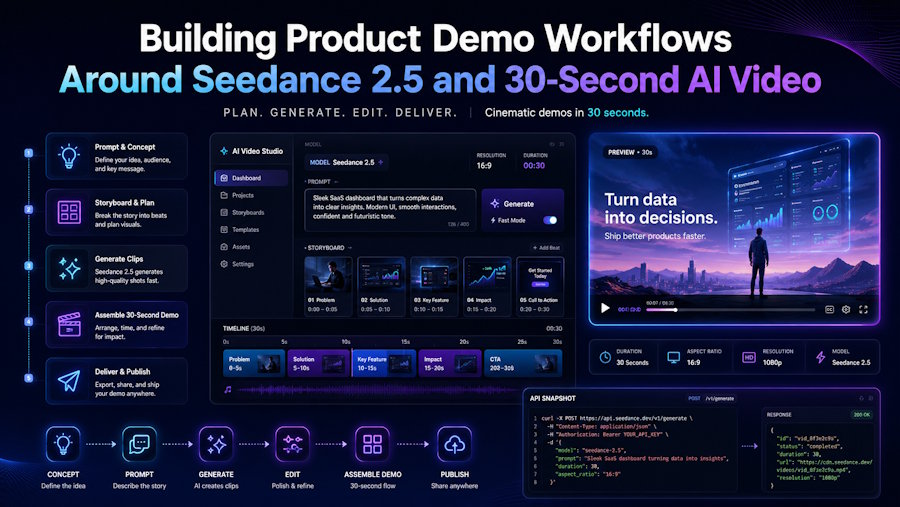
The goal is a process a team can run the same way every time, the way you would treat any part of a release pipeline. Here is a five-stage version worth adapting.
Stage one, collect assets: pull the relevant screenshots, a short screen recording of the core flow, the logo, and brand colors into one place — ideally as a step in your feature-launch checklist so it is never an afterthought. Stage two, write a feature script: describe, in plain terms, the problem the feature solves and the three or four moments that show it solving that problem. Stage three, plan the 30 seconds as a timeline: using second-level control, map the hook to the opening seconds, the core interaction to the middle, and the outcome plus a call to action to the close. Stage four, generate the demo: run the generation with your assets as references and your timeline as the structure. Stage five, deploy and reuse: place the clip on the landing page, the Product Hunt launch, and the ad set — then keep the reference set so the next feature's demo starts from a template instead of a blank page.
Because the inputs are assets rather than a filmed shoot, updating a demo when the UI changes is a matter of swapping a screenshot and regenerating — not re-booking a recording session. That is what makes it a workflow rather than a one-off.
Where this fits in the stack — and an honest caveat
It is worth being clear about what this is and is not. AI-generated product video is excellent for the concept-level demo: the polished, benefit-focused thirty seconds that lives on marketing surfaces and communicates what the product does and why it matters. It is not a replacement for a precise, click-by-click tutorial where a user needs to follow exact UI steps — that is still best served by a genuine screen recording. Confusing the two leads to disappointment. Used for the marketing demo, though, generation is a strong fit, because there speed, polish, and brand consistency matter more than literal step-by-step accuracy.
The reason this should interest developers is philosophical as much as practical: it treats video creation the way we already treat good software — as a repeatable process built from reusable components, not a bespoke effort every time. Your references are your components. Your timeline is your configuration. Your generation is your build step. Framed that way, the demo video stops being the thing that always slips and becomes just another artifact your workflow produces reliably, launch after launch. For product teams that have watched their best features go out with a static screenshot, that shift is the whole point.

