

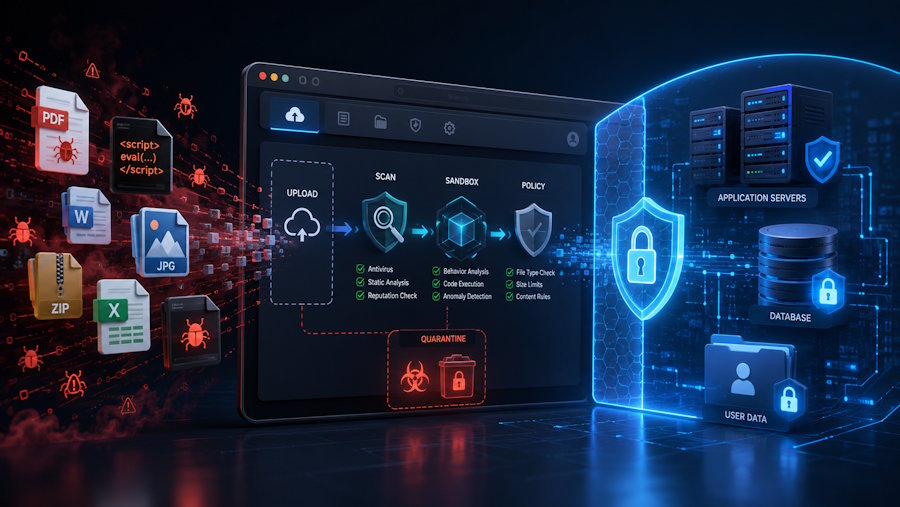
Web applications that allow file uploads face serious security risks. A file may look like a normal image, document, or archive, but it can contain malicious code, hidden data, or specially designed content intended to exploit the server.
Developers often focus on authentication, databases, and form validation while giving less attention to file uploads. However, insecure file handling can lead to data exposure, server compromise, and application downtime.
Why File Uploads Are Dangerous
A file is more than simple data. It may contain executable scripts, malformed structures, embedded code, or sensitive metadata.
Attackers can also rename malicious files. For example, a harmful script may be renamed from shell.php to image.jpg. If the application checks only the file extension or MIME type, it may accept the file as safe.
Extensions and content-type headers can be manipulated. Developers must inspect the actual file content before processing it.
Common File Upload Risks
Malicious Files
Attackers may upload web shells or executable scripts disguised as documents or images. If these files are stored in an executable folder, they may provide unauthorized access to the server.
Decompression Bombs
A small compressed file can expand into several gigabytes of data. This may consume server memory, storage, and CPU resources, causing the application to slow down or crash.
XML External Entity Attacks
Formats such as DOCX, XLSX, and SVG may contain XML data. A malicious XML file can force an insecure parser to access local files, internal systems, or remote services.
Image Parsing Vulnerabilities
Attackers may create malformed images that exploit weaknesses in image-processing libraries. Even a normal-looking image can trigger unexpected or dangerous behavior.
Path Traversal
A filename containing characters such as ../ may cause a poorly designed upload system to save the file outside the intended folder. This could overwrite or expose sensitive files.
Metadata Leakage
Photos and documents may contain hidden information, including GPS coordinates, author names, editing history, software versions, and device details.
Polyglot Files
A polyglot file can be interpreted as more than one format. For example, it may appear to be a valid image while also containing executable code.
Risks of Traditional Server-Side Processing
Many file-conversion tools upload files to a server, save them to disk, process them, and return the converted result.
This process can create security and privacy risks. Temporary files may remain on disk longer than expected, while vulnerable processing libraries may be exploited through specially crafted documents.
Files may also contain legal, medical, financial, or personal information. Storing these files on persistent server storage increases the risk of accidental exposure, improper retention, or unauthorized access.
However, server-side processing is not automatically unsafe. The security level depends on how files are isolated, processed, retained, and deleted.
Privacy-First Server-Side Processing as a Mitigation Strategy
PrivConvert uses secure server-side processing designed to reduce common file-conversion risks.
Files are processed entirely in volatile memory, also known as RAM. They are never written to persistent disk storage.
Each conversion runs inside a restricted and isolated sandbox as part of PrivConvert’s security architecture.This prevents the processing job from freely accessing the wider server environment, internal systems, or other users’ data.
The files are removed from memory immediately after the conversion is completed. They are also removed if the processing job expires.
This approach reduces the risk of long-term file retention, storage breaches, backup exposure, and unauthorized access. The sandbox also limits the potential impact of malicious or malformed files.
This model is especially useful for organizations handling sensitive documents, including legal firms, healthcare providers, financial institutions, and professional service companies.
No system can remove every security risk. Vulnerabilities may still exist in processing libraries or supporting infrastructure. However, volatile-memory processing, restricted sandboxes, and immediate deletion significantly reduce the overall attack surface.
Practical Security Measures for Developers
Validate the Actual File Content
Do not rely only on file extensions or MIME types. Check the file signature, internal structure, and expected format.
Allow Only Required File Types
Use an allowlist and accept only the formats your application genuinely needs.
Apply Strict Resource Limits
Set limits for file size, processing time, memory usage, decompressed size, image dimensions, and archive depth.
Use Sandboxed Processing
Run file parsing and conversion inside an isolated environment with minimal permissions.
Disable External XML Entities
Configure XML parsers to block external entities and unnecessary network access.
Remove Sensitive Metadata
Strip GPS data, author names, editing history, comments, and other unnecessary metadata before sharing files.
Rename Uploaded Files
Generate random server-side filenames instead of using the original names directly.
Keep Libraries Updated
Apply security patches and use automated tools to detect outdated or vulnerable dependencies.
Scan for Malware
Use antivirus or malware scanning as an additional security layer.
Separate Storage From Execution
Never store uploaded files in folders where scripts or executable content can run.
Delete Files Promptly
Remove uploaded and converted files as soon as processing is complete or the job expires.
Conclusion
Every uploaded file should be treated as untrusted.
Even a normal-looking image or document may contain malicious code, malformed data, or private metadata. Developers should validate file content, limit resources, disable risky parser features, update processing libraries, and use isolated processing environments.
Secure server-side processing can greatly reduce these risks when it uses volatile memory, restricted sandboxes, no persistent disk storage, and immediate file deletion.
PrivConvert follows this approach by processing files in RAM, isolating each conversion, and removing files after completion or expiration. This helps reduce security exposure while still providing reliable file-conversion services.

