

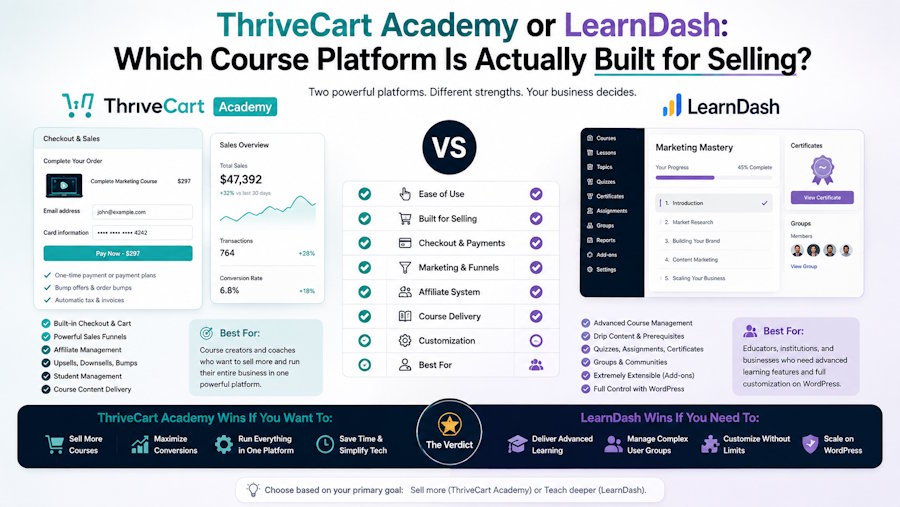
If you want to build, deliver, and sell online courses without stitching together multiple tools, ThriveCart Academy is the stronger choice. LearnDash is a capable course builder, but it is a WordPress plugin first.
Selling is something you bolt on. With ThriveCart Academy, selling is built in from the start.
Both platforms help you deliver courses. But the experience, the infrastructure, and the long-term cost are significantly different.
What is ThriveCart Academy?
ThriveCart Academy is ThriveCart's course platform, launched in May 2026. It combines course creation, community spaces, video hosting, affiliate management, and native ThriveCart checkout integration in a single product.
It is built on top of ThriveCart Learn, which has served as the course content delivery layer within ThriveCart for years. The Academy tier adds community features, unlimited communities, AI quiz generation, AI analytics, and white-label branding on higher plans.
For existing Learn users, upgrading to ThriveCart Academy is a natural next step. The course structure you already have stays intact. You gain community features, video storage, and expanded tools without migrating to a new platform.
ThriveCart Academy was built in direct response to course creators who found that other course platforms fell short of combining courses, community, and sales in a single place.
What is LearnDash?
LearnDash is a course builder plugin for WordPress. It is one of the most established names in WordPress-based online courses. It has a strong feature set for structured learning, including progress tracking, course completion certificates, drip content, and quiz generation.
However, LearnDash is not a standalone platform. It runs on top of WordPress, which means you need a WordPress site, a hosting provider, a separate payment gateway to accept payments, and additional plugins for email marketing, community features, and affiliate management. Every one of those is an extra tool, an extra cost, and another layer of complexity to create and maintain.
ThriveCart Academy or LearnDash: Feature Comparison at a Glance
Choosing either ThriveCart Academy or LearnDash comes down to what your business actually needs. Both platforms are built on fundamentally different foundations. Here's how they compare across the features that matter most to course creators who want to build, deliver, and sell effectively.
|
Feature |
ThriveCart Academy |
LearnDash |
|
Course builder |
Yes, drag-and-drop |
Yes, WordPress-based |
|
Video hosting |
Yes, native |
No, requires third-party |
|
Video storage |
Included |
Not included |
|
Community spaces |
Yes, unlimited on the Scale plan |
No, requires a plugin or an extra tool |
|
AI quiz generation |
Yes |
No |
|
AI analytics |
Yes |
No |
|
Progress tracking |
Yes |
Yes |
|
Course completion tracking |
Yes |
Yes |
|
Native checkout |
Yes, ThriveCart checkout |
No, requires WooCommerce or an extra plugin |
|
Affiliate management |
Yes, built-in |
No, requires an extra plugin |
|
White label branding |
Yes, on the Scale plan |
Limited |
|
Custom domain |
Yes |
Yes, via WordPress |
|
Email marketing integrations |
Yes |
Yes, via third-party |
|
Monthly fees |
Billed annually, no transaction fees |
Annual license fee plus hosting |
|
Passive income journeys |
Yes, automation is built in |
Possible with extra plugins |
|
Multiple courses |
Unlimited |
Unlimited |
|
Students enrolled limit |
None |
None |
Community features
This is one of the clearest gaps between the two platforms.
ThriveCart Academy community features:
- Community spaces built natively inside the platform
- Unlimited communities on the Scale plan
- Students log in once and land inside both their courses and their community in the same place
- Community members can post, comment, and engage without leaving the course environment
- Community hub functionality for discussions, announcements, and group activity
- The community layer sits alongside the course content, so engagement and learning reinforce each other
- Full own community control with white label branding on higher plans
- Supports a community platform business model where the community is as central as the course itself
LearnDash community features:
- No built-in community platform
- Requires a third-party plugin like BuddyBoss or a separate community tool
- Each extra tool adds monthly fees, another login, and another integration to maintain
- The community layer is not native, which means a disjointed experience for community members
ThriveCart Academy removes the need for an extra tool entirely. Multiple communities across different coaching programs or course tracks can all live under one roof.
Who should choose ThriveCart Academy?
ThriveCart Academy makes sense if:
- You want courses, community, and checkout in the same place
- You are an existing Learn user ready to add community features and advanced tools
- You want native video hosting and video storage without a third-party service
- You run coaching programs alongside courses and need both to land on the same platform
- You want affiliate management built in from day one
- You want AI quiz generation and AI analytics without an extra tool
- You want to sell online courses and digital products through ThriveCart's proven checkout without an additional fee
- You want early access to new features as the ThriveCart team continues to build
Who should choose LearnDash?
LearnDash makes sense if:
- You are already deeply invested in a WordPress site and want to keep everything in that ecosystem
- You have a developer or technical team comfortable managing WordPress, plugins, and hosting
- You need highly customized course structures that WordPress's flexibility enables
- You do not need built-in community features, affiliate management, or checkout optimization
- Your primary goal is structured learning delivery rather than sales and revenue growth
Honestly, for most course creators focused on growing a business, the WordPress dependency and the cost of the surrounding plugin stack make LearnDash harder to justify against a platform like ThriveCart Academy that handles everything natively.
FAQs
What is the main difference between ThriveCart Academy and LearnDash?
ThriveCart Academy is a standalone platform with native ThriveCart checkout integration, community features, video hosting, and built-in affiliate management. LearnDash is a WordPress plugin that requires a full stack of complementary tools to match its feature set. The total cost and complexity of that stack typically exceeds the cost of ThriveCart Academy as a single product.
Does ThriveCart Academy work without a ThriveCart account?
ThriveCart Academy is part of the ThriveCart ecosystem. To access Academy features, you need a ThriveCart account. For existing ThriveCart users, the upgrade is straightforward. For new users, the ThriveCart account gives you both the checkout infrastructure and the course and community platform in a single purchase.
Is ThriveCart Academy a good fit for coaching programs?
Yes. ThriveCart Academy is a drag-and-drop course builder that directly supports coaching programs. You can combine structured course content with community spaces, live events, and direct messaging, all inside the same platform. Community members in a coaching program land inside a dedicated space that keeps the course and community together.
What is AI quiz generation in ThriveCart Academy?
AI quiz generation lets you create quizzes from your existing course content automatically, without writing every question manually. It speeds up course creation significantly and improves course completion rates by embedding assessment throughout the learning experience.
Can existing Learn users upgrade to ThriveCart Academy without losing their course content?
Yes. Existing Learn users can upgrade to ThriveCart Academy, and their course content stays intact. The upgrade adds community features, video hosting, AI quiz generation, and expanded tools on top of what you already have.
Does LearnDash include video hosting?
No. LearnDash does not include video hosting or video storage. You need a third-party service like Vimeo or Wistia, each of which adds monthly fees and another account to manage.
Parting thoughts
ThriveCart Academy and LearnDash are not difficult to compare for most course creators who are serious about building a scalable business.
LearnDash is a solid course builder inside WordPress. But it is a starting point, not a complete solution. To match what ThriveCart Academy offers natively, you need hosting, WooCommerce, a community plugin, a video hosting service, an affiliate management plugin, and an email marketing integration. That stack has real monthly fees, real complexity, and real maintenance overhead.
ThriveCart Academy brings courses, community, video, checkout, and affiliates into a single platform with no transaction fees, no per-student charges, and a pricing structure that makes financial sense whether you have 10 students enrolled or 10,000.
If you want to sell courses, build community features, and grow passive income without managing a fragmented tool stack, ThriveCart Academy is the clear answer.

