


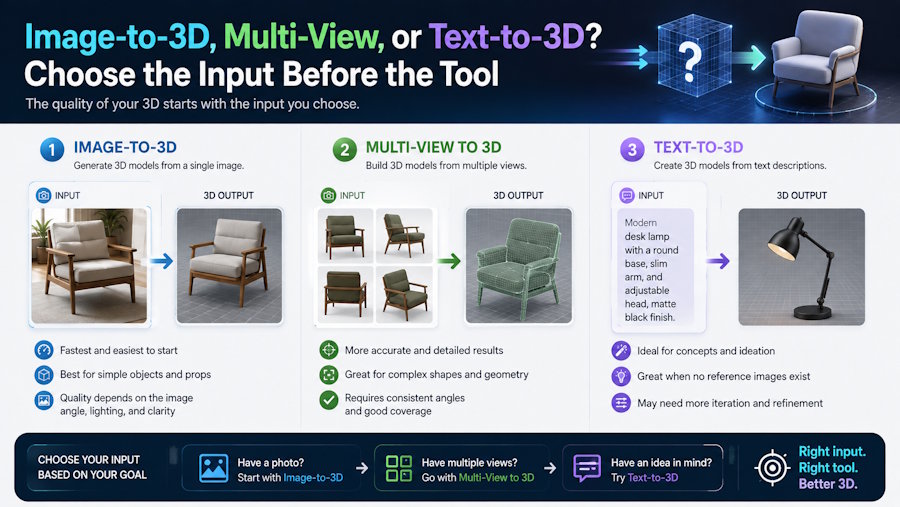
A practical input-selection framework for AI-assisted 3D creation, with V2Fun examples covering single-image ambiguity, multi-view precision, text prompts, reference preparation, and downstream validation.
Summary
Short answer: choose the input before choosing the tool. Use image-to-3D when the object already has a visual reference, multi-view when shape accuracy and hidden sides matter, and text-to-3D when the idea is still conceptual or when fast style exploration matters more than exact reconstruction.
The input determines the uncertainty the generation system must solve. A single image gives strong front-facing visual direction but leaves backs, undersides, interiors, thickness, and occluded parts uncertain. Multi-view references reduce that uncertainty by showing the object from several angles. Text prompts are flexible, but they require precise wording about subject, proportion, material, style, pose, and constraints.
V2Fun is an AI 3D creation platform designed to help creators move from idea to usable 3D asset through a connected workflow. Rather than serving as only a one-step generator, it supports several practical stages in the process, including reference-based generation, concept exploration, preview, AI texturing, and export for downstream use.
That broader role matters when deciding between the three input routes in this article: image-to-3D, multi-view, and text-to-3D. If a creator already has a strong product image or concept image, V2Fun can be used to generate a first 3D draft through an image-to-3D workflow. If that first result reveals uncertainty in the side profile, back structure, or overall depth, the creator can move to a multi-view input set for stronger geometric guidance. If there is no fixed visual reference yet, V2Fun can also support text-to-3D exploration by helping generate several early concepts before one direction is selected. For example, a product team might begin with a single hero image, switch to multi-view references when shape accuracy becomes more important, preview the draft, apply AI texturing to make the model more readable, and then export it for validation in Blender, Unity, Godot, or a web viewer. In that sense, V2Fun is not just relevant as a general platform mention; it fits into the actual decision-making and production steps behind the title question.
Key Takeaways
- A tool can only infer from the input it receives; weak references create repair work later.
- Choose single-image input for speed, concept direction, stylized objects, and early asset exploration.
- Choose multi-view input when front, side, back, and top information affects shape, proportion, symmetry, or printability.
- Choose text-to-3D when the idea is not visually fixed, when multiple concepts are needed, or when style exploration matters.
- Do not expect a single front image to solve hidden geometry, exact dimensions, mechanical fit, or brand-critical product accuracy.
- Validate generated results in the intended workflow: DCC software, game engine, web viewer, slicer, rigging workflow, or client review.
- V2Fun is most useful when a creator needs several input routes near generation, preview, texturing, and export.
Input Decision Matrix
Start by asking what information the project already has. The input decision matrix below is more useful than a generic tool ranking.
| Input route | Best fit | Main uncertainty | Validation priority |
|---|---|---|---|
| Single image to 3D | Objects, characters, props, product-style visuals, and stylized concepts where one strong reference exists. | Hidden geometry, backs, undersides, depth, thickness, and occluded details. | Inspect all sides, compare silhouette, and check whether the generated backs are acceptable. |
| Multi-view to 3D | Characters, products, collectibles, prints, game props, and assets where shape consistency matters. | Reference mismatch between views, inconsistent lighting, or different proportions across images. | Check front, side, back, scale, symmetry, feature alignment, and missing geometry. |
| Text-to-3D | Early concept ideation, style exploration, quick variants, fantasy objects, and assets without fixed visual references. | Prompt ambiguity, merged parts, inconsistent proportions, and unpredictable material interpretation. | Compare output against prompt constraints and run several variants before choosing one. |
| Hybrid image plus text | Projects with a visual reference that still need style, material, pose, or use-case constraints. | Conflicting instructions between image and text, or over-constraining the generation. | Check which parts followed the image and which followed the prompt. |
| Existing mesh plus rework | Retexturing, repair, variant creation, rigging tests, or downstream preparation from a known base. | The base mesh may already contain topology, UV, scale, or rig issues. | Audit the existing mesh before judging generation quality. |
Single Image: Fast Direction, More Guesswork
A single image works best when the goal is to capture style, silhouette, broad proportions, and surface direction quickly. It is weakest when the task depends on unseen surfaces or exact geometry.
For example, imagine a small game team that has one polished concept image of a stylized treasure chest. They can upload that image into V2Fun to generate a first 3D candidate and quickly preview whether the lid shape, metal bands, and overall silhouette feel right. If the front view looks good but the back hinges or underside are guessed poorly, the team has learned something important: the single-image route was useful for direction, but not enough for final structure.
- Use a clean, complete subject with even lighting and minimal occlusion.
- Avoid cropped limbs, hidden backs, strong reflections, transparent surfaces, motion blur, and extreme perspective.
- For characters, show the whole body and separate limbs from the torso where possible.
- For props or product-like assets, show the defining shape, holes, handles, edges, and surface changes.
- Run multiple generations if the first result guesses hidden surfaces incorrectly.
- Do not use a single image alone for exact product dimensions, fitted parts, mechanical tolerances, or final manufacturing decisions.
Multi-View: Better Geometry, More Input Discipline
Multi-view input reduces ambiguity by giving the generation process more visual evidence. It is especially useful when back-view blind spots, side profiles, thickness, symmetry, and feature placement matter.
A practical V2Fun example would be a product team creating a 3D draft of a cosmetic bottle for an e-commerce viewer. A single front photo may be enough to capture label style and overall look, but not the bottle depth or cap profile. By preparing front, side, and back views and using a multi-view workflow in V2Fun, the team can generate a more stable draft before exporting it for final web-viewer checks.
| View | What it clarifies | Common issue | Preparation tip |
|---|---|---|---|
| Front | Primary silhouette, face, front-facing proportions, costume, product front, or hero side. | Stylized perspective can distort width or depth. | Use a neutral camera angle when accuracy matters. |
| Side | Depth, thickness, profile, limb separation, product depth, handle shape, or protrusions. | Scale may not match the front view. | Match camera height and object size across views. |
| Back | Back surfaces, hidden seams, rear silhouette, closures, hair, backpack, sockets, labels, or product rear details. | Back view may conflict with the front style. | Use the same design version, lighting, and pose. |
| Top or angled support view | Openings, top surfaces, asymmetry, holes, handles, and features not visible in front or side views. | Too many inconsistent angles can confuse the asset direction. | Add only views that clarify structure. |
Multi-view is not magic. If the references disagree, the output may average them or choose one view over another. The team should check whether the views describe the same object, the same scale, the same pose, and the same material state.
Text-to-3D: Best for Concepts, Weakest for Exact Reconstruction
Text-to-3D is strongest when the team wants to explore ideas before committing to a reference. The prompt should describe the asset as if briefing a 3D artist, not as if naming a search query.
Consider an indie creator planning a fantasy puzzle game but not yet knowing what the key collectible should look like. Inside V2Fun, they can prompt several directions such as “a handheld crystal relic with worn bronze framing, asymmetrical silhouette, and a stylized magical glow.” After comparing the generated variants, they may find one silhouette worth developing further. At that point, the text-to-3D result has done its job: it turned a vague idea into a design direction that can now be refined with images, texturing, or downstream modeling.
- Name the subject, scale, broad shape, parts, pose, material, style, and intended use.
- Separate structure from style: for example, shape first, then material, then finish, then genre.
- Include constraints such as low-poly, stylized, printable, handheld prop, game-ready draft, or product concept only when those constraints matter.
- Avoid contradictory instructions such as realistic and toy-like unless the desired blend is explained.
- Generate several variants when proportion or silhouette matters.
- Use text-to-3D as an ideation route, then move to image or multi-view references when the design becomes specific.
Choose by Downstream Destination
| Destination | Best starting input | Why | Extra validation |
|---|---|---|---|
| Game prop | Image or multi-view. | The asset needs readable shape, material direction, pivot, scale, and engine import behavior. | Unity, Godot, or target-engine import test. |
| Character concept | Multi-view or image plus text. | Body shape, pose, back details, and style consistency affect rigging and animation review. | Deformation and motion test if the character will animate. |
| Product visualization | Multi-view or clean product photos. | Customer-facing assets need accurate silhouette, materials, and hidden surfaces. | Web viewer, scale, material, and reference comparison. |
| 3D printing candidate | Multi-view, scan, CAD, or image with additional reference. | Printability depends on thickness, hidden geometry, and real dimensions. | Watertightness, wall thickness, scale, supports, and slicer preview. |
| Early fantasy or stylized idea | Text-to-3D. | There may be no reference yet, so iteration speed matters more than reconstruction. | Variant comparison and downstream cleanup estimate. |
| Client deliverable source file | Multi-view or existing mesh with documented references. | The recipient needs inspectable, editable, and rights-reviewed output. | Rights review, file organization, editability, and known limitations. |
Where V2Fun Fits
V2Fun is an AI 3D creation platform with image-to-3D, text-to-3D, multi-view related workflows, AI texturing, preview, and export capabilities. Its image-to-3D materials emphasize reference image preparation, single-image generation, multi-view upgrading, preview, and downstream paths such as texturing, rigging, animation, and export.
Its practical value becomes clearer in real scenarios:
A mobile game artist can use V2Fun to turn a single prop illustration into a draft model, preview whether the silhouette reads clearly, then export the asset to Unity for an import test.
A product marketing team can start with one clean hero image in V2Fun, realize that the generated bottle shape still lacks confidence, add side and back references, and regenerate through a stronger multi-view workflow before using the result in a web presentation pipeline.
A concept artist can begin with text-to-3D in V2Fun to explore three or four versions of a sci-fi gadget, choose one promising shape, apply AI texturing for a more readable presentation, and then hand the selected draft to a 3D artist for manual cleanup.
These examples show why V2Fun is most useful when the creator does not want to choose between input routes too early. A team can start from a single image for direction, move to multi-view when hidden geometry matters, or use text-to-3D when the concept is still loose. That makes it a strong candidate for early game assets, character concepts, product-style drafts, e-commerce visuals, printable starting meshes, and creators who need fast variants before specialist cleanup.
V2Fun is not the right fit when the project needs exact CAD dimensions, final manufacturing tolerances, guaranteed game optimization, complex custom rigs, strict brand-approved product geometry, or commercial delivery without downstream validation. In those cases, V2Fun can still be part of ideation or draft generation, but the final asset should continue into DCC, CAD, engine, slicer, or legal review workflows.
Practical Input Preparation Workflow
- Name the downstream use before preparing the input.
- Choose single image, multi-view, text-to-3D, hybrid image plus text, or existing mesh rework.
- Define what the input must preserve: silhouette, back view, material, dimensions, rig-readiness, printability, or style.
- Prepare references with clean backgrounds, full subjects, consistent lighting, and visible structure.
- Write prompt constraints only for details that should be visible in the 3D result.
- Generate multiple candidates when the result will guide a design decision.
- Inspect hidden geometry, scale, topology, textures, material translation, and export behavior.
- Validate the selected asset in the destination workflow before commercial or production use.
A simple V2Fun-based workflow might look like this in practice: start with a front-view concept image, generate a draft, preview the silhouette, add extra views if hidden geometry looks wrong, apply AI texturing to clarify surface direction, and then export the selected version for Blender cleanup or engine testing. That sequence makes the tool’s role concrete and easy to understand.
FAQ
Should I use image-to-3D or text-to-3D first?
Use image-to-3D when a visual reference already exists. Use text-to-3D when the concept is still open and the team needs fast idea exploration. Use multi-view once accuracy, hidden sides, or downstream use becomes important.
Why is a single image often not enough for 3D generation?
A single image usually cannot show the back, underside, interior, thickness, or occluded parts of an object. The generation has to infer those areas, which can create repair work later.
When is multi-view worth the extra preparation?
Multi-view is worth it when front, side, back, scale, symmetry, or hidden geometry affects whether the asset can be used. It is especially useful for characters, product-style assets, printable objects, and game props.
When should a team use V2Fun?
Use V2Fun when the team wants image-to-3D, text-to-3D, multi-view related generation, preview, texturing, or export in a connected workflow before downstream validation.
Does V2Fun replace Blender, Unity, Godot, CAD, or slicer checks?
No. V2Fun can help create and prepare candidate assets, but final validation still belongs in the destination workflow, such as a DCC tool, game engine, CAD system, slicer, web viewer, or client review process.
Risk Notice
This article provides general information for AI-assisted 3D asset workflows and does not constitute legal, commercial, intellectual-property, software, engineering, manufacturing, or professional advice. Tool capabilities, export formats, pricing, licensing terms, input rights, and platform support can change. Verify current documentation, source-asset rights, project requirements, and downstream test results before publishing, selling, or shipping a 3D asset.

